
Installing
- Make
- Volkswagen
- Model
- Golf Plus
- Year
- 2005–2014
- Section
- Repairing clutch mechanism › Installing
Installing
Install in the reverse order of removal, observing the following:
Note
- Renew self-locking nuts.
Attach retainer (2) to master cylinder operating rod (1).
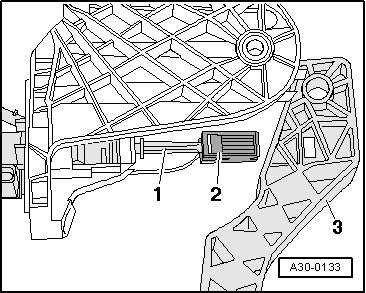
Press retainer into notch in clutch pedal (3) until it can be heard to engage.
Insert over-centre spring (2) in mounting bracket from above while holding end of spring with assembly tool T10178 in installation position.
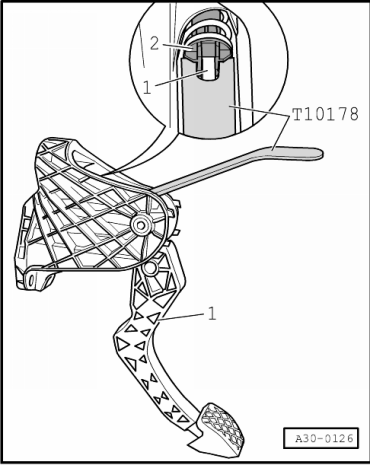
Receptacle (arrow) for tip (A) of clutch pedal (1) must be vertical.
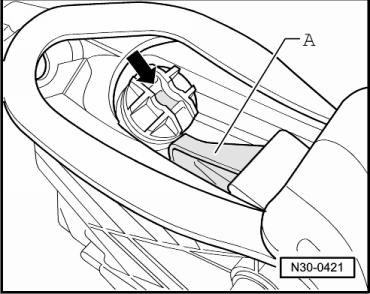
Insert tip (A) of clutch pedal in bearing recess of over-centre spring.
Depress clutch pedal slightly, push bolt through and tighten self-locking nut to specified torque → Chapter.
Some cars have damping (arrow) on the mounting bracket/clutch pedal.
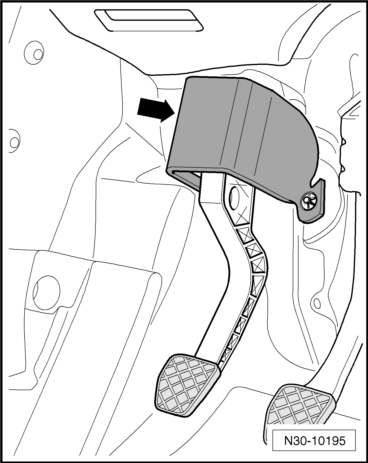
Return it to installation position.
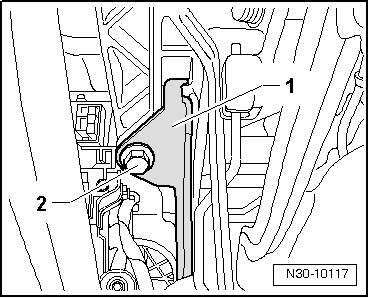
Install crash bar (1) and tighten bolt (2) to specified torque → Chapter.
Mount cable guide (2) on steering column.
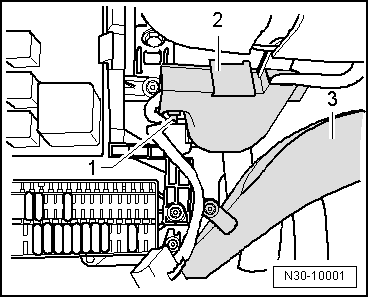
Install foot well vent (3). Rep. gr.80
Install bracket for knee airbag together with crash bar Interior equipmentRep. gr.69Airbag; Removing and installing knee airbag bracket (Golf 2009 ►).
Install trim and cover below trim on drive side General body repairs, interiorRep. gr.68.
Parts & tools for this job For 2005 Volkswagen Golf
- PARTClutch kitSearch: Volkswagen Golf 2005 clutch kit
- TOOLClutch alignment toolSearch: clutch alignment tool
- FLUIDGear oilSearch: Volkswagen Golf manual gearbox oil
As an Amazon Associate we earn from qualifying purchases.