
Removing
- Make
- Volkswagen
- Model
- Golf Plus
- Year
- 2005–2014
- Section
- Repairing clutch mechanism › Removing
5-speed manual gearbox 0AFRemoving
Removing
Remove mounting bracket, Golf 2004 ► Chapter.
Remove mounting bracket, Golf 2009 ► LHD Chapter.
Remove mounting bracket, Golf 2009 ► right-hand drive and Golf Plus right-hand drive → Chapter.
Remove mounting bracket, Golf Plus left-hand drive → Chapter.
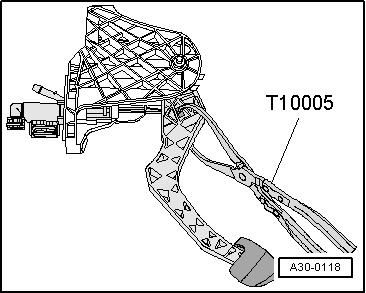
Release retainer for master cylinder operating rod using pliers T10005.
Insert spacer (A) between clutch pedal and stop and press clutch pedal to spacer.
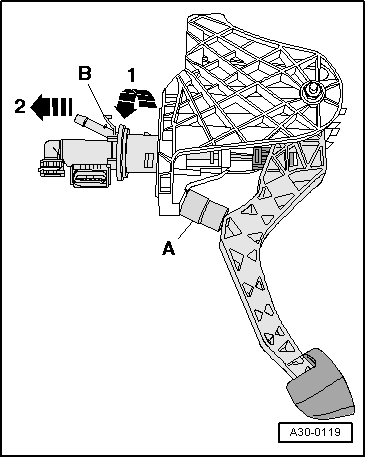
- Length of spacer = about 40 mm (e.g. 1/2 socket)
Release securing bar (B) and pull master cylinder out of mounting bracket (arrow 1) and (arrow 2).
Parts & tools for this job For 2005 Volkswagen Golf
- PARTClutch kitSearch: Volkswagen Golf 2005 clutch kit
- TOOLClutch alignment toolSearch: clutch alignment tool
- FLUIDGear oilSearch: Volkswagen Golf manual gearbox oil
As an Amazon Associate we earn from qualifying purchases.