
Installing
- Make
- Volkswagen
- Model
- Golf Plus
- Year
- 2005–2014
- Section
- Repairing clutch mechanism › Installing
Installing
Install in reverse order of removal. During this step, observe the following:
Note
- Renew self-locking nuts.
- Renew hose clips.
- Allocate all components according to Electronic parts catalogue (ETKA).
If present, install retaining clip for front parking aid warning buzzer H22Electrical systemRep. gr.94Parking aid.
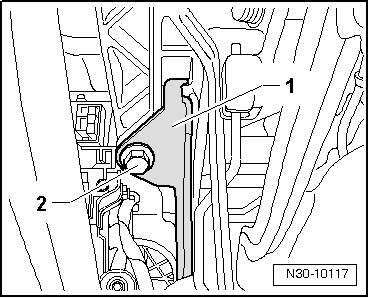
Install crash bar (1) and tighten bolt (2) to specified torque.
Install lower steering column trim General body repairs, interiorRep. gr.68Compartments, covers and trim panels.
Install driver side footwell cover General body repairs, interiorRep. gr.68Compartments, covers and trim panels.
Push line (1) with seal (2) onto connection of master cylinder (4) until securing clip (3) engages audibly.
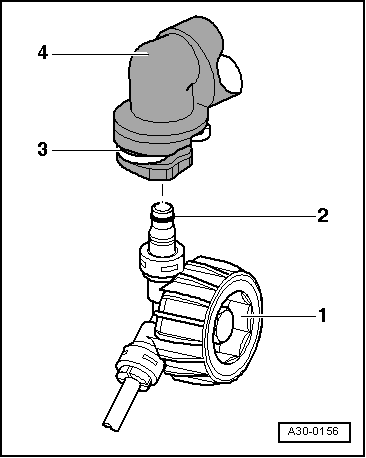
Test line by tugging on it.
After removing hose clamp 3094, return supply hose to its original shape, if necessary.
Bleed clutch system → Chapter.
Install battery Electrical systemRep. gr.27Battery; Removing and installing.
Parts & tools for this job For 2005 Volkswagen Golf
- PARTClutch kitSearch: Volkswagen Golf 2005 clutch kit
- TOOLClutch alignment toolSearch: clutch alignment tool
- FLUIDGear oilSearch: Volkswagen Golf manual gearbox oil
As an Amazon Associate we earn from qualifying purchases.