
Removing
- Make
- Volkswagen
- Model
- Golf Plus
- Year
- 2005–2014
- Section
- Repairing clutch mechanism › Removing
Removing
First check whether a coded radio is fitted. If so, obtain anti-theft code.
Remove battery and, if necessary, detach back wall of battery box Electrical systemRep. gr.27Removing and installing battery.
Note
- During the following work, ensure that no brake fluid lands on longitudinal member or gearbox. If this does happen, clean the affected areas thoroughly.
- Place a lint-free cloth under the master cylinder.
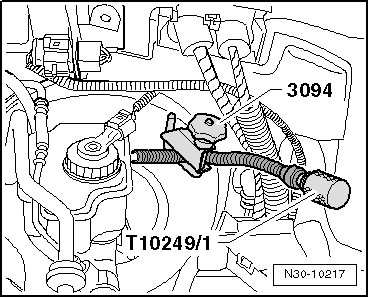
Clamp off supply hose to master cylinder using hose clamp 3094.
It may also be sealed with sealing tool T10249/1.
If necessary, loosen spring-type clip (3) with assembly tool VAS 5024 and pull supply hose off master cylinder.
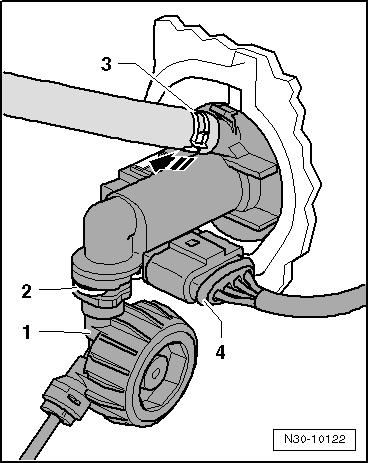
Release securing clip (2) with a screwdriver or a pointed object and pull out of master cylinder to stop.
Pull line (1) out from master cylinder and seal hose.
Separate electrical connector (4) at clutch position sender G476.
Remove driver side footwell cover General body repairs, interiorRep. gr.68Compartments, covers and trim panels.
Remove lower steering column trim General body repairs, interiorRep. gr.68Compartments, covers and trim panels.
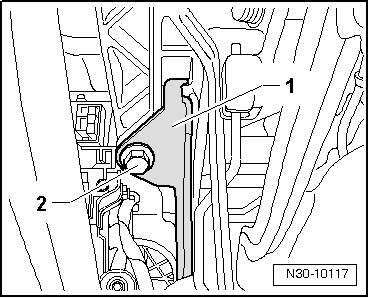
Remove crash bar (1) by removing bolt (2).
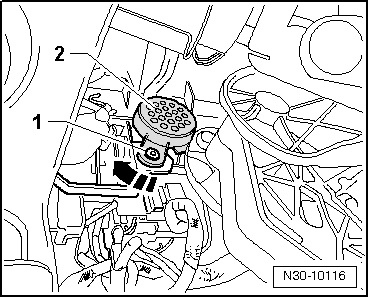
If present, remove retaining clip (1) and swing front parking aid warning buzzer H22(2) in (direction of arrow).
Pull off damping if lower securing bolts for mounting bracket are covered (arrows).
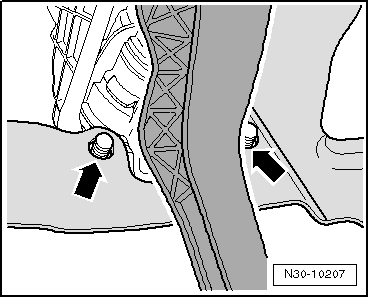
Remove securing nuts (1) and (2).
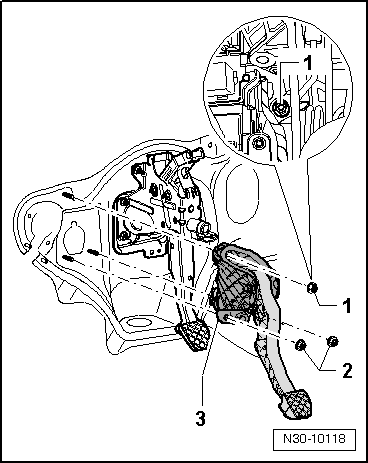
The upper securing nut (1) is accessible through the opening in the lower steering column trim.
Pull mounting bracket (3) off studs on body.
Parts & tools for this job For 2005 Volkswagen Golf
- PARTClutch kitSearch: Volkswagen Golf 2005 clutch kit
- TOOLClutch alignment toolSearch: clutch alignment tool
- FLUIDGear oilSearch: Volkswagen Golf manual gearbox oil
As an Amazon Associate we earn from qualifying purchases.