
Installing
- Make
- Volkswagen
- Model
- Golf Plus
- Year
- 2005–2014
- Section
- Repairing clutch mechanism › Installing
6-speed manual gearbox 0AGInstalling
Installing
Install in the reverse order of removal, observing the following:
Note
- Renew self-locking nuts.
Insert over-centre spring in mounting bracket from above while holding end of spring with release tool T10178 in installation position.
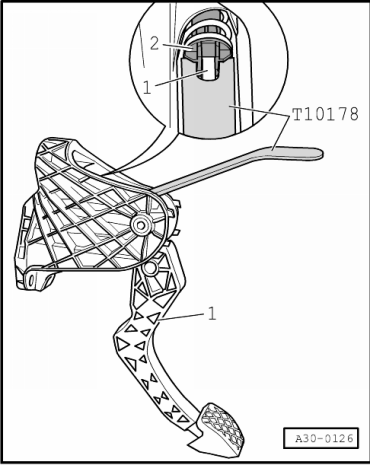
Insert tip of clutch pedal in bearing recess of over-centre spring.
Depress clutch pedal slightly, push bolt through and tighten self-locking nut.
Some cars have damping (arrow) on the clutch pedal mounting bracket.
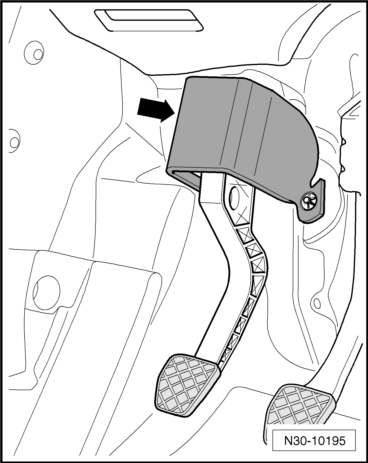
Return it to installation position.
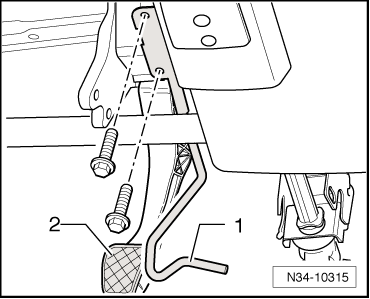
Install crash bar (1) and tighten the 2 bolts to specified torque → Chapter.
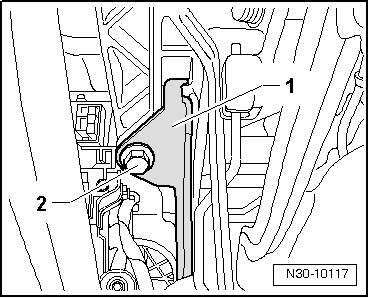
Install crash bar (1) and tighten bolt (2) to specified torque → Chapter.
Install trim and cover below trim on drive side General body repairs, interiorRep. gr.68.
Parts & tools for this job For 2005 Volkswagen Golf
- PARTClutch kitSearch: Volkswagen Golf 2005 clutch kit
- TOOLClutch alignment toolSearch: clutch alignment tool
- FLUIDGear oilSearch: Volkswagen Golf manual gearbox oil
As an Amazon Associate we earn from qualifying purchases.