
Installing
- Make
- Volkswagen
- Model
- Golf Plus
- Year
- 2005–2014
- Section
- Repairing clutch mechanism › Installing
Installing
Install in reverse order of removal. During this step, observe the following:
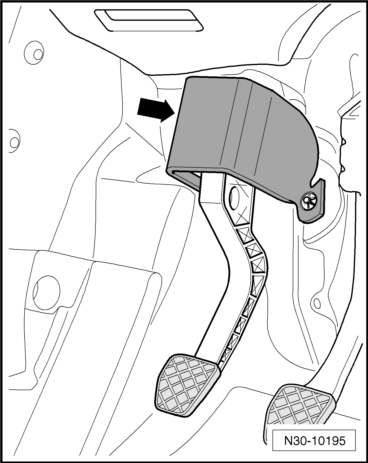
Some cars have damping (arrow) on the clutch pedal mounting bracket.
Install relay carrier beneath dash panel on left Electrical systemRep. gr.97Removing and installing relay carrier.
Install fuse holder beneath dash panel on left Electrical systemRep. gr.97Removing and installing fuse holder.
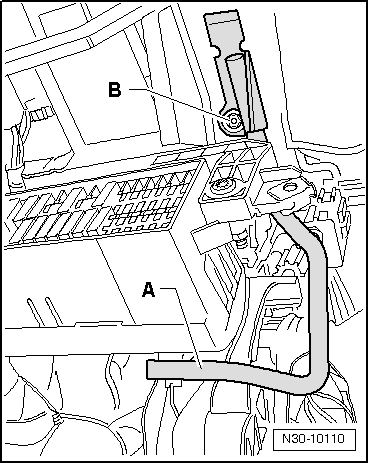
Install crash bar (A), tightening bolt (B)Chapter.
Install footwell vent, cable guide, cover and compartment on driver side General body repairs, interiorRep. gr.68Compartments, covers and trim panels.
Renew cut cable ties.
Push pipe/hose line or plastic line (1) with seal (2) onto connection of master cylinder (4) until securing clip (3) engages audibly.
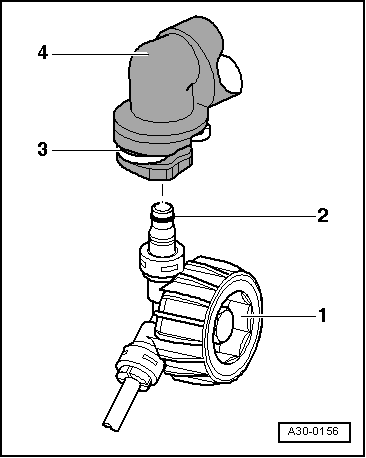
Test line by tugging on it.
After removing hose clamp 3094, return supply hose to its original position, if necessary.
Bleed clutch system → Chapter.
Install battery Electrical systemRep. gr.27Battery; Removing and installing.
Parts & tools for this job For 2005 Volkswagen Golf
- PARTClutch kitSearch: Volkswagen Golf 2005 clutch kit
- TOOLClutch alignment toolSearch: clutch alignment tool
- FLUIDGear oilSearch: Volkswagen Golf manual gearbox oil
As an Amazon Associate we earn from qualifying purchases.