
Installing
- Make
- Volkswagen
- Model
- Golf Plus
- Year
- 2005–2014
- Section
- Repairing front brakes › Installing
Brake systemsInstalling
Installing
Lightly grease guiding surface for brake pads on brake carrier with lithium grease G 052150 A2.
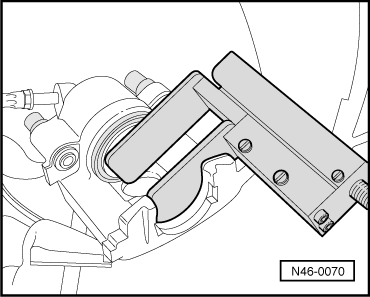
Press piston back.
Insert inner brake pad (piston side) (1) and outer brake pad (2) into brake caliper with retaining springs.
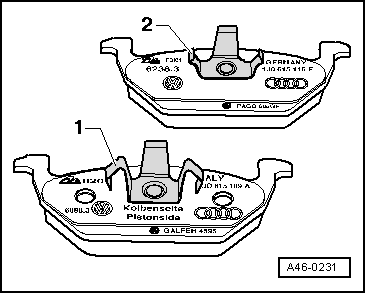
- Inner brake pad (piston side) with large 3-finger clip (1).
- Outer brake pad with small 3-finger clip (2) (coloured black).
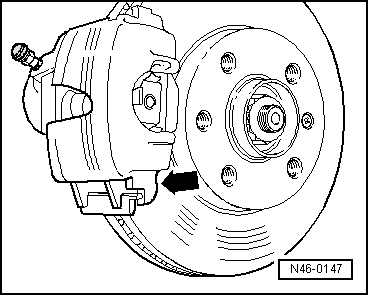
First position brake caliper with brake pads at bottom (arrow) of brake carrier.
Bolt brake caliper to brake carrier with both guide pins.
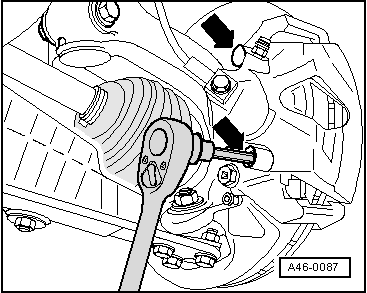
Fit both cover caps.
Reconnect connector for brake pad wear indicator.
Fit wheels.
Specified torque of wheel bolts Running gear, axles, steeringRep. gr.44Specified torques of wheel bolts.
Note
- Every time after changing pads, depress brake pedal firmly several times with vehicle stationary, so that brake pads are properly seated in their normal operating position.
- Check brake fluid level after changing brake pads.
| Specified torque: | |
|---|---|
| Guide pin to brake carrier | 30 Nm |
Parts & tools for this job For 2005 Volkswagen Golf
- PARTBrake padsSearch: Volkswagen Golf 2005 brake pads
- TOOLBrake bleeder kitSearch: one man brake bleeder kit
- FLUIDBrake fluidSearch: brake fluid
As an Amazon Associate we earn from qualifying purchases.