
Removing
- Make
- Volkswagen
- Model
- Golf Plus
- Year
- 2005–2014
- Section
- Telephone systems › Removing
‹ Prev Removing and installing telephone bracket, Golf Plus 06/2006 »Next › Removing and installing telephone operating electronics control unit (interface box), Golf saloon » 06/2006
Electrical: CommunicationRemoving
Removing
Note
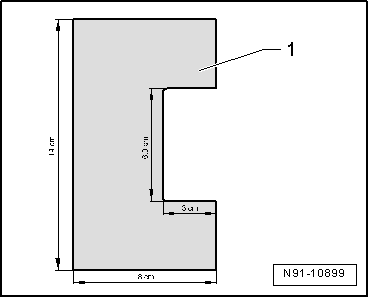
- To avoid damage to dash panel while removing, make a template as shown in illustration.
- Use an overhead film or a similar material.
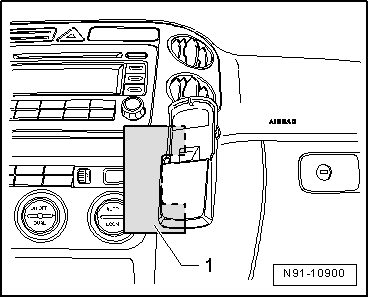
Fit protective film as shown in illustration.
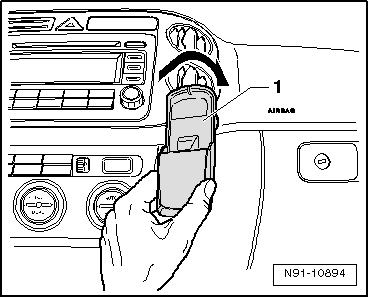
Turn bracket clockwise (arrow) and release retainer.
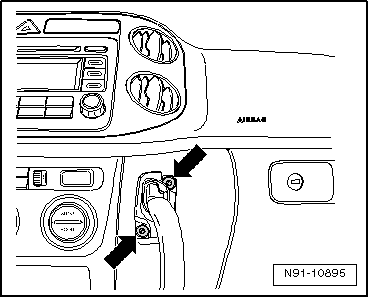
Unscrew both Torx screws (arrows)
Pull out wiring harness.
Disconnect connector.
‹ Prev Removing and installing telephone bracket, Golf Plus 06/2006 »Next › Removing and installing telephone operating electronics control unit (interface box), Golf saloon » 06/2006
Parts & tools for this job For 2005 Volkswagen Golf
- TOOLDigital multimeterSearch: automotive digital multimeter
- PARTAssorted fuse kitSearch: car fuse assortment kit
- TOOLWire crimper and connector kitSearch: wire crimper connector kit
As an Amazon Associate we earn from qualifying purchases.