
Removing
- Make
- Volkswagen
- Model
- Golf Plus
- Year
- 2005–2014
- Section
- Compartments, covers and trims › Removing
‹ Prev Removing and installing left trim panel on driver sideNext › Removing and installing dash panel lower trim
General body repairs, interiorRemoving
Removing
Note
- For greater clarity the steering wheel is not shown in figure, there is no requirement to remove the steering wheel.
Switch off ignition.
Remove dash panel end cover on driver side → Chapter
Remove footwell cover on driver side → Chapter
Remove light switch E1Rep. gr.96
Release steering column gap cover from dash panel → Chapter. There is no need to remove the complete steering column trim.
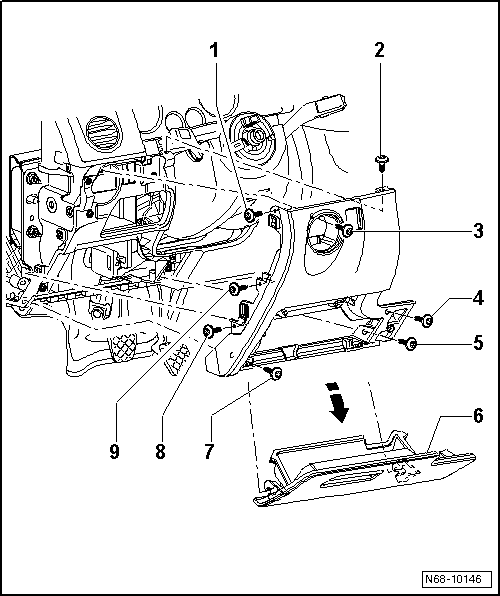
Pull out storage tray (6) from mountings (arrow).
Remove screws (1), (2), (3), (4), (5), (7), (8) and (9) (1.5 Nm).
Note
- When installing, screw bolts in in the following order: (3), (7), (5), (4), (2), (1), (9) and (8) (1.5 Nm).
Release trim from dash panel and disconnect wiring harness from headlight range control regulator.
‹ Prev Removing and installing left trim panel on driver sideNext › Removing and installing dash panel lower trim
Parts & tools for this job For 2005 Volkswagen Golf
- TOOLTrim removal tool kitSearch: trim removal tool kit
- PARTTouch-up paintSearch: Volkswagen touch up paint
- PARTPanel clip assortmentSearch: Volkswagen panel clips assortment
As an Amazon Associate we earn from qualifying purchases.