
Installing
- Make
- Volkswagen
- Model
- Phaeton 3D
- Year
- 2002–2016
- Section
- Multi-media system › Installing
‹ Prev Removing multi-media system in luggage compartmentNext › Removing and installing the display unit control unit
Electrical: CommunicationInstalling
Installing
Install in reverse order of removal.
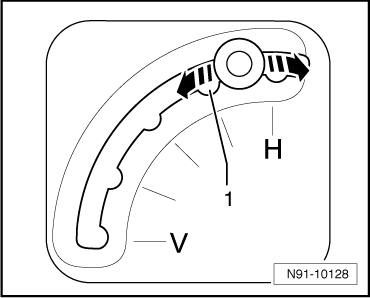
Before installing, set the adjusting mechanism for the installation position (arrow) on each side of the DVD changer.
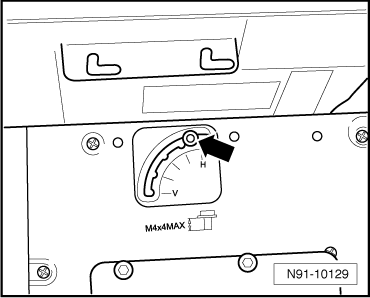
For this, push the adjusting mechanism in the desired direction with a finger. The correct setting is the notch marked with (1).
Note
- Only use the specified bolts when installing. The use of excessively long bolts results in internal damage to the unit.
After replacing the DVD changer, reset the standard settings for the system, DVD Operating Instructions.
‹ Prev Removing multi-media system in luggage compartmentNext › Removing and installing the display unit control unit
Parts & tools for this job For 2002 Volkswagen Phaeton
- TOOLDigital multimeterSearch: automotive digital multimeter
- PARTAssorted fuse kitSearch: car fuse assortment kit
- TOOLWire crimper and connector kitSearch: wire crimper connector kit
As an Amazon Associate we earn from qualifying purchases.