
Removing multi-media system in luggage compartment
- Make
- Volkswagen
- Model
- Phaeton 3D
- Year
- 2002–2016
- Section
- Multi-media system › Removing multi-media system in luggage compartment
Removing multi-media system in luggage compartment
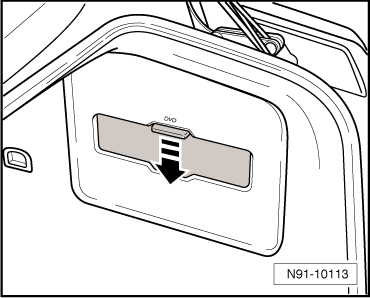
Open the cover by pushing it in the (direction of the arrow).
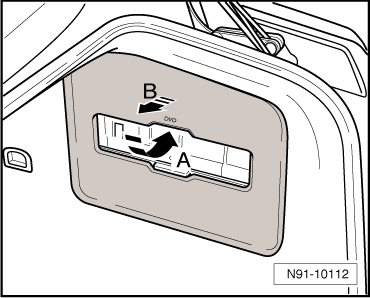
Grasp the opened cover at (arrow A) and withdraw the complete cover in the direction of (arrow B) from the latching mechanism.
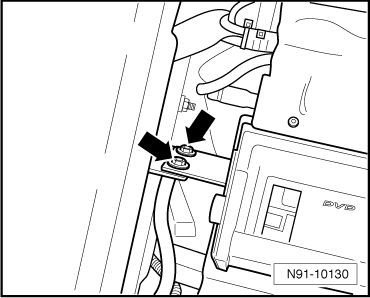
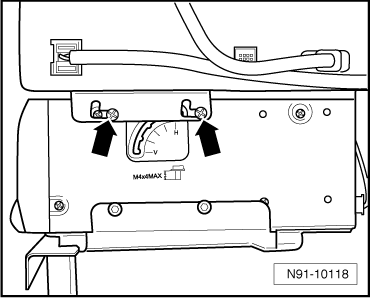
Unscrew and remove the two bolts (arrows).
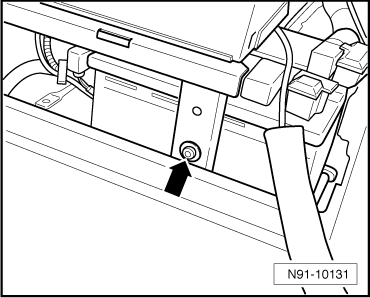
Unscrew the bolt (arrow); there is no need to remove it.
Withdraw the complete assembly of DVD changer, display units control units and multimedia control unit. Unplugged connectors should be marked with their sockets, see also the chapter “System component connection assignments”, Chapter.
Unscrew and remove bolts (arrows) at the top and bottom on each side of the DVD changer.
Disconnect connectors. Disconnected connectors should be marked with their sockets, see also the chapter “System component connection assignments”Chapter.
Parts & tools for this job For 2002 Volkswagen Phaeton
- TOOLDigital multimeterSearch: automotive digital multimeter
- PARTAssorted fuse kitSearch: car fuse assortment kit
- TOOLWire crimper and connector kitSearch: wire crimper connector kit
As an Amazon Associate we earn from qualifying purchases.