
Removing
- Make
- Volkswagen
- Model
- Phaeton 3D
- Year
- 2002–2016
- Section
- Compartments, covers and trims › Removing
‹ Prev Removing and installing glove compartmentNext › Removing and installing footwell cover (driver side)
General body repairs, interiorRemoving
Removing
Remove footwell cover (front passenger side) → Chapter.
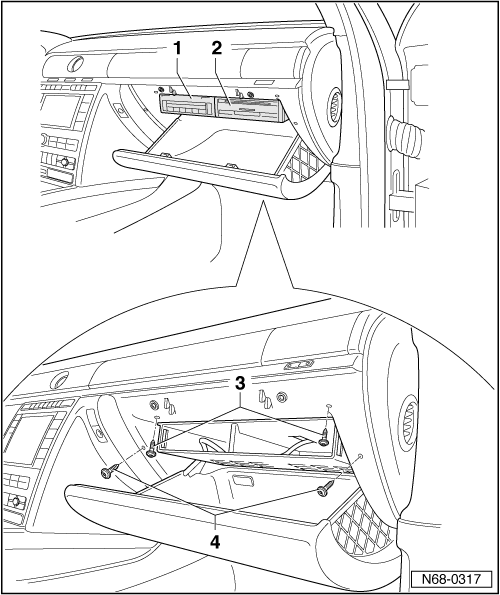
Remove CD changer (1)Rep. gr.91.
Remove CD drive for navigation (2)Rep. gr.91.
Remove the two bolts (3) (3.5 Nm).
An additional bolt may be installed between the two bolts (3).
If so, unscrew additional bolt (3.5 Nm).
Remove the two bolts (4) (3.5 Nm).
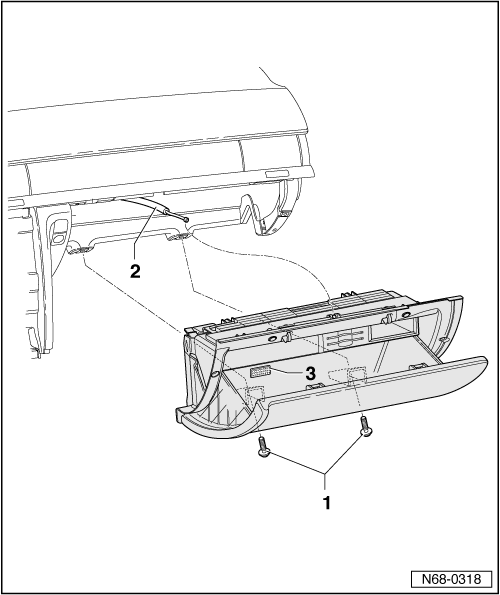
Remove the two bolts (1) (3.5 Nm).
Pull glove compartment out of dash panel and unhook operating cable (2).
Separate connector for glove compartment light (3).
‹ Prev Removing and installing glove compartmentNext › Removing and installing footwell cover (driver side)
Parts & tools for this job For 2002 Volkswagen Phaeton
- TOOLTrim removal tool kitSearch: trim removal tool kit
- PARTTouch-up paintSearch: Volkswagen touch up paint
- PARTPanel clip assortmentSearch: Volkswagen panel clips assortment
As an Amazon Associate we earn from qualifying purchases.