
Removing
- Make
- Volkswagen
- Model
- Phaeton 3D
- Year
- 2002–2016
- Section
- Compartments, covers and trims › Removing
‹ Prev Removing and installing footwell cover (driver side)Next › Removing and installing fuse holder cover (driver side)
General body repairs, interiorRemoving
Removing
Switch off ignition.
Note
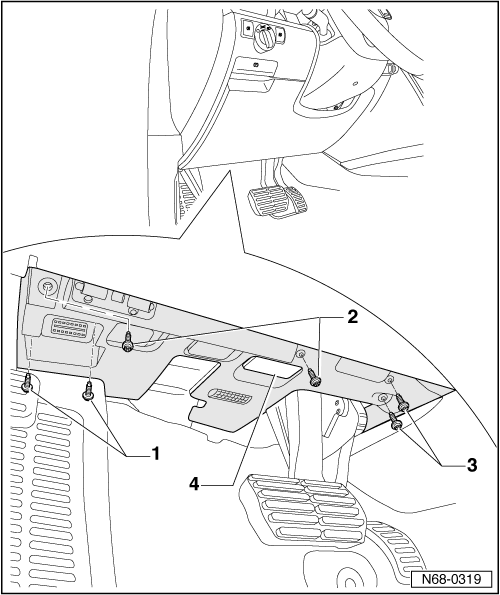
- The button (4) is for opening the fuse holder cover.
Remove the two bolts (1) (1.5 Nm).
Remove the two bolts (2) (1.5 Nm).
Remove the two bolts (3) (1.5 Nm).
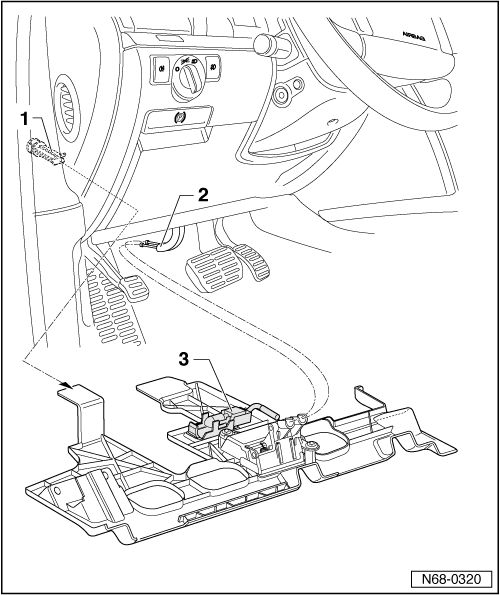
Pull driver side footwell cover out of mounting (1).
Unhook cables (2) for releasing fuse holder cover.
Separate wiring harness from footwell light (3).
‹ Prev Removing and installing footwell cover (driver side)Next › Removing and installing fuse holder cover (driver side)
Parts & tools for this job For 2002 Volkswagen Phaeton
- TOOLTrim removal tool kitSearch: trim removal tool kit
- PARTTouch-up paintSearch: Volkswagen touch up paint
- PARTPanel clip assortmentSearch: Volkswagen panel clips assortment
As an Amazon Associate we earn from qualifying purchases.