
Removing
- Make
- Volkswagen
- Model
- Phaeton 3D
- Year
- 2002–2016
- Section
- Luggage compartment trims › Removing
‹ Prev Removing and installing side panel trim for luggage compartmentNext › Removing and installing rear bulkhead trim
General body repairs, interiorRemoving
Removing
Switch off ignition.
Remove fridge, if fitted.
- 4-seater → Chapter
- 5-seater → Chapter.
Remove rear lock carrier cover → Chapter.
Remove rain channel trim → Chapter.
Remove right storage compartment (only necessary when removing right luggage compartment trim) → Chapter.
Note
- Depending on equipment, a DVD player may be installed on the right in the luggage compartment instead of the storage netting/basket.
- DVD player cover must be removed to remove right side panel in luggage compartment, see CommunicationRep. gr.91Multimedia system (rear seat DVD); Removing and installing DVD player for Multimedia system.
Unscrew the outer and centre bolts of lower part of rear shelf → Chapter.
Note
- Removing the lower part of rear shelf completely is not necessary.
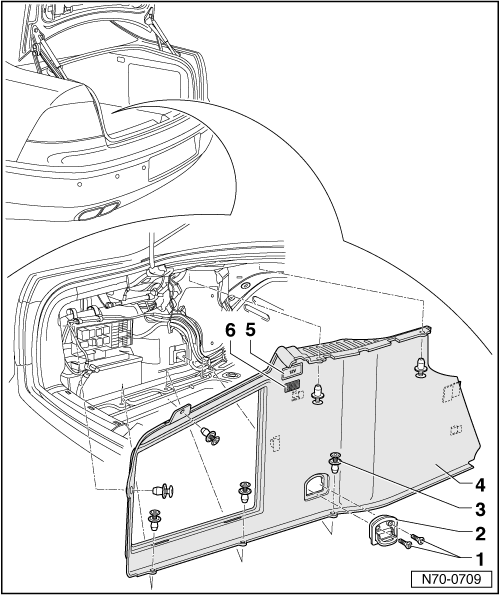
Remove the two bolts (1) (6 Nm) and remove lashing eye (2).
Remove plugs (3) (Qty. 7) and release trim (4) in area of clips.
Disconnect wiring harnesses from socket (5) and luggage compartment light (6).
Lower the lower part of the rear shelf until the luggage compartment trim can be pulled out from underneath the rear shelf.
‹ Prev Removing and installing side panel trim for luggage compartmentNext › Removing and installing rear bulkhead trim
Parts & tools for this job For 2002 Volkswagen Phaeton
- TOOLTrim removal tool kitSearch: trim removal tool kit
- PARTTouch-up paintSearch: Volkswagen touch up paint
- PARTPanel clip assortmentSearch: Volkswagen panel clips assortment
As an Amazon Associate we earn from qualifying purchases.