
Removing
- Make
- Volkswagen
- Model
- Phaeton 3D
- Year
- 2002–2016
- Section
- Luggage compartment trims › Removing
General body repairs, interiorRemoving
Removing
Remove rear lock carrier cover → Chapter.
Remove rain channel trim → Chapter.
Remove right storage compartment → Chapter.
Note
- Depending on equipment, a DVD player may be installed on the right in the luggage compartment instead of the storage netting/basket.
- DVD player cover must be removed to remove right side panel in luggage compartment, see CommunicationRep. gr.91Multimedia system (rear seat DVD); Removing and installing DVD player for Multimedia system.
Remove fridge if fitted.
- 4-seater → Chapter
- 5-seater → Chapter.
Remove luggage compartment side trim → Chapter.
Remove lower part of rear shelf → Chapter.
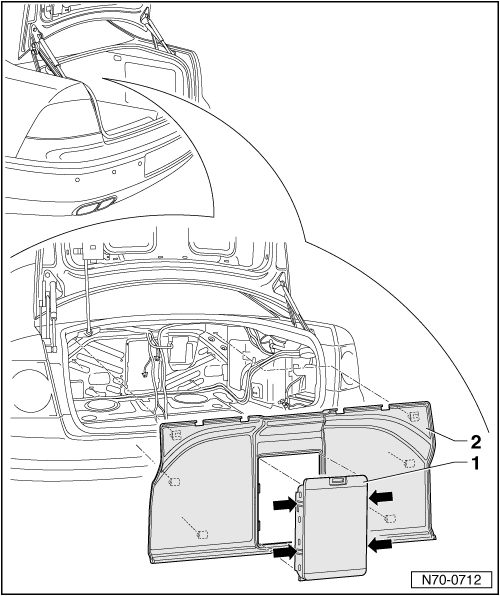
Press in locating lugs (arrows) and remove ski bag (1).
Release rear bulkhead trim (2) in area of clips.
Parts & tools for this job For 2002 Volkswagen Phaeton
- TOOLTrim removal tool kitSearch: trim removal tool kit
- PARTTouch-up paintSearch: Volkswagen touch up paint
- PARTPanel clip assortmentSearch: Volkswagen panel clips assortment
As an Amazon Associate we earn from qualifying purchases.