
Removing and installing rotary light switch EX1
- Make
- Volkswagen
- Model
- Scirocco Mk3
- Year
- 2008–2017
- Section
- Controls › Removing and installing rotary light switch EX1
Removing and installing rotary light switch EX1
Note
- The removal and installation procedures are described for LHD vehicles. Removal and installation for RHD vehicles are similar.
Turn light switch to “0” position.
Press in rotary knob (1) of rotary light switch EX1 opposite direction of arrow (A) and turn it opposite direction of arrow (B).
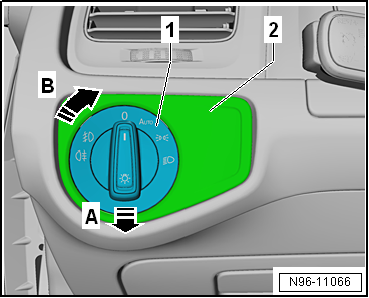
Hold rotary knob (1) in this position.
Pull entire rotary light switch EX1 out of dash panel in direction of arrow (A).
Disconnect connectors (arrow A) and remove rotary light switch EX1(1).
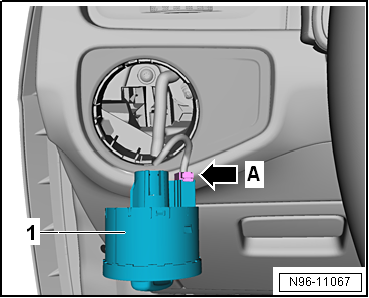
Install in the reverse order of removal observing the following:
Hold rotary light switch EX1 and press in rotary knob of light switch (1) while simultaneously turning it clockwise (2).
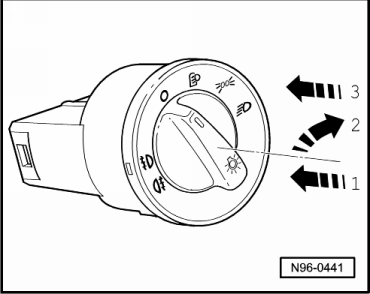
Hold rotary knob in this position and insert rotary light switch EX1 into dash panel (3).
Turn the rotary grip to position “0” in order to ensure that the switch engages in the dash panel.
Test functionality.
Parts & tools for this job For 2008 Volkswagen Scirocco
- TOOLOBD2 scannerSearch: OBD2 scanner
- TOOLDigital multimeterSearch: automotive digital multimeter
- TOOLBack-probe test leadsSearch: back probe test leads
As an Amazon Associate we earn from qualifying purchases.