
Removing and installing TCS and ESP button E256
- Make
- Volkswagen
- Model
- Scirocco Mk3
- Year
- 2008–2017
- Section
- Controls › Removing and installing TCS and ESP button E256
‹ Prev Removing and installing headlight range control regulator E102Next › Removing and installing parking aid button E266
Electrical systemRemoving and installing TCS and ESP button E256
Removing and installing TCS and ESP button E256
Depending on equipment, the following switches are installed in the centre console storage compartment:
- TCS and ESP button E256
- Parking aid button E266
- Shock absorber damping adjustment button E387
- Park assist steering button E581
- Start/stop operation switch E693
Warning Danger of damage to component surfaces.
- When using leverage tools, mask visible areas of the component with commercially available adhesive tape.
Note
- The procedure for removal and installation is the same for all buttons in the centre console storage compartment and is therefore described for just one button.
Remove ignition key, and switch off all electrical consumers.
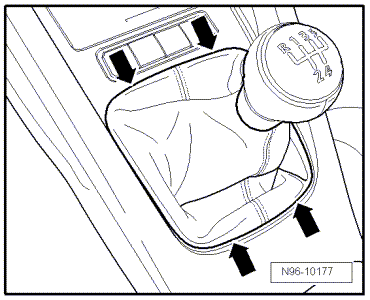
Carefully lever gear lever gaiter out of centre console (arrows).
Remove securing bolts (arrows).
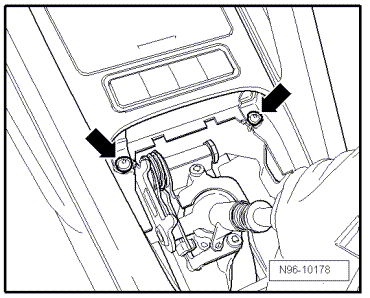
Remove storage compartment/ash tray from centre console.
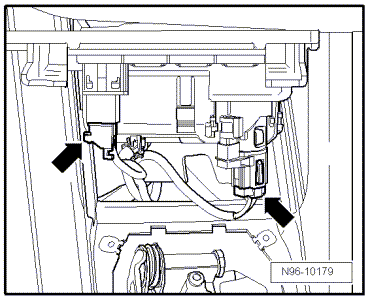
Disconnect all connectors (arrows), depending on vehicle equipment.
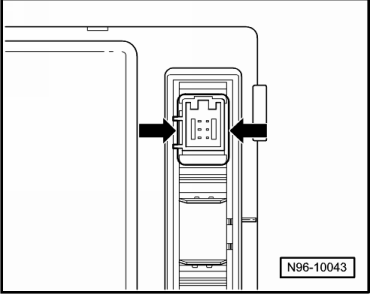
Release locking lugs (arrows), and remove switch upwards from mounting frame.
Installation is carried out in the reverse sequence.
| Component | Specified torque |
|---|---|
| Storage compartment/ash tray to centre console | 1.5 Nm |
‹ Prev Removing and installing headlight range control regulator E102Next › Removing and installing parking aid button E266
Parts & tools for this job For 2008 Volkswagen Scirocco
- TOOLDigital multimeterSearch: automotive digital multimeter
- PARTAssorted fuse kitSearch: car fuse assortment kit
- TOOLWire crimper and connector kitSearch: wire crimper connector kit
As an Amazon Associate we earn from qualifying purchases.