
Removing and installing electromechanical parking brake button E538/auto-hold button E540
- Make
- Volkswagen
- Model
- Sharan Mk2
- Year
- 2010–2022
- Section
- Controls › Removing and installing electromechanical parking brake button E538/auto-hold button E540
Removing and installing electromechanical parking brake button E538/auto-hold button E540
The electromechanical parking brake button E538 and the auto-hold button E540 are combined to form one component and cannot be separated. Electromechanical parking brake button E538/AUTO HOLD button E540 is located between front seats in centre console.
Switch off ignition.
Remove ignition key, if inserted.
Carefully insert feeler gauge (0.6 mm thick) (1), as shown in illustration, into gap between centre console (2) and button module (3).
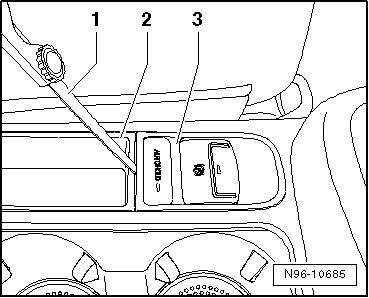
Hold feeler gauge vertically and slide down 10 mm between button module and centre console.
Note
- Vertical insertion of feeler gauge ensures that lock button can be reached on the outside. At 10 mm insertion depth, the tip of the feeler gauge can be felt to rest on shoulder of locking button.
Tilt feeler gauge (1) in (direction of arrow) to operate locking button (3). At the same time, lift up rear of button module (2) from centre console (4).
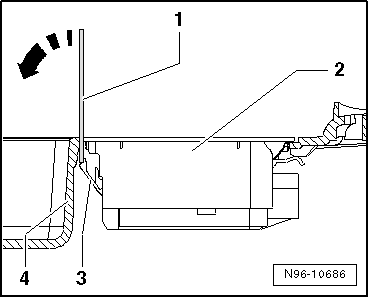
Remove button module (1) upwards from centre console, taking different lengths of connected wiring into consideration.
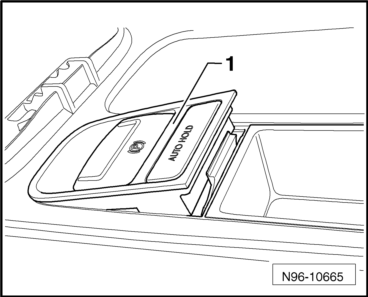
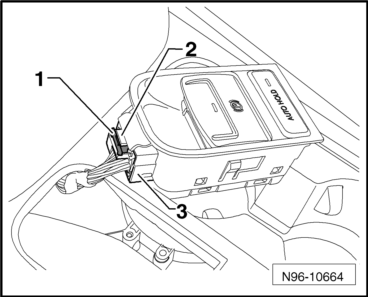
Pull out primary locking mechanism (1), push locking button (2) and pull off connector (3).
Remove electromechanical parking brake button E538/AUTO HOLD button E540 from vehicle.
Install in the reverse order of removal, observing the following:
Test functionality.
Parts & tools for this job For 2010 Volkswagen Sharan
- PARTBrake padsSearch: Volkswagen Sharan 2010 brake pads
- TOOLBrake bleeder kitSearch: one man brake bleeder kit
- FLUIDBrake fluidSearch: brake fluid
As an Amazon Associate we earn from qualifying purchases.