
Removing and installing hazard warning light switch E3
- Make
- Volkswagen
- Model
- Sharan Mk2
- Year
- 2010–2022
- Section
- Controls › Removing and installing hazard warning light switch E3
‹ Prev Removing and installing operating unit in front of centre console E461Next › Removing and installing buttons for seat heating E653/ E654
Electrical systemRemoving and installing hazard warning light switch E3
Removing and installing hazard warning light switch E3
Hazard warning light switch E3 is located in trim strip centrally beneath display unit for front information display and operating unit control unit J685.
Warning Danger of damage to component surfaces.
- When working with leverage tools, always mask off the components installed in visible areas using commercially available adhesive tape.
Switch off ignition.
Remove ignition key, if inserted.
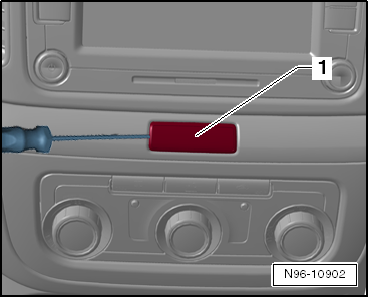
Carefully lever off cap (1) of hazard warning light switch on both sides using a suitable flat tip screwdriver.
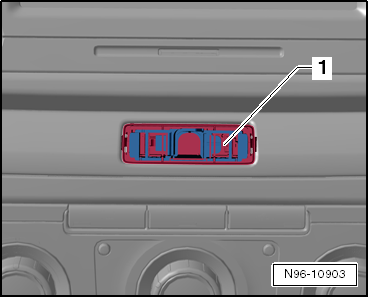
Pull out hazard warning light switch E3(1) in a straight line backwards from trim switch.
Release and disconnect connector (arrow).
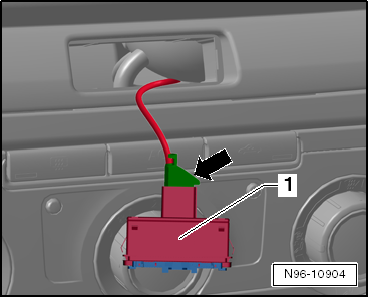
Remove hazard warning light switch E3(1).
Install in the reverse order of removal, observing the following:
Test functionality.
‹ Prev Removing and installing operating unit in front of centre console E461Next › Removing and installing buttons for seat heating E653/ E654
Parts & tools for this job For 2010 Volkswagen Sharan
- TOOLOBD2 scannerSearch: OBD2 scanner
- TOOLDigital multimeterSearch: automotive digital multimeter
- TOOLBack-probe test leadsSearch: back probe test leads
As an Amazon Associate we earn from qualifying purchases.