
Recharging the System
- Make
- Aston Martin
- Model
- DB7 Factory Workshop Manual Volume 2: Electrics, Body and Air Conditioning
- Year
- 1994–1998
- Section
- Air conditioning procedures › Recharging the System
Air conditioningRecharging the System
Recharging the System
- Open the high side valve on the unit control panel. If the messages PROGRAM and CHARGE are not displayed press the CHG key to enter PROGRAM mode.
- Key in the amount of refrigerant needed to recharge the system and press ENTER.
- Press the CHG key; the message AUTOMATIC and the entered amount of refrigerant will be displayed. The display counts down to zero as the charging process proceeds. When the charging is complete the message CPL is displayed. If the refrigerant transfer is too slow the charging unit emits a signal. If the message CHECK REFRIGERANT is not displayed, close the high side valve, open the low side valve and start the air conditioning system to pull the remainder of the charge into the system. If the refrigerant transfer will not complete and the message CHECK REFRIGERANT is displayed, press the HOLD/CONT key to interrupt the cycle then reset the unit by pressing the RESET key. Recover the refrigerant already charged into the system by following the procedure for recovering the refrigerant, add new refrigerant to the tank and return to Step 1 to recharge the system.
- If the air conditioning system is not running start it and let it run until the gauge pressure readings stabilize (compare the gauge readings with the system manufacturer's specifications). Note: Ensure that the readings are accurate by closing both the high and low side valves on the unit's control panel.
- Check the evaporator outlet temperature to make sure that the air conditioning system is operating properly (refer to the system manufacturer's specifications for the proper temperature).
Compressor Oil Check
Data
Special Tools
Sanden oil dipstick JD 149
Torque Figures
Oil filler plug 8-12 Nm
Procedure
Whenever a component has been replaced in the refrigerator system or there is an obvious oil leak, the following procedure should be carried out. A Sanden oil dipstick and angle gauge are required in order to carry out the check.
- Run the compressor for 10 minutes at engine idle speed.
- Depressurise the system.
- Lay the angle gauge across the flat surfaces of the two front mounting lobes. Centre the bubble and note the mounting angle.
- Remove the compressor from the vehicle.
- Remove the plug from the oil filler hole (1 Fig. 1).
- Rotate the counter weight (3 Fig. 1) on the front of the clutch to allow the dipstick (2 Fig. 1) to penetrate to its fullest extent.
- Insert the dipstick to its stop position (4 Fig. 1). The point of dipstick angle should be facing left.
- Remove the dipstick and check the oil level against the figures quoted in the chart below.
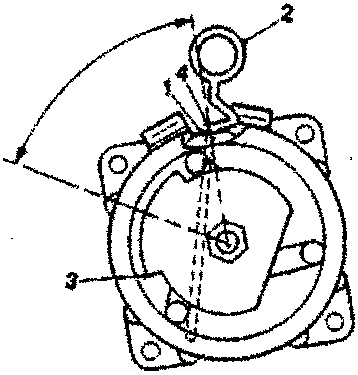
Figure 1.
Parts & tools for this job For 1994 Aston Martin DB7
- TOOLA/C manifold gauge setSearch: AC manifold gauge set
- TOOLUV leak detection kitSearch: AC UV leak detection kit
- PARTCabin filterSearch: Aston Martin DB7 1994 cabin filter
Links open Amazon search results in a new tab. As an Amazon Associate I earn from qualifying purchases.