
Power Brake System: Specifications
- Make
- Aston Martin
- Model
- DB9 Factory Workshop Manual
- Year
- Issue 2, 2005
- Section
- Power Brake System › Specifications
06 Brake systemSpecifications
Specifications
| Torque Figures | ||
|---|---|---|
| Description | Nm. | lb. / ft. |
| Brake Booster Mount | 21-24 | 15.5-18 |
Maintenance
Brake Booster
| Repair Operation Time (ROT) | |
|---|---|
| Item | Code |
| Brake Booster Renew | RHD 06.07.AB |
Removal
- Remove the master cylinder (Refer to 'Master Cylinder', page 6-4-2).
- Remove the oil dip sick.
- Remove the clevis pin.
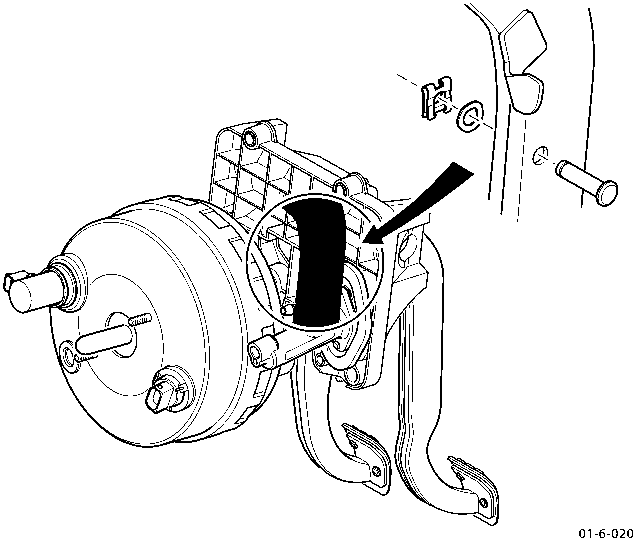
- Remove nuts (x4).
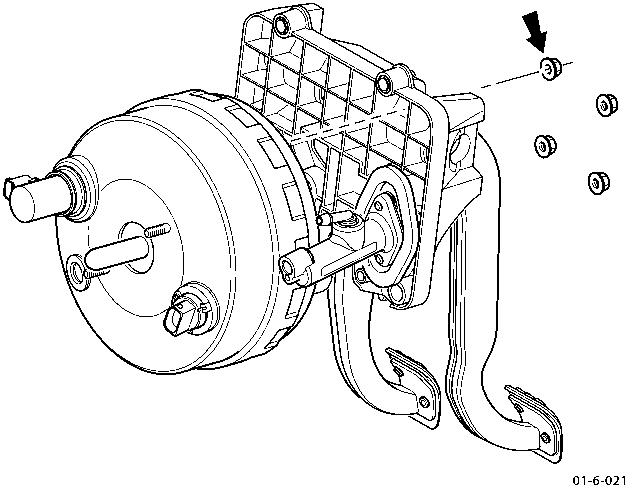
- Disconnect the wiring harness plugs (x2).
- Withdraw the brake booster.
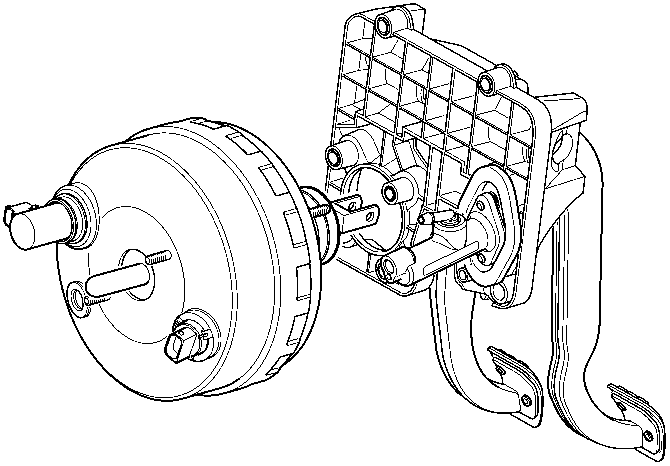
- Remove and discard the brake light switch (mounted on the brake pedal block).
Installation
- Install a new brake light switch.
After installing a new brake booster a new brake light switch, mounted on the brake pedal block, must be installed.
- Place the brake booster through the bulkhead.
- Secure using bolts (x4). Torque to 21-24 Nm.
- Install the clevis pin.
- Connect the wiring harness plugs (x2).
- Install the master cylinder (Refer to 'Master Cylinder', page 6-4-2).
- Bleed the brake system (Refer to 'Brake Bleeding - WDS', page 6-4-4).
Parts & tools for this job For 2005 Aston Martin DB9
- PARTBrake padsSearch: Aston Martin DB9 2005 brake pads
- TOOLBrake bleeder kitSearch: one man brake bleeder kit
- FLUIDBrake fluidSearch: brake fluid
Links open Amazon search results in a new tab. As an Amazon Associate I earn from qualifying purchases.