
Removing and installing electromechanical parking brake button E538/auto-hold button E540
- Make
- Audi
- Model
- Q5 Mk1
- Year
- 2008–2017
- Section
- Controls › Removing and installing electromechanical parking brake button E538/auto-hold button E540
Removing and installing electromechanical parking brake button E538/auto-hold button E540
Warning Safety hazard: the engine can start unexpectedly.
Before carrying out general work on a vehicle with high-voltage electrical system, switch off the ignition and remove the ignition key from the vehicle.
Pull electromechanical parking brake button to apply electromechanical parking brake.
Switch off ignition and take out ignition key.
Vehicles equipped with MMI basic: Remove insert for centre console General body repairs, interiorRep. gr.68Centre console; Removing and installing insert for centre console.
Vehicles equipped with MMI convenience: Remove multimedia system operating unit E380CommunicationRep. gr.91Infotainment system; Removing and installing multimedia system operating unit E380.
Release retaining clips (arrows) and press electromechanical parking brake button E538/auto-hold button E540(item 2) out of cover (1)/multimedia system operating unit E380.
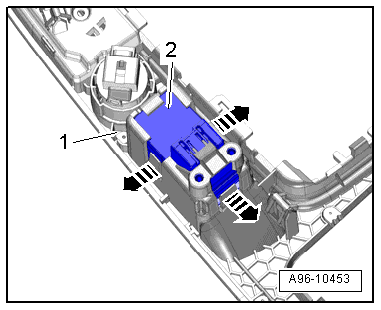
Installation is carried out in the reverse order; note the following:
Vehicles equipped with MMI basic: Install insert for centre console General body repairs, interiorRep. gr.68Centre console; Removing and installing insert for centre console.
Vehicles equipped with MMI convenience: Install multimedia system operating unit E380CommunicationRep. gr.91Infotainment system; Removing and installing multimedia system operating unit E380.
Parts & tools for this job For 2008 Audi Q5
- PARTBrake padsSearch: Audi Q5 2008 brake pads
- TOOLBrake bleeder kitSearch: one man brake bleeder kit
- FLUIDBrake fluidSearch: brake fluid
As an Amazon Associate we earn from qualifying purchases.