
Removing and installing rotary light switch EX1
- Make
- Audi
- Model
- Q5 Mk1
- Year
- 2008–2017
- Section
- Controls › Removing and installing rotary light switch EX1
Removing and installing rotary light switch EX1
Warning Safety hazard: the engine can start unexpectedly.
Before carrying out general work on a vehicle with high-voltage electrical system, switch off the ignition and remove the ignition key from the vehicle.
Switch off ignition and take out ignition key.
Turn light switch to position “0”.
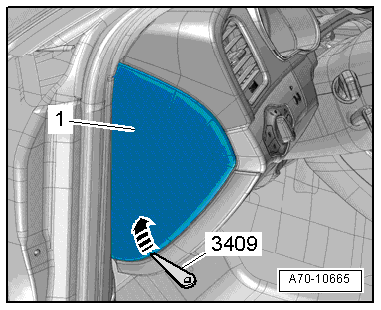
Lever side cover (1) off dash panel with removal wedge 3409(arrow) and detach.
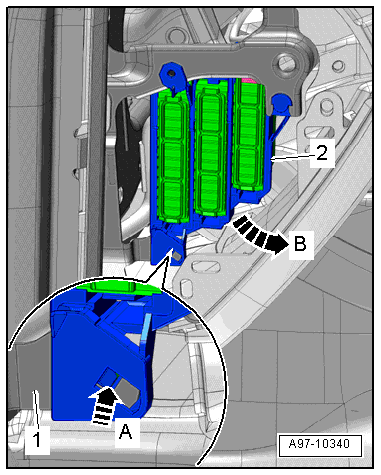
Release retaining clip (arrow A) and swivel out fuse holder C SC(item 2) in direction of (arrow B) on central tube (1) for dash panel and place down facing inside.
Reach through opening on dash panel side and press light switch E1(item 1) out of dash panel cover (driver's side) towards rear (arrow).
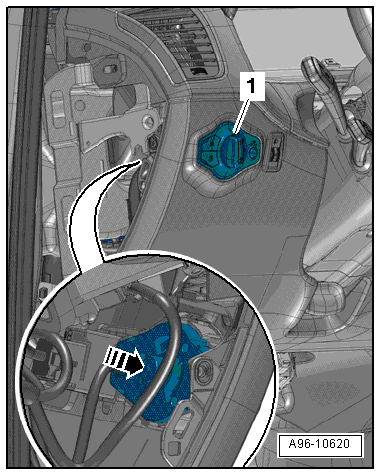
Unplug electrical connector.
Installation is carried out in the reverse order; note the following:
Press switch into switch housing until catch engages.
Parts & tools for this job For 2008 Audi Q5
- TOOLOBD2 scannerSearch: OBD2 scanner
- TOOLDigital multimeterSearch: automotive digital multimeter
- TOOLBack-probe test leadsSearch: back probe test leads
As an Amazon Associate we earn from qualifying purchases.