
Removing and installing hazard warning lights button E229
- Make
- Audi
- Model
- Q5 Mk1
- Year
- 2008–2017
- Section
- Controls › Removing and installing hazard warning lights button E229
‹ Prev Removing and installing switch panel in dash panel, vehicles equipped with MMI convenienceNext › Removing and installing front heated seat regulator E94/ E95
Electrical systemRemoving and installing hazard warning lights button E229
Removing and installing hazard warning lights button E229
Warning Safety hazard: the engine can start unexpectedly.
Before carrying out general work on a vehicle with high-voltage electrical system, switch off the ignition and remove the ignition key from the vehicle.
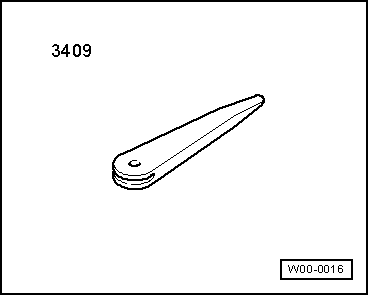
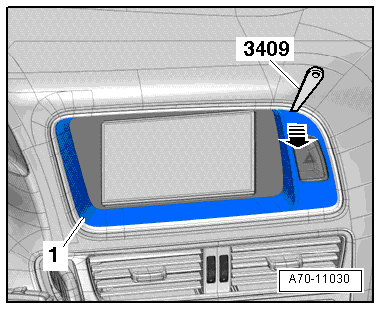
Switch off ignition and take out ignition key.
Use removal wedge 3409 to lever off cover (1) for MMI screen at corners (arrow) and detach.
Unplug electrical connector and detach cover for MMI screen.
Release retaining clips (arrows A) and press hazard warning lights button E229(item 1) out of cover (2) for MMI screen (arrow B).
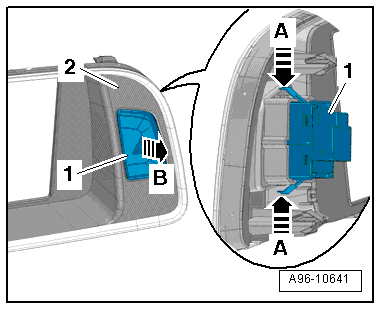
Installation is carried out in the reverse order; note the following:
Press cover for MMI screen onto mounting points until fasteners engage fully.
‹ Prev Removing and installing switch panel in dash panel, vehicles equipped with MMI convenienceNext › Removing and installing front heated seat regulator E94/ E95
Parts & tools for this job For 2008 Audi Q5
- TOOLDigital multimeterSearch: automotive digital multimeter
- PARTAssorted fuse kitSearch: car fuse assortment kit
- TOOLWire crimper and connector kitSearch: wire crimper connector kit
As an Amazon Associate we earn from qualifying purchases.