
Removing and installing bumper aerials
- Make
- Audi
- Model
- R8 Mk2
- Year
- 2015–2023
- Section
- Aerial systems › Removing and installing bumper aerials
‹ Prev Removing and installing dedicated short-range communication aerialNext › Removing and installing LTE aerial 2 R306
Electrical: CommunicationRemoving and installing bumper aerials
Removing and installing bumper aerials
Special tools and workshop equipment requiredTorque wrench V.A.G 1410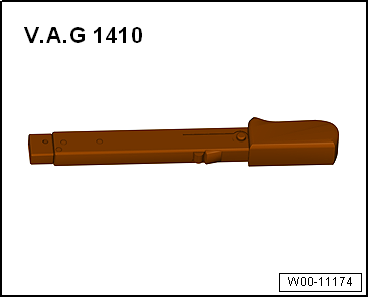
LTE aerial 1 R297 is located on left side and telephone aerial R65 on right side underneath bumper cover (front).
The procedure for removing and installing LTE aerial 1 R297 is described. The procedure for removing and installing the telephone aerial R65 only differs with respect to the position of the electrical connector.
Switch off ignition and all electrical equipment.
Remove front bumper cover General body repairs, exteriorRep. gr.63Bumper (front); Removing and installing bumper cover.
Release and unplug electrical connector (2).
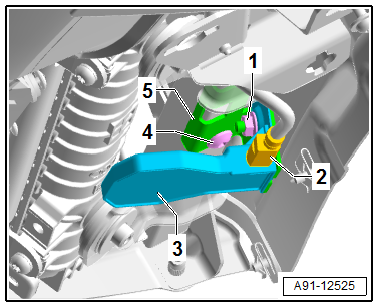
Remove nut (1).
Detach LTE aerial 1 R297(3) from bracket (5).
Remove bolt (4).
Detach bracket (5).
Install in reverse order.
- Chapter“Overview of fitting locations - aerial systems”
‹ Prev Removing and installing dedicated short-range communication aerialNext › Removing and installing LTE aerial 2 R306
Parts & tools for this job For 2015 Audi R8
- TOOLTrim removal tool kitSearch: trim removal tool kit
- PARTTouch-up paintSearch: Audi touch up paint
- PARTPanel clip assortmentSearch: Audi panel clips assortment
As an Amazon Associate we earn from qualifying purchases.