
Removing and installing GPS aerial
- Make
- Audi
- Model
- R8 Mk2
- Year
- 2015–2023
- Section
- Aerial systems › Removing and installing GPS aerial
‹ Prev Removing and installing aerial amplifier R111/ R112Next › Removing and installing traffic data aerial
Electrical: CommunicationRemoving and installing GPS aerial
Removing and installing GPS aerial
GPS aerial R50 is located in dash panel at front under loudspeaker trim.
Switch off ignition and all electrical equipment.
Remove centre loudspeaker trim General body repairs, interiorRep. gr.70Dash panel; Removing and installing loudspeaker trim.
Press retainers (2) outwards.
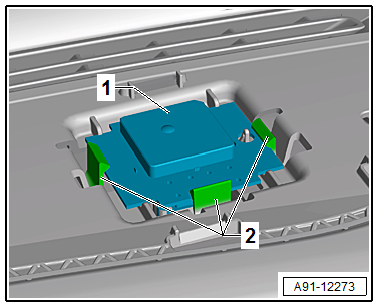
At the same time, pull GPS aerial R50(1) out of dash panel until electrical connector becomes accessible.
Release and unplug electrical connector.
Detach GPS aerial R50(1).
Install in reverse order.
‹ Prev Removing and installing aerial amplifier R111/ R112Next › Removing and installing traffic data aerial
Parts & tools for this job For 2015 Audi R8
- TOOLDigital multimeterSearch: automotive digital multimeter
- PARTAssorted fuse kitSearch: car fuse assortment kit
- TOOLWire crimper and connector kitSearch: wire crimper connector kit
As an Amazon Associate we earn from qualifying purchases.