
Clutch plate and release bearing
- Make
- MG
- Model
- MGF Factory Workshop Manual
- Year
- 1995–2000
- Section
- Repairs › Clutch plate and release bearing
ClutchClutch plate and release bearing · page 1 of 2
CLUTCH PLATE AND RELEASE BEARING
Service repair no - 33.10.07
Remove
- Remove gearbox. See MANUAL GEARBOX, Repairs.
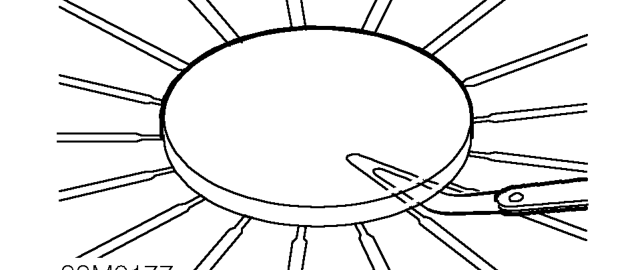
- Place a circular piece of flat plate across diaphragm fingers and insert feeler gauges between plate and fingers; measure finger clearance: Diaphragm finger clearance - service limit = 1.0 mm Renew pressure plate if clearance obtained is outside service limits.
- Progressively loosen then remove 6 bolts securing pressure plate to flywheel.
- Remove pressure plate.
- Remove clutch plate.
- Inspect clutch linings for signs of wear or oil contamination. Check for broken or weak springs and signs of cracking of spring apertures; renew components as necessary.
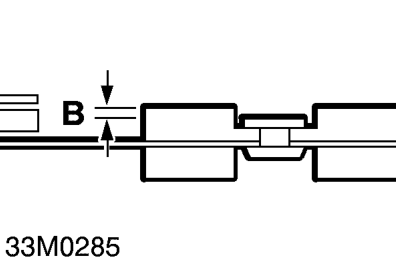
- Measure clutch plate thickness at point ’A’, renew plate if less than service limit. clutch plate thickness - NEW = 7.40 mm - 6.90 mm clutch plate thickness - SERVICE LIMIT = 5.60 mm.
- Measure rivet depth at point ’B’, renew plate if less than service limit: Rivet depth - NEW = 1.0 mm Rivet depth - SERVICE LIMIT = 0.20 mm
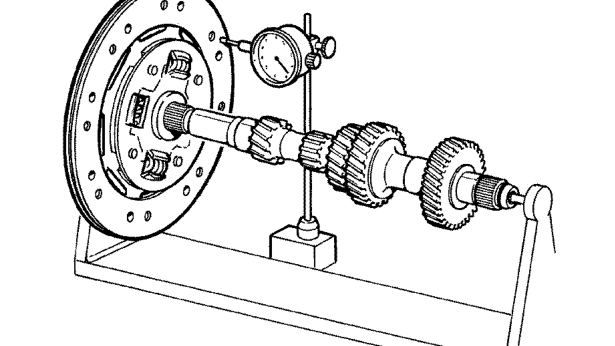
- Measure clutch plate run-out using a dial gauge and a gearbox mainshaft; renew plate if outside service limit: Run-out - NEW = 0.80 mm Run-out - SERVICE LIMIT = 1.0 mm
- Check clutch plate for signs of wear or damage. Check for signs of overheating on drive straps (deep straw or blue colour); renew pressure plate if necessary.
CAUTION: Renew a pressure plate which has been accidentally dropped.
Parts & tools for this job For 1995 MG MGF
- PARTClutch kitSearch: MG MGF 1995 clutch kit
- TOOLClutch alignment toolSearch: clutch alignment tool
- FLUIDGear oilSearch: MG MGF manual gearbox oil
Links open Amazon search results in a new tab. As an Amazon Associate I earn from qualifying purchases.