
Gear selector mountings
- Make
- Mini
- Model
- Mini Workshop Manual
- Year
- 1996–2000
- Section
- Repairs › Gear selector mountings
Manual gearboxGear selector mountings
GEAR SELECTOR MOUNTINGS
Service repair no - 37.16.25
Remove
- Remove carpet See BODY, Interior trim components.
- Raise front of vehicle.
WARNING: Support on safety stands.
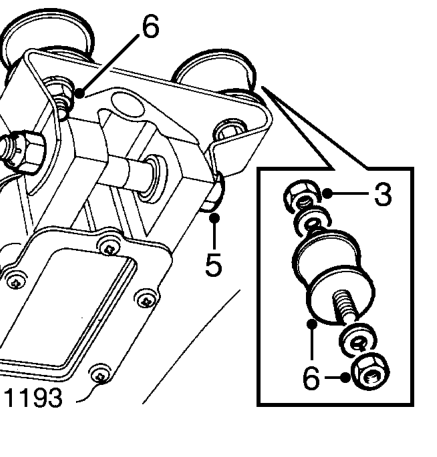
- Remove 2 nuts securing selector mountings to floor.
- Lower gear selector.
- Remove nut and bolt securing mounting bracket to gear selector and remove.
- Remove nuts securing mountings to mounting bracket and remove mountings.
Refit
- Position mountings to mounting bracket and secure with nuts.
- Position mounting bracket to gear selector, secure with nut and bolt.
- Raise gear selector and locate mountings to floor, fit and tighten nuts.
- Fit carpet. See BODY, Interior trim components.
- Remove stand(s) and lower vehicle.
MANUAL GEARBOX
Service repair no - 37.20.02.99
Remove
- The procedure for removing the gearbox is identical to that for renewing the Engine to gearbox gasket. See ENGINE, Repairs.
Parts & tools for this job For 1996 Mini Mini
- PARTClutch kitSearch: Mini Mini 1996 clutch kit
- TOOLClutch alignment toolSearch: clutch alignment tool
- FLUIDGear oilSearch: Mini Mini manual gearbox oil
Links open Amazon search results in a new tab. As an Amazon Associate I earn from qualifying purchases.