
Timing Belt: Diagrams (page 6 of 8)
- Make
- Mitsubishi
- Model
- Diamante
- Engine
- V6-2972cc 3.0L SOHC
- Year
- 1992
- Section
- Timing Belt
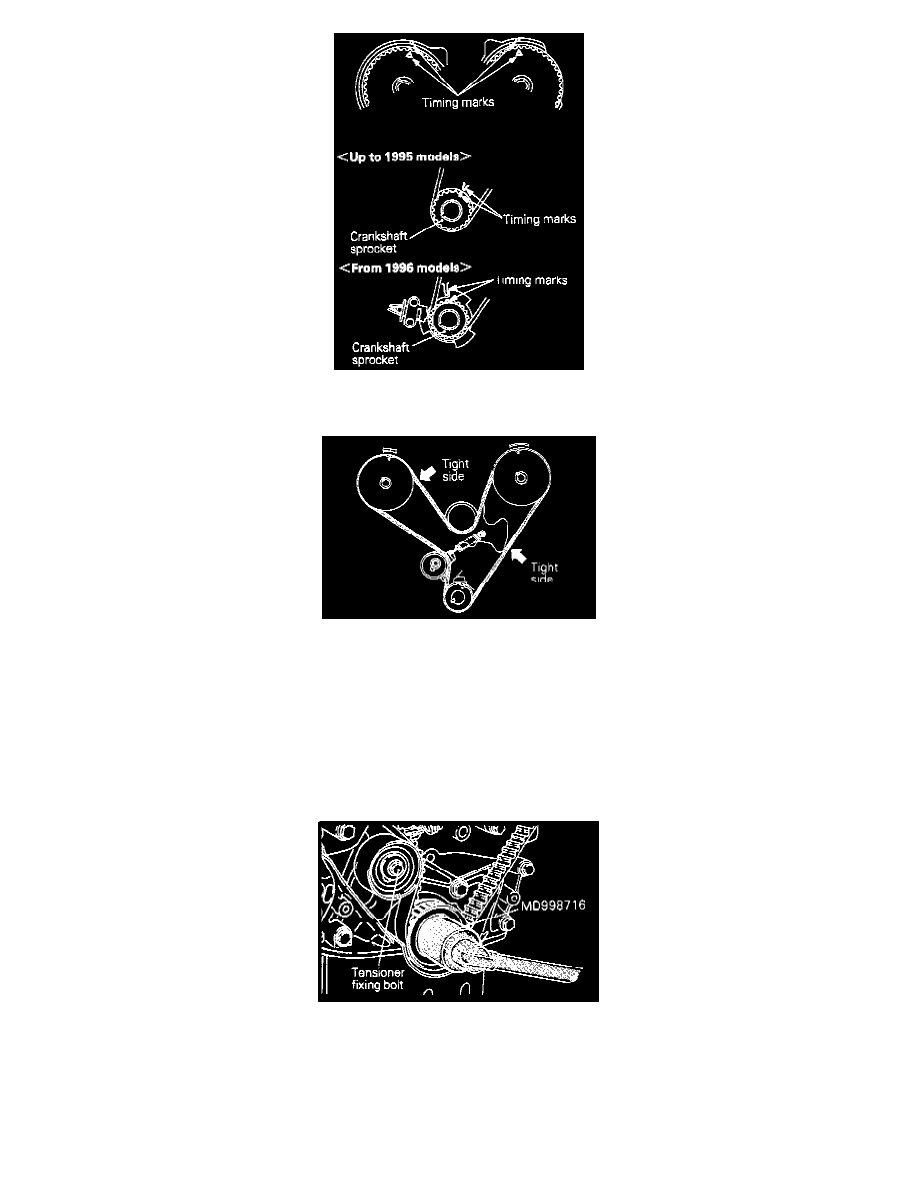
(a) Align the timing marks of the camshaft sprockets (on the front and rear sides) and the crankshaft sprocket (At the top dead point of the No.1
cylinder compression stroke.)
(b) First, route the timing belt on the crankshaft sprocket then on the camshaft sprocket on the side without slackness in the tight side.
(c) Next run the timing belt onto the water pump pulley the camshaft sprocket on the front side, and the timing belt tensioner.
(d) Apply force counterclockwise to the camshaft sprocket on the rear side. When the tight side of the belt is fault check that the timing marks are all
aligned.
-
Adjustment of timing belt tension.
(a) Attach the flange.
(b) Back off the fixing bolts of the temporarily tightened tensioner one or two turns and tighten the timing belt with the tensioner spring force.
(c) Using the special tool, turn the crankshaft two turns in the normal rotating direction (clockwise).
NOTE:
-
Turn smoothly, but not in the opposite direction (counterclockwise).
Pinch or Ctrl + scroll to zoom. Double-tap to reset.
Parts & tools for this job For 1992 Mitsubishi Diamante 3.0L
- PARTTiming belt kitSearch: Mitsubishi Diamante 1992 3.0L timing belt kit
- TOOLEngine timing tool setSearch: Mitsubishi engine timing tool set
- TOOLTorque wrenchSearch: 3/8 inch torque wrench
Links open Amazon search results in a new tab. As an Amazon Associate I earn from qualifying purchases.