
Rear screen (page 2 of 3)
- Make
- Rover
- Model
- 200 Body Repair Manual
- Year
- 1995–1999
- Section
- Screens
BodyRear screen · page 2 of 3
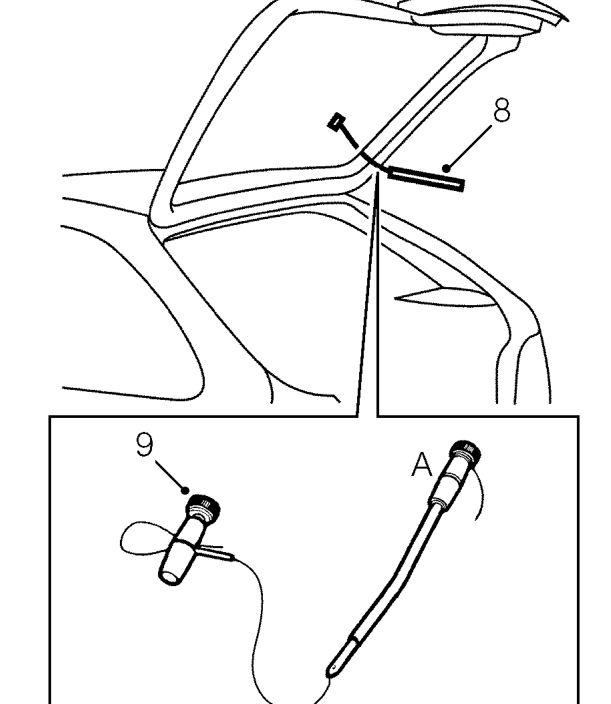
- Fit handles as shown, with approximately 200 mm of wire between handles.
- With assistance, wedge tube of handle ’A’between glass and body, ahead of cutting position. Carefully cut sealant from screen aperture.
NOTE: If multi-strand cutting wire is used, a sawing action can be used to cut through heavy sealant deposits around corners.
CAUTION: Use of a sawing action may overheat and break single strand wire.
- Attach suction cups to screen and use assistance to remove glass from body.
CAUTION: Lay glass on felt covered supports. Do not stand on edge. Any chipping of glass edge may develop into cracks.
Refit
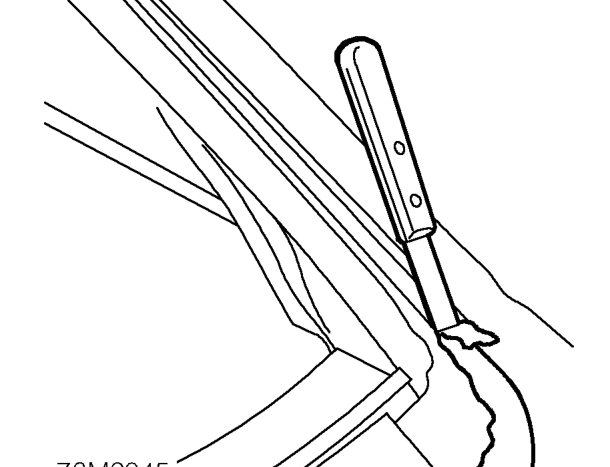
- Carefully remove excess sealer from body leaving a smooth surface approximately 1 to 2 mm thick.
- Use a vacuum cleaner to clear away any waste.
- Apply T-Cut around screen aperture to erase any witness marks made by old screen finisher.
- With assistance, locate screen to aperture.
- Apply masking tape reference marks to aid fitment.
- With assistance, remove screen and place aside.
- Apply de-greasant agent (yellow top) around screen aperture.
CAUTION: Do not touch cleaned or primed surfaces with fingers.
- Apply etch primer to any bare metal around screen aperture.
- Clean and polish new glass.
- Apply de-greasant agent (yellow top) to screen obscuration band.
- Apply primer (green top) to screen obscuration band.
NOTE: Allow 15 minutes for primer to cure.
Parts & tools for this job For 1995 Rover 200
- TOOLTrim removal tool kitSearch: trim removal tool kit
- PARTTouch-up paintSearch: Rover touch up paint
- PARTPanel clip assortmentSearch: Rover panel clips assortment
Links open Amazon search results in a new tab. As an Amazon Associate I earn from qualifying purchases.