
Exploded view - parking brake
- Make
- SEAT
- Model
- Alhambra
- Year
- 2010–2020
- Section
- Brake system: › Exploded view - parking brake
Brake, brake mechanicsExploded view - parking brake
Exploded view - parking brake
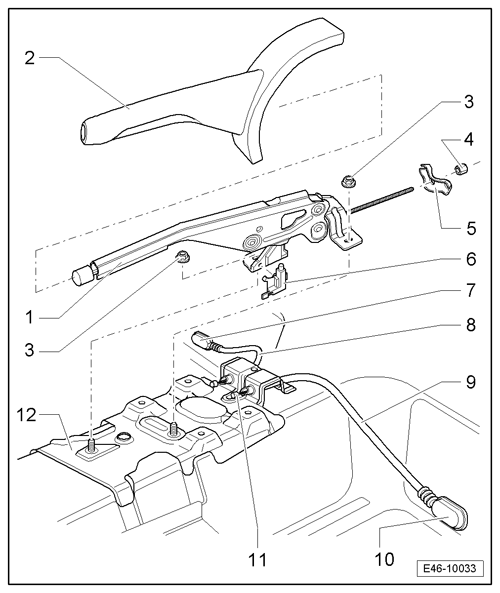
- Handbrake lever
Prior to removal, remove the extension of the centre console Stowage compartment, coverings and trims; Centre console: removing and installing. - Trim
Removing: press the locking tab of the rear lower part using a small screwdriver, and remove it by pulling forward - Nut
20 Nm + 90°
Replace after every removal. - Adjustment nut
Adjusting handbrake Chapter “Adjusting parking brake” - Expansion tab
- Handbrake warning switch F9
- Thrust piece
Removing:Remove the handbrake cable from the guide tube.Remove the socket.Separate the socket from the guide tube.
Installing:Make sure that the socket is correctly seated in the bodywork. - Right guide tube
For hand brake cable - Left guide tube
For hand brake cable - Thrust piece
Removing:Remove the handbrake cable from the guide tube.Remove the socket.Separate the socket from the guide tube.
Installing:Make sure that the socket is correctly seated in the bodywork. - Hand brake cable
Removing and installing Chapter “Removing and installing parking brake cable” - Handbrake lever securing point
Soldered in the bodywork tunnel
Parts & tools for this job For 2010 SEAT Alhambra
- PARTBrake padsSearch: SEAT Alhambra 2010 brake pads
- TOOLBrake bleeder kitSearch: one man brake bleeder kit
- FLUIDBrake fluidSearch: brake fluid
As an Amazon Associate we earn from qualifying purchases.