
Removing and installing brake pedal, LHD
- Make
- SEAT
- Model
- Alhambra
- Year
- 2010–2020
- Section
- Brake system: › Removing and installing brake pedal, LHD
Removing and installing brake pedal, LHD
Note
- It is not possible to remove the brake pedal individually.
- First, remove mounting bracket.
Note
- Replace the bearing axle after removal.
Remove mounting bracket Chapter “Removing and installing mounting bracket”.
Turn the bearing axle anti-clockwise (direction of rotation).
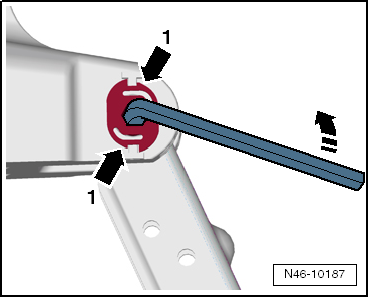
Note
- (arrow 1) break in the process.
Remove the brake pedal from the bracket.
Before installing the brake pedal to the bracket, mount both bushes.
Warning
Both bushes must be installed on the rocker bearing in order to ensure that it has a correct seating.
Push the new bearing axle from the left to the right through the bracket and brake pedal.
Turn the bearing axle clockwise (direction of rotation) until the retainer tabs (arrow 2) are located at the stop of the bracket.
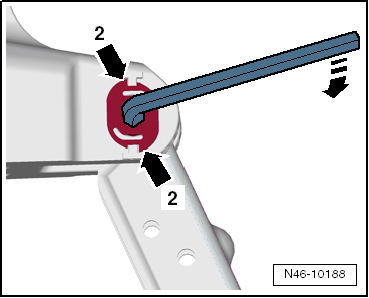
Install mounting bracket Chapter “Removing and installing mounting bracket”.
Warning
Before performing the first test drive, make sure that the brakes are operating correctly.
Parts & tools for this job For 2010 SEAT Alhambra
- PARTBrake padsSearch: SEAT Alhambra 2010 brake pads
- TOOLBrake bleeder kitSearch: one man brake bleeder kit
- FLUIDBrake fluidSearch: brake fluid
As an Amazon Associate we earn from qualifying purchases.