
Multimedia control unit J650: Removing and installing
- Make
- SEAT
- Model
- Leon Mk2
- Section
- Radio, Telephone, Navigation › Multimedia control unit J650: Removing and installing
Multimedia control unit J650: Removing and installing
The multimedia system control unit is installed behind the instrument panel in the middle under the radio or radio / navigation system.
The multimedia unit MDI is fixed behind the instrument panel on the cross beam of the instrument panel using a suitable support.
Remove instrument panel with centre console Body - interior body assembly work Rep. gr. 70
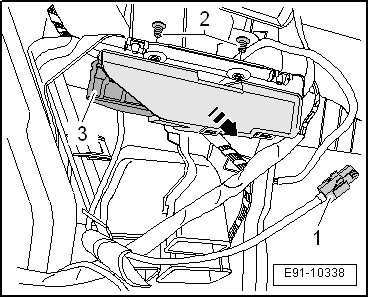
Undo the fixing screws (2) of the support on the crossbeam of the instrument panel.
Remove the multimedia unit (3) together with the support and disconnect the power supply cable and the Mitsumi-Mitsumi connector (1).
For connection, the operations are carried out in reverse order, taking the following into account.
After fitting the unit in its support, insert the connectors, not bending the contacts in the process.
Fix the unit with support to the cross member. Fit the rest of the parts.
Install the instrument panel together with the centre console Body - interior body assembly work Rep. gr. 70
Parts & tools for this job For SEAT Leon
- TOOLTorque wrenchSearch: 3/8 inch torque wrench
- TOOLSocket setSearch: socket set metric
- BOOKHaynes manualSearch: Haynes manual SEAT Leon
As an Amazon Associate we earn from qualifying purchases.