
Removing and installing brake caliper CI 38
- Make
- Skoda
- Model
- Octavia Mk2
- Section
- Brake systems › Removing and installing brake caliper CI 38
Removing and installing brake caliper CI 38
- Brake pedal load e.g. V.A.G 1869/2
- Bleeding bottle (commercially available)
Remove wheels.
Detach the hand brake cable from the lever on the brake caliper.
If necessary, remove spring clip and pull hand brake cable out of the brake line holder.
Fit the bleeder hose of the bleeding bottle onto the bleeder screw of the brake caliper and then open the bleeder screw.
Position brake pedal load e.g. V.A.G 1869/2.
Close the bleeder screw and remove the bleeding bottle.
Unscrew the brake line.
Unscrew both fixing screws from the brake caliper while counterholding the guide bolt.
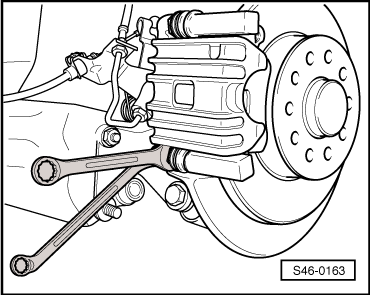
Pull off brake caliper from brake carrier.
- The piston is pushed back.
- The brake pads are fitted on the brake carrier.
Secure the brake caliper to the brake carrier using new self-locking screws.
Screw the brake line onto the brake caliper.
Bleeding brake system Chapter “Bleeding brake system”.
Install the hand brake cable and if necessary attach with spring clips to the support.
Setting the hand-brake Chapter “Setting the hand-brake”.
Attach the wheels.
Note
- Chapter “Changing the brake pads of the rear brake - Mounting instructions”
- Forcefully apply the brake pedal repeatedly to ensure the brake pads go into their normal operating position.
- Inspecting the brake fluid level.
| Brake caliper to brake carrier Use new self-locking screws! | 35 Nm |
| Brake line to brake caliper | 12 Nm |
| Wheel bolts | 120 Nm |
Parts & tools for this job For Skoda Octavia
- PARTBrake padsSearch: Skoda Octavia brake pads
- TOOLCaliper piston rewind toolSearch: brake caliper piston rewind tool
- FLUIDBrake fluidSearch: brake fluid
As an Amazon Associate we earn from qualifying purchases.