
Removing and installing brake pads (CII 41)
- Make
- Skoda
- Model
- Superb II
- Year
- 3T, 2008 on
- Section
- Brake systems › Removing and installing brake pads (CII 41)
Removing and installing brake pads (CII 41)
- Resetting tool T10165
Remove wheels.
Unscrew the fixing screws of the brake carrier while counterholding the guide bolts.
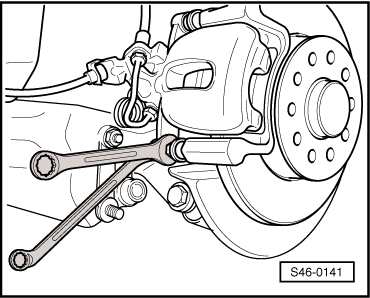
Remove the brake caliper and e.g. secure with wire in such a way that the weight of the brake caliper does not burden or damage the brake hose.
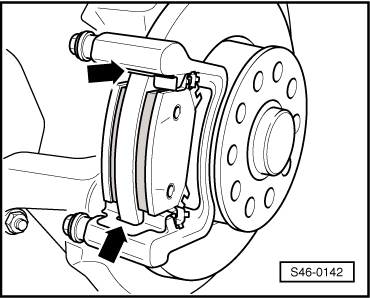
Remove the brake pads and pad retaining plates (arrows).
Screw in the piston by turning the knurled wheel clockwise on the resetting tool T10165, during this procedure do not damage the protective cap.
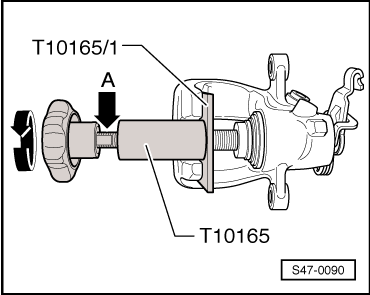
To insert use the special tool T10165/1.
- (arrow A) if the piston is difficult to move.
Insert the new pad retaining plates (arrows) and brake pads in the brake carrier.
Make sure that the brake pads are located in the pad retaining plates (arrows).
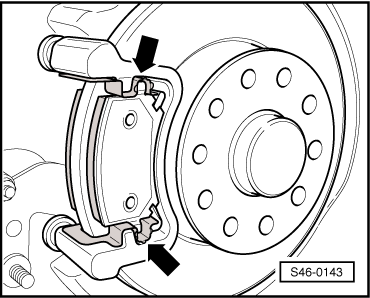
Secure the brake caliper using new self-locking screws.
- There are four self-locking screws in the repair set, which must be fitted.
Attach the wheels.
Note
- Chapter “Changing the brake pads of the rear brake - Mounting instructions”
- After each brake pad replacement, forcefully apply the brake pedal repeatedly to ensure the brake pads go into their normal operating position.
- Check brake fluid level after replacing the brake pads.
| Brake caliper to brake carrier Use new self-locking screws! | 35 Nm |
| Wheel bolts | 120 Nm |
Parts & tools for this job For 2008 Skoda Superb
- PARTBrake padsSearch: Skoda Superb 2008 brake pads
- TOOLCaliper piston rewind toolSearch: brake caliper piston rewind tool
- FLUIDBrake fluidSearch: brake fluid
As an Amazon Associate we earn from qualifying purchases.