
Removing clutch
- Make
- Skoda
- Model
- Superb II
- Year
- 3T, 2008 on
- Section
- Gearbox 02E-DSG › Removing clutch
Clutch, controlRemoving clutch
Removing clutch
- Gearbox mount T30109 (VW 353)
- Gearbox mount T30108
- Assembly stand MP9-101
In order to remove and install the clutch, the gearbox must be tightened securely in the vertical position at the assembly stand Chapter “Attaching gearbox to assembly stand”.
Remove clutch cover Chapter “Removing the clutch cover”.
Remove circlip (arrow) of clutch cover (1).
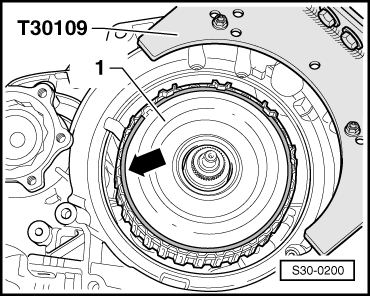
Take clutch cover off the clutch.
Removing the circlip (arrow).
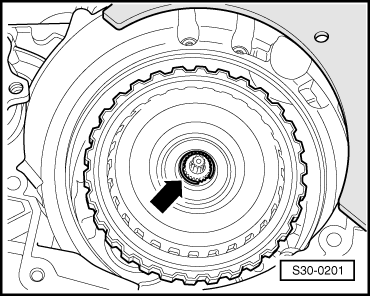
When installing at a later stage, this circlip (arrow) must be measured again and replaced Chapter “Installing and adjusting the clutch”.
Note
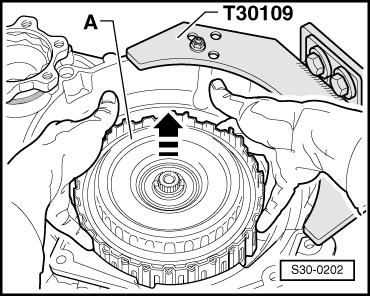
- Carefully remove the clutch. Make sure that the plate support or any other parts of the clutch do not fall out, therefore never turn the clutch!
- Chapter “Summary of components”.
Remove the complete clutch (A) in (direction of arrow).
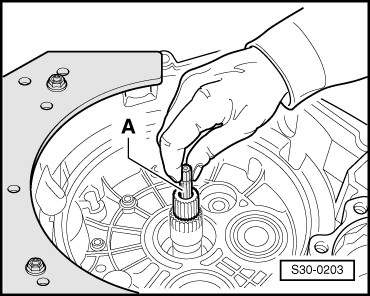
Pull out drive shaft (A) of gearbox oil pump.
Note
- The drive shaft of the gearbox oil pump is inserted only after the installation of the new clutch. Place down the shaft until then.
Parts & tools for this job For 2008 Skoda Superb
- PARTClutch kitSearch: Skoda Superb 2008 clutch kit
- TOOLClutch alignment toolSearch: clutch alignment tool
- FLUIDGear oilSearch: Skoda Superb manual gearbox oil
As an Amazon Associate we earn from qualifying purchases.