
Removing and installing clutch pedal (Octavia II)
- Make
- Skoda
- Model
- Superb II
- Year
- 3T, 2008 on
- Section
- Manual gearbox 0AJ › Removing and installing clutch pedal (Octavia II)
Removing and installing clutch pedal (Octavia II)
- Pliers T10005
- Release tool T10178
- Bracket for clutch pedal installed in the vehicle.
Slide the driver seat to the rear.
Remove lower part of the dash panel insert on the driver's side Body Work Rep. gr. 70.
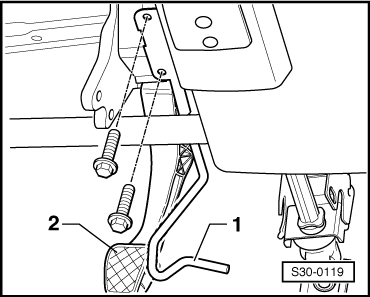
Unscrew crash strut (1) in front of the clutch pedal (2).
Unscrew clutch pedal (1) from bracket (3), to this end release nut (2) and pull out screw (5).
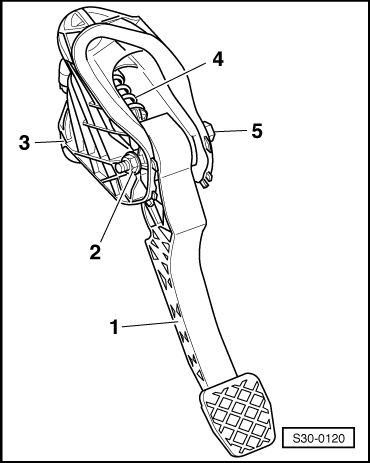
Swivel clutch pedal slightly forwards and remove over-centre helper spring (4) from the bracket.
Release support of actuating rod of master cylinder with pliers T10005.
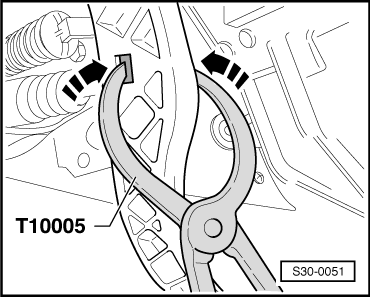
Remove clutch pedal.
Installation is performed in the reverse order, pay attention to the following points:
Note
- Electronic Catalogue of Original Parts.
Attach support (2) to the actuator rod (1) of the master cylinder.
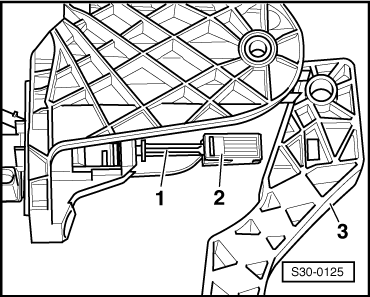
Press support into the clutch pedal until it audibly clicks into place.
Insert over-centre helper spring from above into the bracket and while doing so hold the the spring end in the fitting position using the release tool T10178.
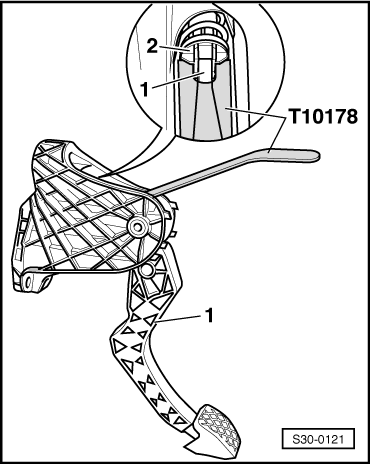
Insert bearing bolt of clutch pedal into the step bearing of the over-centre helper spring.
Press on clutch pedal slightly, slide through screw and tighten self-locking nut.
Screw on crash strut (1) in front of the clutch pedal (2).
Install lower part of the dash panel insert on the driver's side Body Work Rep. gr. 70.
| Component | Nm | |
|---|---|---|
| Clutch pedal to bearing bracket | Chapter “Summary of components - Foot controls” | |
| Crash strut to bracket/steering column | 9 | |
Parts & tools for this job For 2008 Skoda Superb
- PARTClutch kitSearch: Skoda Superb 2008 clutch kit
- TOOLClutch alignment toolSearch: clutch alignment tool
- FLUIDGear oilSearch: Skoda Superb manual gearbox oil
As an Amazon Associate we earn from qualifying purchases.