
Installing:
- Make
- Volkswagen
- Model
- Golf Plus
- Year
- 2005–2014
- Section
- Multimedia system RSE (Rear Seat Entertainment), “Golf Plus” › Installing:
Electrical: CommunicationInstalling:
Installing:
Push the rubber stop buffer onto the DVD player (arrow). Connect the cable connection for the DVD player onto connection (A).
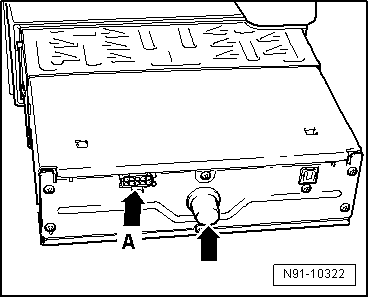
Carefully push DVD player into mounting frame in centre console until it is audibly engages.
Further installation is carried out in the reverse order of removal.
Then check the multimedia system functions correctly.
Parts & tools for this job For 2005 Volkswagen Golf
- TOOLDigital multimeterSearch: automotive digital multimeter
- PARTAssorted fuse kitSearch: car fuse assortment kit
- TOOLWire crimper and connector kitSearch: wire crimper connector kit
As an Amazon Associate we earn from qualifying purchases.