
Removing:
- Make
- Volkswagen
- Model
- Golf Plus
- Year
- 2005–2014
- Section
- Multimedia system RSE (Rear Seat Entertainment), “Golf Plus” › Removing:
Removing:
Before beginning dismantling work, perform the following steps:
Switch off ignition and all electrical consumers and remove ignition key.
Fold monitor down out of roof console.
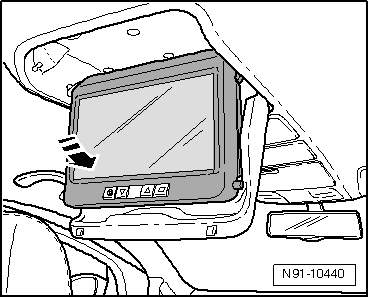
Guide front-end hook VAS 3370 between monitor and the flap in roof console and move it in direction of (arrow) downwards until it contacts the plastic pin of the monitor.
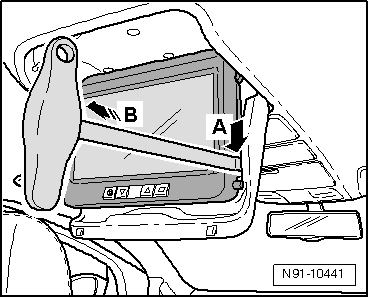
Carefully pull monitor using front-end hook VAS 3370 in direction of (arrow A) until the plastic pin disengages.
This is a view of the monitor with the plastic pin (arrow) disengaged.
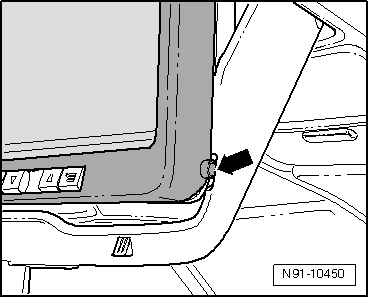
Repeat the sequence for the plastic pin on the other side of the monitor.
Tilt monitor so that the guide pins (arrows) can be guided out of the guide rails.
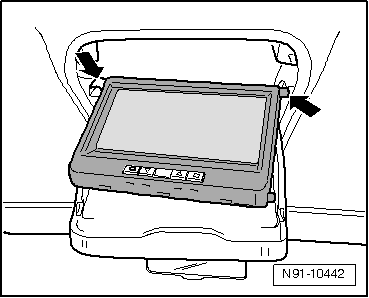
Remove monitor as far as wiring will allow. Now the connector (arrow) on the back of the monitor is visible.
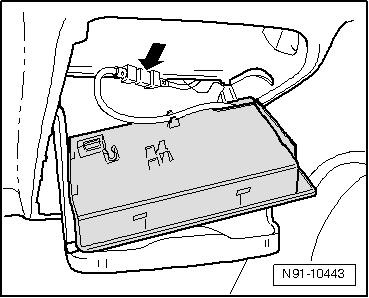
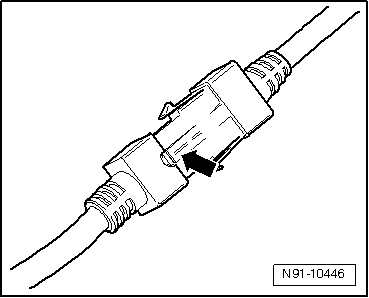
Press locking mechanism on connector (arrow) and disconnect connector.
Parts & tools for this job For 2005 Volkswagen Golf
- TOOLDigital multimeterSearch: automotive digital multimeter
- PARTAssorted fuse kitSearch: car fuse assortment kit
- TOOLWire crimper and connector kitSearch: wire crimper connector kit
As an Amazon Associate we earn from qualifying purchases.