
Removing:
- Make
- Volkswagen
- Model
- Golf Plus
- Year
- 2005–2014
- Section
- Multimedia system RSE (Rear Seat Entertainment), “Golf Plus” › Removing:
Electrical: CommunicationRemoving:
Removing:
Open hinged centre armrest.
Actuate button (arrow) and unfold control panel on DVD player.
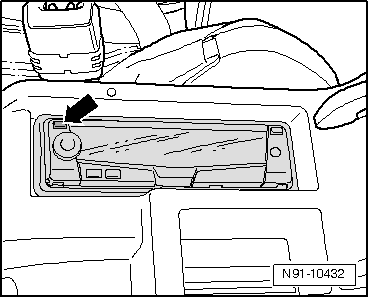
Remove operating unit from DVD player.
Unclip frame at points indicated by (arrows) using a suitable screwdriver and remove it.
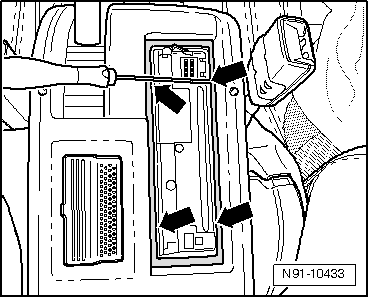
Insert release tools T10315 into DVD player (arrows).
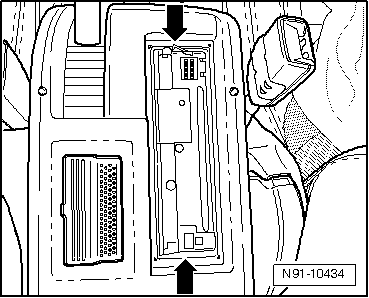
Note
- The release tool must be inserted so that the thickened section on the lower end of the release tool (A) faces towards the housing of the DVD player. Otherwise the locking springs on the DVD player will not be operated correctly by the release tool.
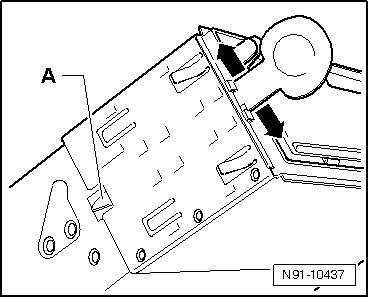
Move the release tool sideways (arrows) so that the groove of the release tool engages behind the tab on the DVD player.
Now pull DVD player out of mounting frame using both release tools.
Release connectors (arrows) on back of DVD player and disconnect them.
Parts & tools for this job For 2005 Volkswagen Golf
- TOOLDigital multimeterSearch: automotive digital multimeter
- PARTAssorted fuse kitSearch: car fuse assortment kit
- TOOLWire crimper and connector kitSearch: wire crimper connector kit
As an Amazon Associate we earn from qualifying purchases.