
Brake light switch - r+r
- Make
- Alfa Romeo
- Model
- 147 Factory Service Manual
- Year
- 2000–2004
- Section
- Manoeuvring and warning signals › Brake light switch - r+r
Electrical equipmentBrake light switch - r+r
Brake light switch - r+r
Removing
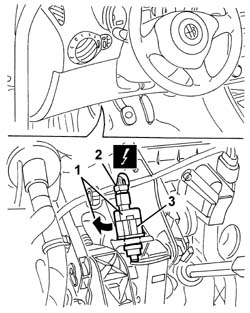
1. Working under the left side of the dashboard cover, rotate the switch in a clockwise direction through around 90 degrees and move it.
2. Disconnect the electrical connections.
| Name | Connector | |
|---|---|---|
| 2 | Brake pedal switch | I30 |
3. Recover the switch.
Refitting
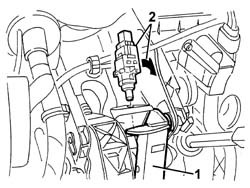
1. Keep the brake pedal pressed and fit the switch in the position illustrated.
2. Rotate the switch in an anti-clockwise direction through around 90 degrees until it is properly fitted in the housing.
Release the brake pedal.
Check the operation of the brake lights.
Parts & tools for this job For 2000 Alfa Romeo 147
- TOOLOBD2 scannerSearch: OBD2 scanner
- TOOLDigital multimeterSearch: automotive digital multimeter
- TOOLBack-probe test leadsSearch: back probe test leads
Links open Amazon search results in a new tab. As an Amazon Associate I earn from qualifying purchases.