
Installation (page 2 of 2)
- Make
- Aston Martin
- Model
- DB9 Factory Workshop Manual
- Year
- Issue 2, 2005
- Section
- Clutch Assembly
08 ClutchInstallation · page 2 of 2
- Insert the clutch alignment tool (Refer to '303-667 (Clutch Alignment)', page 20-1-5) through the clutch assembly. Offer this assembly to the flywheel and insert the alignment tool into the crankshaft pilot bearing.
Caution
The flywheel and pressure plate are a balanced assembly. Ensure alignment marks are aligned.
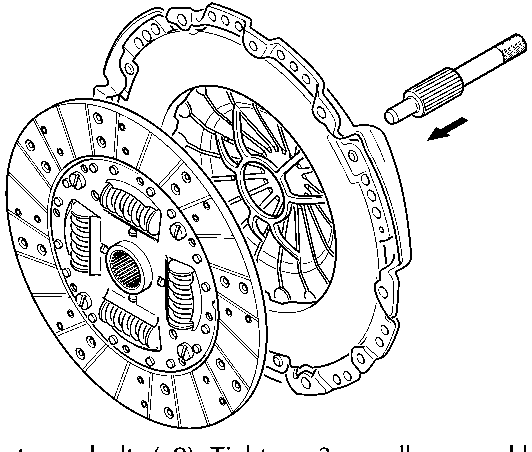
- Insert new bolts (x9). Tighten x3 equally-spaced bolts in-turn to pull-down the clutch evenly.
Torque all bolts, in sequence, to 29-35 Nm.
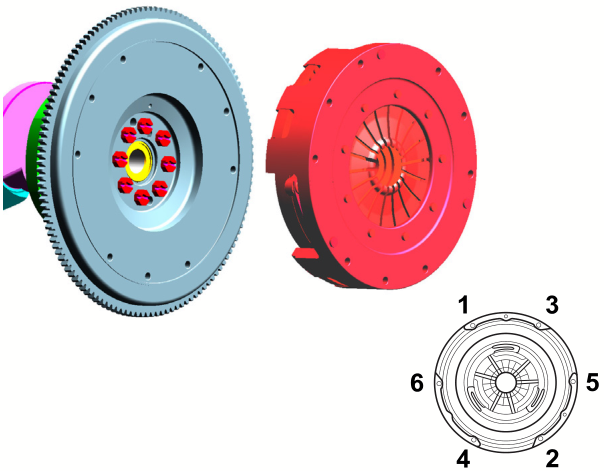
- Visually check that marks between the clutch and the flywheel are correctly aligned. If not, the clutch must be removed and installed correctly.
- Remove the alignment tool.
- Remove the crankshaft holding tool.
- Install the torque tube and the transaxle.
- (Refer to 'Torque Tube', page 5-1-2)
- (Refer to 'Manual Transmission (07.03)', page 7-3-1)
- Install the starter motor. Torque the starter motor bolts to 30-35 Nm.
- Install the front and rear undertrays.
- Install the road wheel arch liners.
- Install the road wheels (Refer to 'Road Wheel Nut Torque Tightening', page 4-5-7).
- Remove the vehicle securing strap, if installed.
- Connect vehicle battery.
Parts & tools for this job For 2005 Aston Martin DB9
- PARTClutch kitSearch: Aston Martin DB9 2005 clutch kit
- TOOLClutch alignment toolSearch: clutch alignment tool
- FLUIDGear oilSearch: Aston Martin DB9 manual gearbox oil
Links open Amazon search results in a new tab. As an Amazon Associate I earn from qualifying purchases.