Workshop Manuals Factory service & repair Audi
01 Running gear02 Body03 Power unit04 Power transmission05 Vehicle electrics06 Heating, ventilation, air conditioning system
Audi A4 Mk105 · Vehicle electrics
05 · General

Removing and installing battery

Make
Audi
Model
A4 Mk1
Section
Starter-current supply-CC › Battery › Removing and installing battery
Vehicle electricsRemoving and installing battery
Removing and installing battery
   
Removing
Removing and installing battery – Audi A4 Mk1   Caution
On vehicles fitted with telematics system, activate service mode of telematics control unit before disconnecting battery → Communication; Rep. Gr.01 or → Rep. Gr.91.
–  Switch off ignition and take out ignition key.
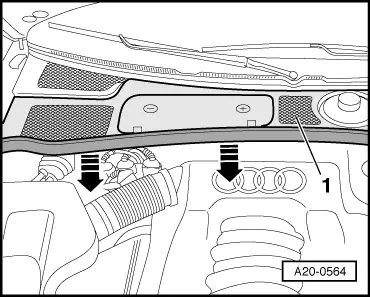
–  If fitted, detach rubber seal of plenum chamber cover in direction of -arrow-.
–  Remove plenum chamber cover -1- to front.
  A20-0564
–  If fitted, fold up cover over positive terminal.
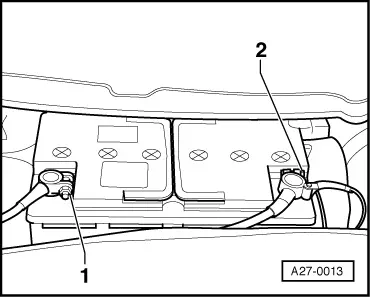
–  Disconnect earth cable -1- and positive cable -2- at battery.
  A27-0013
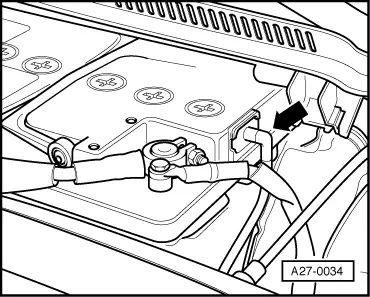
–  Disconnect hose -arrow- for central gas venting system.
  A27-0034
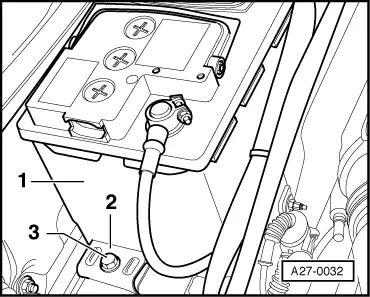
–  Unscrew bolt -3- on battery retainer plate -2-.
–  Lift battery -1- out of plenum chamber.
Removing and installing battery – Audi A4 Mk1   WARNING
When disposing batteries it is absolutely necessary that the disposal procedures for batteries and sulphuric acid are observed.
Installing
Removing and installing battery – Audi A4 Mk1  Note
t  Only install maintenance-free batteries with the specifications “TL82506” (from December 1997 onwards) and “VW75073” (from August 2001 onwards).
t  Batteries from the Audi parts range feature a base strip adapter for matching to different retainer flanges. The battery operating instructions give details of when and how to use the base strip adapter.
  A27-0032
–  Insert battery into battery tray.
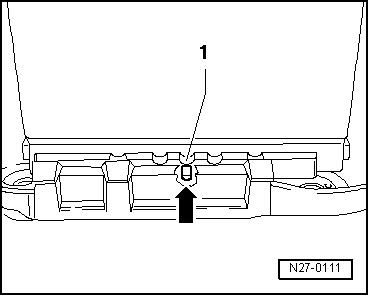
l  The lug on the rear side of the battery tray must engage in the recess -arrow- in the battery base strip -1-.
l  It should no longer be possible to move the battery.
  N27-0111
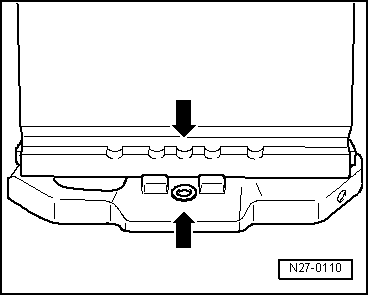
l  The battery has been properly inserted if the centre recess in the battery base strip aligns with the tapped hole in the battery tray -arrows-.
  N27-0110
–  Secure battery retaining strap -2- with hexagon bolt -3-.
Removing and installing battery – Audi A4 Mk1  Note
Lug on battery retainer plate must engage in recess on battery base strip.
Connect up battery in the following sequence with ignition and electrical equipment switched off:
–  First connect battery clamp of positive cable by hand to battery positive terminal “+” and tighten nut.
–  Attach battery clamp of earth cable to negative battery terminal “–” by hand and tighten nut.
–  Connect hose for central gas venting system; see notes → Chapter.
–  Check that battery is firmly secured following installation → Chapter.
Removing and installing battery – Audi A4 Mk1  Note
t  Make sure to activate vehicle equipment (radio, radio navigation system, clock, electric windows) according to operating instructions.
t  Deactivate service mode of telematics control unit → Communication; Rep. Gr.01 or → Rep. Gr.91.
t  For further operations after reconnecting power supply, refer to → Rep. Gr.24.
t  Check proper function of remote control keys; synchronise keys if necessary. Inform customer that all additional keys must also be synchronised to ensure that the remote control works properly → Owner's Manual.
t  After reconnecting the voltage supply, it is possible that the ABS/ESP warning lamp will not go out until the vehicle has been driven several metres.
Tightening torques
  A27-0032
ComponentNm
Bolt to retainer plate22
Battery cable clamp to battery terminal8


Parts & tools for this job For Audi A4

Links open Amazon search results in a new tab. As an Amazon Associate I earn from qualifying purchases.