
Removing and installing function selection switch 2 E272
- Make
- Audi
- Model
- TT Mk1
- Year
- 1998–2006
- Section
- Switches › Removing and installing function selection switch 2 E272
‹ Prev Removing and installing driver side interior locking switch E150Next › Removing and installing cabrio windbreak switch E278
Electrical systemRemoving and installing function selection switch 2 E272
Removing and installing function selection switch 2 E272
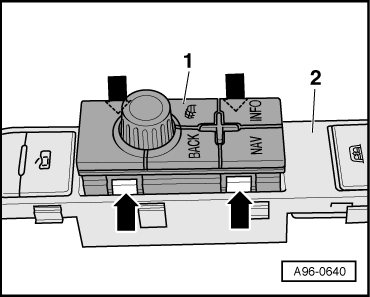
Remove switch mounting in centre console (rear) → Chapter.
Use small knife or feeler gauge to release retainer tabs (arrows).
Pull function selection switch 2 E272(item 1) upwards out of switch mounting (2).
Installation is carried out in the reverse order; note the following:
Press switch into switch mounting until retaining hooks engage.
Install switch mounting in centre console (rear) → Chapter.
‹ Prev Removing and installing driver side interior locking switch E150Next › Removing and installing cabrio windbreak switch E278
Parts & tools for this job For 1998 Audi TT
- TOOLOBD2 scannerSearch: OBD2 scanner
- TOOLDigital multimeterSearch: automotive digital multimeter
- TOOLBack-probe test leadsSearch: back probe test leads
As an Amazon Associate we earn from qualifying purchases.