
Removing and installing switches in front centre console
- Make
- Audi
- Model
- TT Mk1
- Year
- 1998–2006
- Section
- Switches › Removing and installing switches in front centre console
‹ Prev Removing and installing glove compartment light switch E26Next › Removing and installing switch mounting in centre console (rear)
Electrical systemRemoving and installing switches in front centre console
Removing and installing switches in front centre console
Switch off ignition and take out ignition key.
Turn light switch to position “0”.
Slide back cover over switch console.
Using flat screwdriver, carefully pry switch mounting out of centre console (arrows).
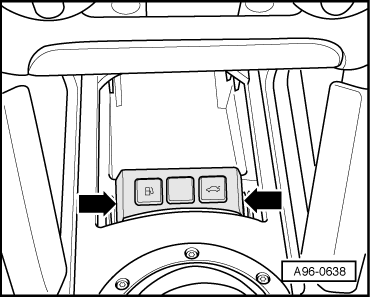
Unplug the electrical connectors.
Installation is carried out in the reverse order; note the following:
Press switch mounting into centre console until retaining hooks engage.
‹ Prev Removing and installing glove compartment light switch E26Next › Removing and installing switch mounting in centre console (rear)
Parts & tools for this job For 1998 Audi TT
- TOOLDigital multimeterSearch: automotive digital multimeter
- PARTAssorted fuse kitSearch: car fuse assortment kit
- TOOLWire crimper and connector kitSearch: wire crimper connector kit
As an Amazon Associate we earn from qualifying purchases.