
Removing and installing switches in dash panel
- Make
- Audi
- Model
- TT Mk1
- Year
- 1998–2006
- Section
- Switches › Removing and installing switches in dash panel
Electrical systemRemoving and installing switches in dash panel
Removing and installing switches in dash panel
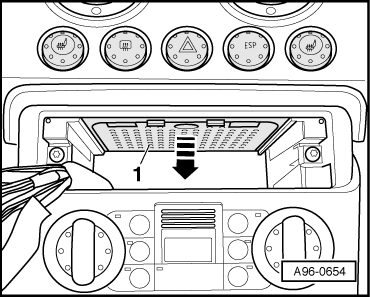
Switch off ignition and take out ignition key.
Remove radio Rep. Gr.91.
Pull down cover plate (1) in top of radio slot at opening (arrow) and take out of radio slot.
Reach upwards through radio slot and release switches by pulling clip (1) downwards (arrow).
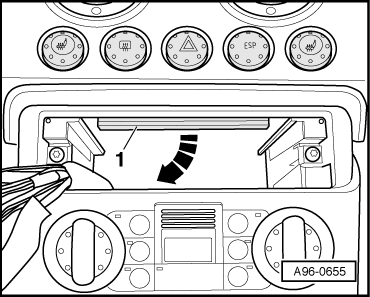
Press switch forwards out of dash panel.
Take switch out of dash panel through radio slot.
Unplug electrical connector.
Installation is carried out in the reverse order; note the following:
Press clip upwards until it engages.
Plug in electrical connector.
Insert cover plate in top of radio slot.
Cover plate can only be fitted in one position.Install radio Rep. Gr.91.
Parts & tools for this job For 1998 Audi TT
- TOOLDigital multimeterSearch: automotive digital multimeter
- PARTAssorted fuse kitSearch: car fuse assortment kit
- TOOLWire crimper and connector kitSearch: wire crimper connector kit
As an Amazon Associate we earn from qualifying purchases.