
Facia trim - replace
- Make
- Fiat
- Model
- Ducato Factory Service Manual
- Year
- 2002–2006
- Section
- Body interior fittings and trim › Facia trim - replace
FACIA TRIM - REPLACE
Removing
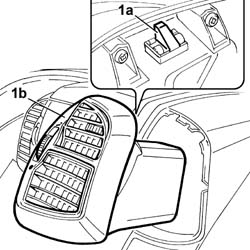
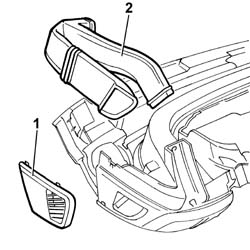
1. Act on the springs (1a) and remove the side vents (1b).
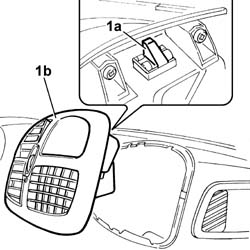
1. Act on the springs (1a) and remove the centre vents (1b).
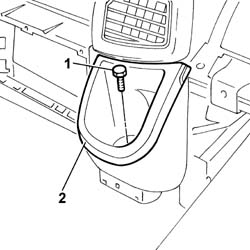
1. Undo the fixing bolt.
2. Remove the glass holder.
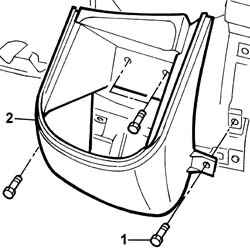
1. Undo the fixing bolts.
2. Remove the glass holder trim.
1. Remove the side diffusers.
2. Remove the air ducts.
- Keep the metal hooks from the instrument panel trim.
Refitting
- Position the metal hooks on the new instrument panel trim.
- Position the air ducts.
- Place the side diffusers in position and fit them.
- Position the glass holder trim and tighten the fixing bolts.
- Position the glass holder and tighten the fixing bolt.
- Place the centre vents in position and fit them.
- Place the side vents in position and fit them.
Parts & tools for this job For 2002 Fiat Ducato
- TOOLTrim removal tool kitSearch: trim removal tool kit
- PARTTouch-up paintSearch: Fiat touch up paint
- PARTPanel clip assortmentSearch: Fiat panel clips assortment
Links open Amazon search results in a new tab. As an Amazon Associate I earn from qualifying purchases.