
Introduction - INSTRUMENT PANEL
- Make
- Fiat
- Model
- Idea Factory Service Manual
- Year
- 2003–2012
- Section
- Instrument panel › Introduction - INSTRUMENT PANEL
Introduction - INSTRUMENT PANEL
SPECIFCATIONS
The control panel is located in the middle of the dashboard. Its position ensures maximum visibility/legibility of the information in all conditions (day/night) for the driver without reflection, distortion or double images.
The control panel comes in two versions:
- COMFORT type control panel - LOW trim levels
- MODAL type control panel - HIGH trim levels
COMFORT Control Panel
View of assembly
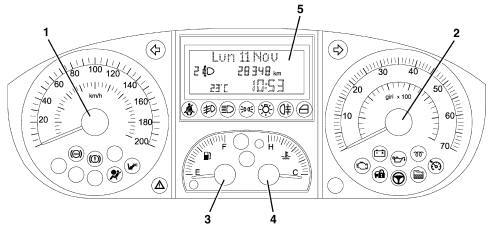
1 - speedometer
2 - rev counter
3 - fuel level gauge (with reserve warning light)
4 - engine coolant temperature gauge (with overheating warning light)
5 - multifunction display
Composition
It is a TN (Negative Transmission) technology control panel connected to the CAN and includes the indicators and stepping motors for:
- Electronic speedometer
- Electronic rev counter
- Fuel gauge (with insufficient level warning light)
- Engine coolant temperature gauge (with overheating warning light)
There are 28 warning lights with negative contrast LEDs.
The buzzer can manage signals of different intensity for the following functions:
- Alarm / warning / danger signals;
- 'Roger beep' when certain keys are pressed.
There is a three line alphanumerical display in the centre.
The top line with a 14 character dot matrix (7x5) for the display of:
- Date
- Trip Computer data
- Set-up menu with relevant messages for settings/adjustments;
- Activation messages for functions, service, failures or warnings;
The two lower segment lines for the display of:
- Total mileage;
- Clock;
- Outside temperature and ice warning symbol;
- Headlamp alignment corrector reading;
- Service symbol (spanner)
- City warning light
MODAL Control Panel
View of assembly
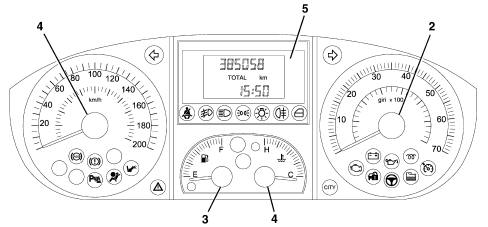
1 - speedometer
2 - rev counter
3 - fuel level gauge (with reserve warning light)
4 - engine coolant temperature gauge (with overheating warning light)
5 - multifunction display
Components
It is a TN (Negative Transmission) technology control panel connected to the CAN and includes the indicators and stepping motors for:
- Electronic speedometer
- Electronic rev counter
- Fuel gauge (with insufficient warning light)
- Engine coolant temperature gauge (with overheating warning light)
There are 30 warning lights with negative contrast LEDs.
The buzzer can manage signals of different intensity for the following functions:
- Alarm / warning / danger signals;
- Door/Boot/Bonnet open with vehicle in motion;
- Handbrake pulled with vehicle in motion;
- Seat belts unfastened;
- Parking sensor
- Speed limit
- Danger of ice
- Fuel reserve
- Limited range (Trip Computer);
- Roger Beep upon key depression
A TN, three line, alphanumerical display is located in the centre; the top line displays the total and trip mileage; the lower line displays the following:
- Clock;
- Headlamp alignment corrector reading;
- Trip Computer data symbol
Components
The control panel cannot be disassembled. It may only be removed and refitted to the vehicle.
battery disconnection. If the power is cut (vehicle battery disconnected), the instrument panel stores input signals and must not be initialised. Trip counter and clock information may be lost but customisation and total mileage information will be retained. When the power is restored, the gauges will be returned to the beginning of their scales.
PANEL REPLACEMENT. Some CAN network nodes, including the instrument panel, are programmed with default settings that the customer will find upon purchasing the vehicle. If the panel is replaced, Parts sends a blank component: once this is fitted: it must receive al the data stored in the Body Computer. This is done by performing the PROXY ALIGNMENT procedure by means of Examiner.
Warning lights in the instrument panel.
The warning lights in the instrument panel is illustrated below.
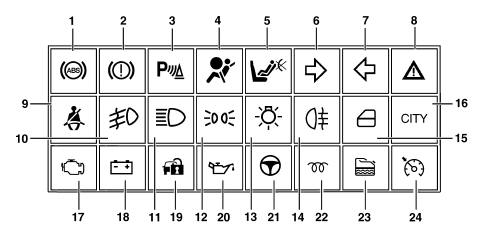
1 - ABS failure
2 - Handbrake or insufficient brake fluid level, EBD failure
3 - Parking sensors failure
4 - Air Bag failure
5 - Passenger Air Bag disabled
6 - Right direction indicator
7 - Left direction indicator
8 - General failure
9 - Seat belt not fastened
10 - Fog lights
11 - Main beam headlamps
12 - Side lights
13 - Exterior lights failure
14 - Rear fog lamps
15 - Doors not properly shut
16 - CITY function
17 - EOBD
18 - Recharging
18 - Fuel level warning light
19 - Vehicle protection system
20 - Engine oil pressure
21 - Electric steering fault
22 - Heater plugs (diesel)
23 - Water in fuel filter (diesel)
24 - Cruise Control
Rear view of instrument panel
The rear view of the instrument panel with the dual connection is illustrated below
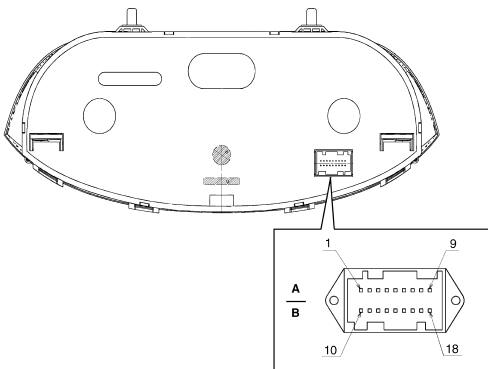
Rear view of instrument panel
A/B connector pin out
| Pin | Signal |
|---|---|
| 1 | Earth |
| 2 | Direct supply |
| 3 | Supply controlled by the ignition |
| 4 | N.C. |
| 5 | B-CAN A |
| 6 | B-CAN B |
| 7 | Headlamp correction actuators signal |
| 8 | Low beam signal for headlamp alignment control |
| 9 | Button signal for Trip Computer from steering column switch unit |
| 10 | Dimmed signal for lighting led |
| 11 | N.C. |
| 12 | N.C. |
| 13 | 'Mode' and 'Mode +' control signal from control panel |
| 14 | Headlamp alignment corrector signal from control panel |
| 15 | N.C. |
| 16 | 'Mode - ' control signal from control panel |
| 17 | N.C. |
| 18 | EOBD fault warning light |
Display at key on
At every key on the check stage for all the electronic control units on board the vehicle begins with several of the warning lights in the panel coming on; the display also shows the 'check in progress' message.
The following warning lights are checked during the check stage at the key on:
- Fuel reserve
- Radiator coolant overheating
- Cruise Control on
- ABS failure
- Insufficient brake fluid level
- Electric steering fault
- Water in diesel filter
If the check stage is completed and the outcome is positive, the 'Check OK message appears after the engine is started up.
If the check stage detects problems, they are displayed.
The display remains off at the key off with the front doors closed: if at least one of the front doors is opened at the key off, the display will show the clock and the mileage counter.
The standard screen appears at the end of the check stage.
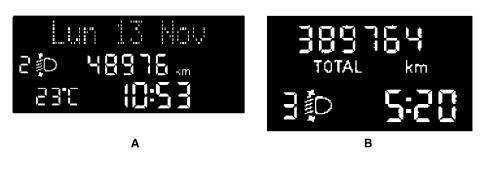
A - COMFORT type control panel
B - MODAL type control panel
Display at key on
The standard display is present as long as no function requiring display output is active.
Access to MENU screen
The control panel to the left of the steering wheel contains all the buttons for the set up: pressing the 'MODE button activates the MENU ambient. Use the '+' and '-' buttons to navigate inside the MENU and press the MODE button again to confirm a selection. At this point it is possible to display the menu items in two ways: with the vehicle moving and with the vehicle stationary.
If no operation is carried out for a certain length of time, the standard screen is restored.
Several set up MENU functions can only be activated with the vehicle stationary.: for safety reasons, with the vehicle moving, only a short set up menu is available: speed limit and dusk sensor sensitivity settings
Access to MENU screen
COMFORT Control Panel
Activation/deactication of automatic locking of 5 doors above 20 km/h
Activation/deactivation of front (driver's) door unlocking
Activation/deactivation of boot unlocking together with unlocking of all the doors
Adjustment of lock and 12h/24h mode
Date adjustment
Display of service interval (km/miles/days)
Speed: selection and setting of speed limit
Buzzer volume for alarms / failures / warnings
Unit of measurement setting (distance, consumption, temperature)
Setting the
Dusk sensor sensitivity (where fitted)
Trip 'B
Display and screen dimming
- Buzzer volume for key depression (Roger beep)
Access to MENU screen
MODAL Control Panel
clock: adjustment of hours/minutes with 'Hour' in place of milometer

Access to MENU screen
Adjustment of buzzer: from 0 (mute) to 4 (max. vol ) with word 'buzz' in place of milometer
Speed limit: 'SPEED in place of milometer, 'km/h' or 'mph', 'OFF or speed limit in place of clock, 'km' or 'miles' unit of measurement setting: 'Unit' in place of milometer.
Access to MENU screen
In nightime lighting conditions, the graphics for the symbols is reversed (graphics lit up on an opaque background).
In daytime lighting conditions, the graphics for the symbols are reversed (light characters on a dark background).
The transparent pointers allow the the reflection of light. The warning lights are back-lit by the LED with direct lighting of the surface involved and a negative display (lighting of the ideogram only).
If there are failure messages, the brightness of the display is automatically set at the maximum daytime value.
Even in the presence of the '+ lights' condition.
The colour of the display does not change when the reading angle of the display is altered.
Dimmed lighting
COMFORT Control Panel
The comfort version allows the driver to adjust the brightness of the display and the control panel, as well as the controls, radio, climate control etc. by pressing the 'Mode +' and 'Mode -' buttons;
The adjustment of the brightness is shown on the display by the 'Lighting' message and the switching on/off the brightness adjustment symbols..

Dimmed lighting
The display lighting is not adjusted during the signalling of faults/warnings.
If the side lights are deactivated, the display is lit at 100% and the brightness cannot be adjusted.
The warning lights cannot be adjusted/dimmed.
Dimmed lighting
MODAL Control Panel
When the exterior lights are activated, the brightness of the display is automatically dimmed to a preset value.
Dimmed lighting
The system calculates the actual speed of the vehicle starting with the values supplied by sensors on the two drive wheels and the circumference of the wheels, provided by the on board computer.
The speedometer reading is produced using the stepping motor at the key on and the pointer moves in a linear fashion to 0 (zero) km/h (or mph)
The actual vehicle speed reading is also supplied if one or both of the drive wheel sensors is broken.
If the vehicle speed sensor is faulty, the instrument panel places the pointer in the rest area (before the reading 0 (zero) km/h).
Rev counter
The operation of the electronic rev counter is achieved through a microprocesser, with the engine rpm reading produced through a stepping motor, with guaranteed precision and continuity for the entire scale in the operating limit conditions.
At the key on, the pointer moves in a linear fashion to 0 (zero) rpm and the instrument panel receives the engine speed information.
Milometer
On starting, the milometer displays the total or trip km (miles), memorized at the previous key off.
The trip meter is zeroed by pressing the SET button on the steering column switch unit for more than 2 secs. - The menu in the instrument panel can be used to change the distance unit of measurement (km or miles).
The display is interrupted at the key off, except when the front doors are opened/closed.
Resetting mileage
The total mileage counter can be reset only once - during the first 200 km - following handling during production or prior to delivery to the Customer.
In the case of a new instrument, the mileage reading is preceded by an 'H (e.g. 'H00199'). After 200 km, the letter H disappears automatically and the reading becomes '000201'.
The reading can also be zeroed if, before 200 km, the SET button for the steering column switch unit is pressed until the letter H appears and the counting starts again from '000000'.
This operation can only be carried out once
Fuel level gauge
The electronic controls are operated by means of a microprocessr; the fuel level reading is the analogue type, using a stepping motor
The fuel level is measured by means of a sensor located in the tank and is processed by a microprocessor interface which tranforms it into a tank percentage value and passes this on to the Body Computer.
The circuit is capable of detecting a fault in the wiring or in the sensor and providing a suitable reading for the instrument panel (via the CAN).
The system detects a system malfunction and activates a failure signalling procedure: the pointer is positioned at the beginning of the scale and the reserve warning light flashes.
The system ensures that there are no fluctuations/incorrect readings for the fuel level due to the fuel splashing around in the tank.
The switching on/off the fuel reserve warning light in the instrument panel is controlled by the Body Computer: the reading for the start of the 'fuel reserve' is red and the warning light has an amber LED on the indicator graphics.
The 'fuel reserve' reading is also signalled by a buzzer.
Engine coolant temperature gauge
The electronic control of the engine coolant temperature gauge is achieved through a microprocessor with the reading (activated at the key on) achieved with precision through a stepping motor with the 'danger zone' in red.
The temperature reading is always guaranteed, even in limit operating conditions.
At every key on, the coolant overheating warning light is controlled by a continuous control signal by means of the dedicated red warning light.
At temperatures of around 120 °C the coolant overheating warning light comes on and the pointer is in the end of scale position at the same time.
If the engine coolant temperature sensor is faulty, the indicator is placed in the rest position by the instrument panel at the key off.
TRIP COMPUTER
The Trip Computer allows the display of certain information in the control panel relating to the journey and distance, measured using a distance sensor ('milometer').
The Trip Computer information is transmitted via the CAN.
The information displayed is expressed in accordance with the Metric Decimal System or the Imperial System, as selected by the drivery (set up menu).
The Trip Computer information can be zeroed manually by the driver, by pressing the 'SET button for a while.
Two trip types are present:
- GENERAL TRIP (always activated)
- TRIP B (that can be activated / deactivated from the menu)
The TRIP B ambient is found (when activated) inside the GENERAL TRIP.
The data display mode follows a preset order: (GENERAL TRIP)
- Distance travelled [km] or [miles]: this indicates the distance travelled by the vehicle from the 'start of the mission', i.e. from when the user reset the function. The reading should be consistent with the total mileage display. The display is updated every 0.1 km
- Instant consumption [l/100 km] or [mpg]: this indicates the value of litres of fuel consumed for the distance travelled. This allows the driver to appreciate the differences in fuel consumption due to driving styles.
- Average consumption [l/100km] or [mpg]: this is the ratio between the distance travelled since the start of the mission and the number of litres consumed since the start of the mission. The display is updated every 10 seconds.
- Range [km] or [miles]: this indicates the estimated distance (in km or miles) that can be covered with the fuel currently contained in the tank and assuming that the mission will continue in the same driving style.
When the calculated range value is equal to that of the fuel reserve, the display shows a 'Limited Range' message and a buzzer sounds.

TRIP COMPUTER
Average speed [km/h] or [mph]: this is calculated at the start of the mission, as a ratio between the journey distance and the journey time. If the driver zeros the Trip Computer, the display will show '----'. The display is updated every 10 seconds with an accuracy of around 0.1 km/h.
Journey time [hh:mm]: this indicates the time elapsed since the start of the mission between 0:00 and 99:59, with a resolution and updating of 1 minute. When the maximum possible value is reached, the counting is automatically zeroed.
The following parameters can be displayed in the Trip B mode:
- Journey distance - B
- Average consumption - B
- Average speed - B
- Journey time - B
SERVICE function
When the next service is nearly due, the message 'Service due in' followed by the number of kilometres (or miles) or days until the next service is due is automatically displayed at the key-on (after the initial check procedure).
The service information can also be shown on the display, if requested by the driver, by selecting the appropriate item in the set-up menu, irrespective of the intervals: the display will show either the kilometres (or miles) or the days left.
The Planned Maintenance Programme includes 9 services with the following intervals:
- within 20000 km (or 12000 miles) from the last one
- within 1 year of the last one
The first message is only displayed once at the key-on if one of the following two conditions occurs:
- the mileage (km or miles) until the service is equal to 2000 km (1240 miles)
- the number of days until the next service = 30 days
Later on, the message is only displayed once at the key on at the following intervals:
- 1800, 1600, 1400, 1200, 1000, 800, 600, 400, 200, 100, 50 km
- 27, 24, 21, 18, 15, 12, 9, 6, 3 days and is no longer displayed in the intervening period.
The display can be interrupted by the driver pressing the 'Mode' button.
Once an expiry limit is reached (0 km or 0 days), the Service Overdue message is displayed.
At each service, the service personnel zero the mileage and days counter and enter the service readings in the Trip Computer memory (date, service no. total mileage), which can only be read using the diagnostic equipment.
this memorized data is preserved even if the vehicle battery is disconnected.
Acoustic indicator
Some functions and warnings are notified via an acoustic signal. This function (buzzer) is performed by means of a piezoelectric acoustic signal.
The buzzer indicates the onset of the following situations by means of a specific procedure:
- Alarm / warning / danger signals;
- Door/Boot/Bonnet open with vehicle in motion;
- Handbrake pulled with vehicle in motion;;
- Seat belts unfastened;
- Parking sensor
- Speed limit
- Danger of ice
- Fuel reserve
- Limited range (Trip Computer);
- Roger Beep upon key depression
The instrument panel buzzer also manages the horns at the impulses requested by the parking sensor control unit Characteristic of working principle 5580H parking obstacle detection device
Warning lights and signals
Some of the warning light LEDs are tested: LED function is tested throughout the period. The following warning lights are tested: ABS, handbrake, ESP, electric steering failure, driver and passenger airbag.
EOBD warning light (both for and JTD engine)
The AMBER warning light is activated by the engine control unit for about 4 seconds (check) at the Key On.
The EOBD (European On Board Diagnosis) system carries out continuous diagnosis of the car's petrol fuel system components relating to emissions and indicates any deterioration of these components by the warning light in the instrument panel coming on.
The aim of the system is:
- keeping the efficiency of the system under control;
- signalling an increase in emissions due to a vehicle malfunction;
- signalling the need to replace deteriorated components.
Prompt repair of the problem which has caused the warning light to come on is vital in accordance with the legal requirements of the traffic regulations of the country in question.
Seatbelt unfastened signal
The seat belt warning light indicates seatbelt unfastened status (driver side) by coming in fixed mode from key-on.
The panel warning light begins to flash and the buzzer sounds intermittently when one of the following situations arises:
Time elapsed of 60s and vehicle speed greater than 10 km/h
Vehicle speed greater than 25 km/h
Distance travelled greater than 500 m
Danger/warning indication: 'Doors open'
To notify the driver that one or more doors are open, the display shows a message corresponding to door and boot status as soon as they are open.: the panel warning light stays on until all the doors and the boot are properly closed.
in addition, if this signal is associated with a particular speed threshold being surpassed, an acoustic signal is activated.
Display of the outside temperature
COMFORT Control Panel
The outdoor temperature reading is shown on a standard screen. It is possible to select the measurement unit from the setup menu: degrees centrigrate '°C or degrees Fahrenheit '°F
Danger/warning signal: 'Ice'
In order to warn the driver of the possible presence of ice on the road, if the outside temperature measured is less than or equal to 3 °C, the Comfort control panel displays:
- an 'Ice danger' warning message with icon (snowflake symbol)
- flashing temperature reading
- this situation is also signalled through the buzzer.
Danger/warning signal: 'Ice'
When vehicle malfunctions arise, the display shows:
- a fault warning light (if present)
- a message corresponding to the fault description
- a 'Go to service centre' (spanner) symbol or messages indicating actions to be performed by the driver
A buzzer also sounds in synchrony with the display that lights up with maximum brightness.
when a problem occurs, all the information contained in the area of the display dedicated to the display of messages is replaced with information relating to the problem.
The faults are displayed according to the priorities assigned to them:
- very serious fault: message cycle repeated infinitely, interrupting any other previous display, also reproposed at the key on until the cause of the malfunction is solved.
- serious or less serious faults: message cycle very 20 seconds, reproposed at each key on until the cause of the malfunction is solved.
- faults that require checking with the engine on: this invoves 'Insufficient alternator recharging warning light', 'Minimum engine oil pressure', 'EOBD failure' signals
In each case, the display can be interrupted by the driver pressing the 'Mode' button.
If there are faults present simultaneously, the display will show each of the messages/ideograms for 5 seconds in rolling mode.
Parts & tools for this job For 2003 Fiat Idea
- TOOLDigital multimeterSearch: automotive digital multimeter
- PARTAssorted fuse kitSearch: car fuse assortment kit
- TOOLWire crimper and connector kitSearch: wire crimper connector kit
Links open Amazon search results in a new tab. As an Amazon Associate I earn from qualifying purchases.