
Multi-function components
- Make
- Fiat
- Model
- Stilo Factory Service Manual
- Year
- 2001–2007
- Section
- Electrical circuit for instruments/indicators › Multi-function components
Multi-function components
SPECIFICATIONS
The BODY COMPUTER NODE manages some of the vehicle's electrical system functions.
The NBC is housed under the dashboard near the steering column, in a central position in relation to the functions that it manages.
The Body Computer Node (NBC) together with the Dashboard Control Unit (CPL) form the DASHBOARD NODE (NPL) where the former (NBC) constitutes the electronic section and the latter (CPL) the electro-mechanical section.
The fuses and relays are fitted on the CPL, whilst the NBC houses the EOBD fixed connector used for the fault diagnosis via the K lines of the NCM, NFR, NCR and CAB.
This is connector is also prepared for the dialogue with the B - CAN and C - CAN networks which can be used for both fault diagnosis and for possible on line programming.
BODY COMPUTER NODE GENERAL FUNCTIONS
The NBC peforms the following functions:
- It receives and sends information on the B - CAN network (e.g.: fault diagnosis, warning lights, commands, data)
- It receives and sends information on the C - CAN network
- It interconnects with the dashboard, front and rear wiring
- It allows an interface for the fault diagnosis (EOBD)
- It connects to the CPL to take power supplies / signals and operate relays.
We find the following functions:
- management of the centre front courtesy light (20W) with timed switching off and dimming
- management of the two spot lights (10W) with timed switching off and dimming
- management of on/off exits at relay: headlamp washer pump, main beam headlamps, fog lights, dipped headlamps, services, heated rear windscreen
- on/off management of relay during right/left direction indicators or hazard warning lights for acoustic feedback
- management of on/off exits directly at loads and diagnostic function: front side lights (left and right), rear side lights (left and right), front direction indicators (left and right), rear direction indicators (left and right), side direction indicators (left and right), no. plate lights (left and right), brake lights (left and right), rear fog lamps (left and right);
- management of on/off exits directly at loads: heated rear windscreen LED, hazard warning lights LED, management of the sun roof;
- repetition of the vehicle speed signal
- management of the ideogram light (15W) driver
- management of the SBMT (35W) driver
- management of the recovery serial line to the engine management control unit (immobilizer)
- management of the serial line to the volumetric sensors, siren, anti-tilt, rain sensor, dusk sensor, steering column switch unit, tyre pressure control unit.
- master for the entire system: management of the IFRs at the slave nodes under direct jurisdiction and monitoring of the IFRs by the other master nodes, monitoring and management of protocol errors, timer control;
- fault diagnosis of the entire system: collection of diagnostic information, management of the fault diagnosis using the Fiat Lancia Tester
- anti-theft: management of the remote control receiver (RF) (excluding NBC192-FULL version), connection with volumetric sensors, the siren and the anti-tilt
- immobilizer: management of the key code with possible engine immobilizing
- acquisition of on/off signals: dipped headlamp operation, main beam headlamp operation, boot lock opening control, boot locking function, handbrake control, hazard warning lights control, left and right rear fog lamps control, fog lights relay feed, left direction indicators control, right direction indicators control, parking lights control, side lights control, city control, steering column switch unit auto control, headlamp washer control, FIS control, boot button, bonnet button, front brake pad wear (left and right), brake fluid level, reverse gear engaged;
- acquisition of analogue signals: fuel level, alternator voltage (D+), battery voltage, brake lights fuse status recognition, centre courtesy light control, left and right spot lights control, brake lights control
- acquisition of vehicle speed signal
- acquisition of lock sensors from door.
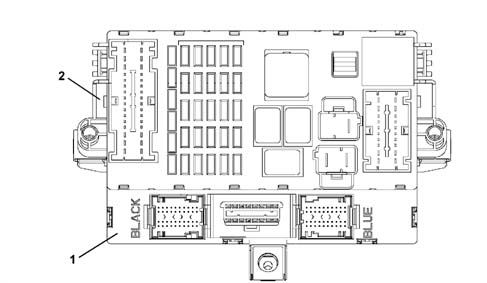
1 - Body Computer Node (NBC)
2 - Dashboard Control Unit (CPL)
NBC+CPL = NPL
BODY COMPUTER NODE GENERAL FUNCTIONS
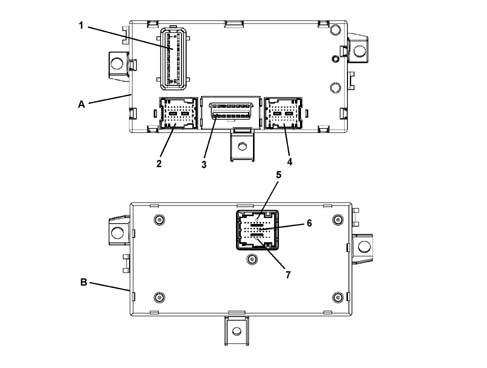
A - Body Computer Node (NBC) front view
B - Body Computer Node (NBC) rear view
1 - Connector M01F 20 PIN
2 - Connector M01E 40 PIN
3 - Connector M01G EOBD diagnostic socket
4 - Connector M01A 40 PIN
5 - Connector M01B
6 - Connector M01C
7 - Connector M01D
BODY COMPUTER NODE NBC PIN OUT
M01F connector (20 way)
| Conn. | Pin | Function |
|---|---|---|
| M01F | 1 | +30 from F-38 for boot release geared motor |
| M01F | 2 | Button on brake pedal status input |
| M01F | 3 | Button for switching on reversing lights status input (connection with M01A 1) |
| M01F | 4 | Not available |
| M01F | 5 | Low speed CAN line (connection with M01G 6, M01D 6, M01A 27, M01C 24) |
| M01F | 6 | Heated rear windscreen relay control output |
| M01F | 7 | Low speed CAN line (connection with M01G 14, M01D 5, M01A 26, M01C 25) |
| M01F | 8 | Dipped headlamp relay control output |
| M01F | 9 | Track from fuse F51 and ignition lock position status input (connection with M01F 15) |
| M01F | 10 | Preparation for boot lock |
| M01F | 11. | Boot release geared motor control |
| M01F | 12. | Lock position input on parking condition |
| M01F | 13 | INT from F-37 for NQS, CPS, CPD and brake lights fuse status input (connection with M01B 31, M01A 10) |
| M01F | 14 | Additional service relay control output |
| M01F | 15 | Track from fuse F51 and ignition lock position status input (connection with M01F 9) |
| M01F | 16 | Not available |
| M01F | 17 | Track towards CPL wiring (+12V) for front, rear courtesy light, NCL siren, CAV, diagnostic socket (connection with M01A 11, M01A 34, M01C 26, M01G 16, M01E 27, M01E 39) |
| M01F | 18 | Power supply for body |
| M01F | 19 | Dedicated power supply for direction indicators and hazard warning lights (connection with M01D 3) |
| M01F | 20 | Dedicated earth for release geared motor (preparation) |
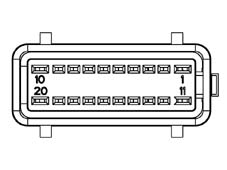
BODY COMPUTER NODE NBC PIN OUT
Connector M01E (40 way) black
| Conn. | Pin | Function |
|---|---|---|
| M01E | 1 | Driver's door open status input for NCR (connection with M01E 8) |
| M01E | 2 | Not available |
| M01E | 3 | Right rear direction indicator control output (21W) |
| M01E | 4 | Fuel level input |
| M01E | 5 | Left rear side light control output (5W) |
| M01E | 6 | Right rear side light control output (5W) |
| M01E | 7 | A-bus serial line for anti-theft (connection with M01A 25) |
| M01E | 8 | Input signal from normally open switch signalling driver's front door open (connection with M01E 1) |
| M01E | 9 | Left no. plate light control output |
| M01E | 10 | Sun roof control unit output |
| M01E | 11. | Not available |
| M01E | 12 | Left rear direction indicator control output (21W) |
| M01E | 13 | Not available |
| M01E | 14 | Hanbrake lever button status input |
| M01E | 15 | Fuel level input |
| M01E | 16 | Left rear door open status input |
| M01E | 17 | F.I.S. signal input |
| M01E | 18 | Serial line for CPP (connection with M01G 13) |
| M01E | 19 | Signal coming from city button in dashboard |
| M01E | 20 | Right rear fog lamp control output |
| M01E | 21 | Centre courtesy light control output |
| M01E | 22 | Right brake light control output |
| M01E | 23 | Interior lights control output (luggage compartment) (connection with M01E 33, M01C 15, M01C 16) |
| M01E | 24 | Signal from boot lock catch (locking enablement) |
| M01E | 25 | Input signal from normally open switch signalling front passenger door open (connection with M01E 11) |
| M01E | 26 | Input signal from normally open switch signalling right rear door open |
| M01E | 27 | Track towards CPL wiring (+12V) from F39 for front/rear courtesy light (connection with M01F 17) |
| M01E | 28 | Analogue input for switching on left/right spot light and excluding front/rear courtesy light in centre courtesy light |
| M01E | 29 | Not available |
| M01E | 30 | Left spot light control in centre front courtesy light |
| M01E | 31 | Left rear fog lamp control output |
| M01E | 32 | Left brake light control output |
| M01E | 33 | Passenger compartment interior lights control output (left and right) (connection with M01E 23, M01C 15. M01C 16) |
| M01E | 34 | Signal from boot lock catch (release enablement) |
| M01E | 35 | Signal from opening switch on boot handle |
| M01E | 36 | Signal from normally open switch signalling boot open |
| M01E | 37 | Right spot light in centre front courtesy light control output |
| M01E | 38 | Right no. plate light control output |
| M01E | 39 | Track towards CPL wiring (+12V) for CAV (connection with M01F 17) |
| M01E | 40 | Internal serigraphy lighting control output (connection with M01C 18) |
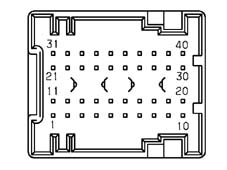
BODY COMPUTER NODE NBC PIN OUT
Connector M01G for EOBD diagnostic socket (16 way)
| Conn. | Pin | Function |
|---|---|---|
| M01G | 1 | Serial line for NFR (connection with M01A 16) |
| M01G | 2 | Not available |
| M01G | 3 | Serial line for Air Bag CAB (connection with M01C 12) |
| M01G | 4 | Power earth (connection with M01D 9) |
| M01G | 5 | Signal earth (connection with M01D 8) |
| M01G | 6 | Low speed CAN line for fault diagnosis (connection with M01F 5, M01A 27, M01D 6, M01C 24) |
| M01G | 7 | Serial line for NCM/NCA fault diagnosis (connection with M01A 20) |
| M01G | 8 | Not available |
| M01G | 9 | Serial line for NGE (connection with M01C 11) |
| M01G | 10 | Not available |
| M01G | 11 | Not available |
| M01G | 12 | Serial line (connection with M01A 35) |
| M01G | 13 | Serial line (connection with M01E 18) |
| M01G | 14 | Low speed CAN line (connection with M01F 7, M01A 26, M01D 5, M01C 25) |
| M01G | 15 | Not available |
| M01G | 16 | Track towards CPL wiring (+12V) for +30 diagnostic socket (connection with M01F 17) |
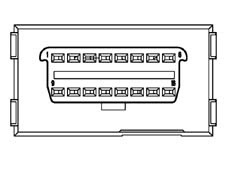
BODY COMPUTER NODE NBC PIN OUT
Connector M01A blue
| Conn. | Pin | Function |
|---|---|---|
| M01A | 1 | Button for switching on reversing lights status input (connection with M01F 3) |
| M01A | 2 | Left side direction indicator control output (5W) (connection with M01E 2) |
| M01A | 3 | Not available |
| M01A | 4 | Immobilizer aerial |
| M01A | 5 | Immobilizer aerial |
| M01A | 6 | Not available |
| M01A | 7 | Speedometer input from NFR (connection with M01A 17) |
| M01A | 8 | Output for fog lights relay control (M01C 22) |
| M01A | 9 | Output for main beam headlamps control |
| M01A | 10 | Brake lights fuse status input and track towards CPL wiring (connection with M01F 13) |
| M01A | 11 | Track towards CPL wiring (+12V) (connection with M01F 17) |
| M01A | 12 | Not available |
| M01A | 13 | Headlamp washer request wish-wash signal input |
| M01A | 14 | Headlamp washer relay control output |
| M01A | 15 | Speedometer input signal earth for gearbox (connection with M01D 8) |
| M01A | 16 | Brake node line K (track) (connection with M01G 1) |
| M01A | 17 | Speedometer signal input coming from robotized gearbox (connection with M01A 7) |
| M01A | 18 | Normally closed braking system low fluid level status input |
| M01A | 19 | Battery recharging warning from alternator D+ input |
| M01A | 20 | Line K for NCM, NCA/NCR fault diagnosis (connection with M01G 7) |
| M01A | 21 | RF receiver aerial earth |
| M01A | 22 | Right side direction indicator control output (5W) (connection with M01E 13) |
| M01A | 23 | Brake pad wear state input |
| M01A | 24 | Normally closed bonnet opening button status input |
| M01A | 25 | A-bus serial line for anti-theft (connection with M01E 7) |
| M01A | 26 | Low speed CAN line (connection with M01F 7, M01G 14, M01D 5, M01C 25) |
| M01A | 27 | Low speed CAN line (connection with M01F 5, M01G 6, M01D 6, M01C 24) |
| M01A | 28 | Speedometer repeater output for CPS |
| M01A | 29 | IN/OUT recovery serial for NCM in case of break in C-CAN line |
| M01A | 30 | Right front side light control output (5W) |
| M01A | 31 | RF receiver aerial |
| M01A | 32 | High speed CAN line to NAS (connection with M01A 36) |
| M01A | 33 | High speed CAN line to NAS (connection with M01A 37) |
| M01A | 34 | Track towrds CPL wiring (+12V) for anti-theft alarm supply (connection with M01F 17) |
| M01A | 35 | Serial line for NAC, CPS, CPD (connection with M01G 12) |
| M01A | 36 | High speed CAN line to NCM (connection with M01A 32, M01G 10) |
| M01A | 37 | High speed CAN line to NCM (connection with M01A 33, M01G 2) |
| M01A | 38 | Left front direction indicator control output (21W) |
| M01A | 39 | Right front direction indicator control output (21W) |
| M01A | 40 | Left front side light control output (5W) |
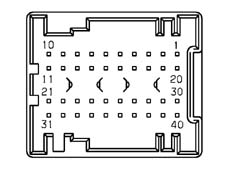
BODY COMPUTER NODE NBC PIN OUT
Connector M01D M01C M01B (9+18+9 way)
| Conn. | Pin | Function |
|---|---|---|
| M01D | 1 | Fog lights on button status input (connection with M01C 20) |
| M01D | 2 | Steering column switch unit exterior lights auto mode activation signal |
| M01D | 3 | Dedicated power supply for direction indicators driver and NQS serigraphy (connection with M01F 19) |
| M01D | 4 | Dipped headlamps switch status input |
| M01D | 5 | Low speed CAN line from NQS (connection with M01F 7, M01A 26, M01G 14, M01C 25) |
| M01D | 6 | Low speed CAN line from NQS (connection with M01F 5, M01A 27, M01G 6, M01C 24) |
| M01D | 7 | Right parking light/direction indicators control input |
| M01D | 8 | Signal earth (connection with M01B 36, M01C 19, M01G 5, M01A 15, M01A 3) |
| M01D | 9 | Power earth (connection with M01G 4, M01C 10) |
| M01C | 10 | Not available |
| M01C | 11 | Serial line for NGE (connection with M01G 9) |
| M01C | 12 | Serial line for CAB (connection with M01G 3) |
| M01C | 13 | Not available |
| M01C | 14 | Not available |
| M01C | 15 | Not available |
| M01C | 16 | Passenger compartment interior lights control output (glove compartment light) (connection with M01E 23, M01E 33, M01C 15) |
| M01C | 17 | Parking lights signal (for easy go and key-less go versions) |
| M01C | 18 | Dashboard interior serigraphy lighting control output (connection with M01E 40) |
| M01C | 19 | Earth signal (connection with M01D 8) |
| M01C | 20 | Not available |
| M01C | 21 | Heated rear windscreen LED control output |
| M01C | 22 | Not available |
| M01C | 23 | Speedometer repeater for CTA output (connection with M01A 28) |
| M01C | 24 | Low speed CAN line for NCL, NVO, NBS (connection with M01F 5, M01A 27, M01G 6, M01D 6) |
| M01C | 25 | Low speed CAN line for NCL, NVO, NBS (connection with M01F 7, M01A 26, M01G 14, M01D 5) |
| M01C | 26 | Track towards CPL wiring (+12V) for CPP (connection with M01F 17) |
| M01C | 27 | Crank stage fault diagnosis input: loads with heavy absorption disconnected |
| M01B | 28 | Side lights switch status input |
| M01B | 29 | Hazard warning lights LED control output |
| M01B | 30 | Left direction indicators/parking light control input |
| M01B | 31 | Track from F37 and brake lights fuse status diagnosis (connection with M01F 13) |
| M01B | 32 | Heated rear windscreen button status input |
| M01B | 33 | Main beam headlamps switch status signal |
| M01B | 34 | Hazard warning lights switch status input |
| M01B | 35 | Rear fog lamp button status input |
| M01B | 36 | Earth signal (connection with M01D 8) |
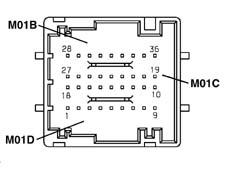
Central locking
The central locking system manages the locking of the doors and the boot in order to protect the passenger compartment from entry / access by non authorized persons.
The mechanical key can be extracted from the
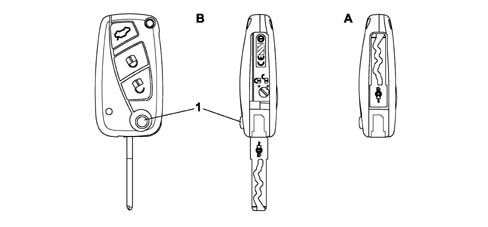
A - Key closed
B - Key extracted
1 - Key extraction button
Central locking
The catches in the driver and passenger doors (fitted in the handle) make it possible to lock and unlock the doors using the mechanical key.
If the vehicle is fitted with remote control and mechanical safety knobs in the doors, then the passenger door catch may no longer be fitted.
There is a red LED located at the side of the driver's door safety knob which signals one or more central locking system actions or states.
There is a catch in the boot which allows the boot lid to be released using the key in order to open it.
The boot can be opened through the boot handle acting on an electrical contact.
There are 2 buttons and the driver's door trim which make it possible to operate the central locking and unlocking of the locks from the inside.
There is also a DEAD-LOCK function on the FIAT STILO.
LOCKING THE LOCKS FROM THE OUTSIDE
The door locks can be centrally locked by inserting the mechanical key in one of the catches (driver's door or passenger door) and turning it.
The locking is confirmed by the safety knob located on each door going down.
The rear doors are locked even if they are open: when they are closed they remain locked.
If the vehicle is locked from the outside, the door central locking and unlocking buttons and the boot release located in the passenger compartment are disabled and then re-enabled the next time the vehicle is unlocked.
If the key is turned to lock the vehicle when one of the front doors is open, the lock for that door does not mechanically perform the manoeuvre and it is therefore not possible to lock the door.
LOCKING THE LOCKS FROM THE INSIDE
Pressing the safety knob on one of the doors only locks that particular door, it does not affect the central locking function: when the knob is in the safety position it is level with the door panel.
If the safety knob on the front doors is pressed with one of the doors open, the knob does not mechanically perform the maneouvre and it is therefore not possible to lock the door.
BUTTONS FOR CENTRAL LOCKING AND UNLOCKING OF LOCKS FROM THE INSIDE
There is 1 rocker switch in the passenger compartment, on the driver's door trim, which allows the central locking and unlocking of the locks on all the doors from the inside.
When the locking button is pressed, all the locks are locked (including the boot).
When the unlocking button is pressed, all the locks are unlocked (see paragraph on unlocking the boot).
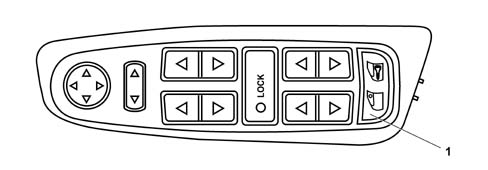
1 - Button for locking/unlocking the doors
DEAD-LOCK ENGAGEMENT MODE
The DEAD-LOCK function is engaged by turning the mechanical key a second time within 1 second of locking the doors (i.e. after having turned the key the first time to lock the doors).
The engagement of the dead-lock is therefore a voluntary action.
The DEAD-LOCK function makes it possible to mechanically disconnect the door interior opening handles and the safety knob so that the door cannot be opened from the inside (e.g. after the glass has been broken in a theft attempt).
Engagement is possible using either of the front door catches.
The engagement of the dead-lock function is signalled to the customer through the red LED at the side of the door safety knob as described later on in the SIGNALLING LED chapter.
If one or more of the doors are not properly shut, the dead-lock cannot be activated.
The function is automatically deactivated for all the doors when the locks are unlocked (even when only the driver's door is unlocked. See chapter on personalization using instrument panel) and at the key on when the transponder is recognized.
The dead-lock function inhibits the door locking / unlocking buttons in the passenger compartment.
If the battery is run down / not working properly or disconnected, the dead-lock function can only be deactivated for doors fitted with catches, using the mechanical key from the outside; the rear doors remain dead-locked.
SIGNALLING LED
Where the dead-lock function is fitted there must be a RED LED at the side of the driver's door safety knob.
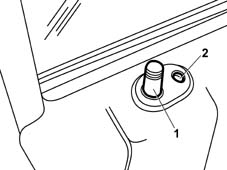
1 - Knob
2 - LED
SIGNALLING LED
The LED gives out the following signals:
- Locking the locks: the LED lights up for 3 seconds. If, when the locks are locked some of the doors or the boot is not properly shut, then the LED will flash at 3 Hz for 3 seconds; it will then move on to the deterrent signal.
- Dead-lock engagement: after the dead-lock has been engaged, the LED will flash twice for 0.5 seconds and then move on to the deterrent signal.
- Deterrent: once the signal that the doors are locked is over, the LED will flash at 0.8 Hz to indicate that the vehicle is locked (deterrent function). The deterrent function is also implemented if one or more of the doors or the boot is not properly closed.
- Unlocking the locks: the LED goes out
On the FIAT STILO it is the NBC which, having received the command to lock the doors, transmits the flashing mode and its duration, through the B - CAN to the NPG and the latter directly manages the flashing of the LED as instructed by the NBC.
UNLOCKING THE LOCKS FROM THE OUTSIDE
The central unlocking of the locks from the outside is achieved by inserting the mechanical key in one of the door catches and turning it. This enables the opening of the doors by pulling the outside handle.
The unlocking is signalled by the raising of the door safety knobs.
UNLOCKING THE DRIVER'S DOOR INDEPENDENTLY
This function can only be activated on vehicles equipped with a high level instrument panel (i.e. with an active matrix display) and/or fitted with CONNECT (NIT).
Using the panel it is possible to set the behaviour of the central locking system, when using the driver's door, as follows:
- central unlocking: when the key is turned all the doors are unlocked simultaneously (including the boot) allowing access to the vehicle from any of the doors.
- unlocking the driver's door: when the key is turned, only the driver's door is unlocked, whilst the other doors and the boot remain locked, preventing acess by non authorized persons.
However, even if the 'unlock driver's door' function is set, the other doors can be unlocked by turning the key a second time within 1 second of unlocking the driver's door or by pressing the central unlocking button on the driver's door trim.
On the other hand, when acting the on the passenger door, all the doors are centrally unlocked.
On vehicles fitted with low level instrument panels (i.e. with an LCD), the setting activated is central locking.
UNLOCKING THE LOCKS FROM THE INSIDE
When the operating the handle on any of the doors from the inside, the door in question is unlocked and, at the same time, opened; if the handle on one of the front doors is operated, the unlocking of the doors is centralized; if, on the other hand, the unlocking of the driver's door is set, operating the latter only unlocks the driver's door with the other doors all remaining locked.
To activate the central unlocking only of the doors, the unlocking button on the driver's door trim must be operated.
UNLOCKING AND OPENING THE BOOT
The boot which is fitted with an electric lock and an electric handle, works like a 5th door; it is automatically centrally unlocked when the doors are unlocked, with the electric handle enabled to open the boot when it is operated: in this way the lock releases the boot and allows it to be raised.
If the 'unlock driver's door' has been requested (high level instrument panel), the boot will not be unlocked.
UNLOCKING THE BOOT INDEPENDENTLY
On vehicles fitted with the high level instrument panel there are 2 different ways for setting the behaviour of the boot:
- Boot subject to the central locking (default setting): the status of the boot follows the status of the doors. With the vehicle locked the boot is locked, with the vehicle unlocked the boot is unlocked.
- Boot indepedent: the boot is always locked and can only be opened using the mechanical key and the boot catch.
On vehicles fitted with the low level instrument panel the setting activated is: boot subject to the central locking.
If there are problems with the electrical power supply to the lock and to the boot handle, the latter can be unlocked and opened mechanically using the mechanical key.
RE-LOCKING THE DOORS AUTOMATICALLY
If, after having unlocked the doors, none of the doors or the boot is opened within 30 seconds, the vehicle is automatically re-locked.
If the dead-lock was engaged before the unlocking, then it is not automatically re-engaged.
CENTRAL LOCKING SYSTEM ADDITIONAL FUNCTIONS
It is possible to close the windows in all the doors and the sun roof when the doors are closed by keeping the key rotated in the closed position.
The windows continue to move as long as the key is rotated.
In the same way it is possible to open the windows and the sun roof by keeping the key rotated in the closed position.
The function which automatically locks the doors and the boot when the vehicle speed exceeds 20 Km/h can be activated using the instrument panel or the Connect. The doors and the boot remain locked when the speed goes below 20 Km/h, preventing access by non authorized persons. The function is not activated in default.
In the case of an impact the locks are automatically unlocked through information from the inertia switch (FIS).
Central locking with radio frequency remote control
The remote control key has 3 buttons which make it possible to operate the central locking system: one button for unlocking the doors, one for locking the vehicle and one for releasing the boot / heated rear windscreen; The key contains a secret code which identifies unequivocably and allows recognition.
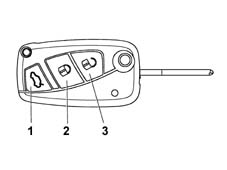
1 - Boot opening button
2 - Door closing button
3 - Door opening button
Central locking with radio frequency remote control
On vehicles equipped with a central locking radio frequency remote control, the display in the high level instrument panel is also used for personalizing the options.
The direction indicators and the LED in the door panel are used to signal that the command has been receieved and/or to signal a manoeuvre which has not been carried out by the system (the signals are activated according to the market).
LOCKING THE DOORS
When the lock button is pressed, the locks are locked centrally.
In addition to the LED at the side of the door safety knob flashing (see Central locking), the manoeuvre is signalled by the direction indicators flashing for 1 second.
If the button is pressed when the vehicle is already locked, the manoeuvre and the signal are carried out anyway.
If one or more of the doors are not properly shut, when the locking command is given the direction indicators flash at 3 Hz for 3 seconds: this advises the user to make sure that the doors are properly shut.
UNLOCKING THE DOORS
When the unlocking button is pressed all the doors are unlocked.
In addition to the signal from the LED, the direction indicators flash twice, for 0.5 seconds, signalling that the command has been received.
If the button is pressed when the vehicle is already unlocked, the manoeuvre and the signal are carried out anyway.
If the 'unlocking driver's door independently' function is activated, when the unlocking button is pressed only the driver's door is unlocked whilst the other doors remain locked.
The other doors can be unlocked by pressing the unlocking button a second time within 1 second of being pressed for the first time.
DEAD-LOCK FUNCTION
The dead-lock function is engaged using the remote control when the doors are locked by pressing the locking button a second time within 1 second of the first time it is pressed.
The normal dead-lock signal is 2 flashes of the direction indicators lasting 0.5 seconds.
It is impossible to get out of the passenger compartment once the dead-lock function has been applied.
OPENING/CLOSING THE BOOT
There is a third button on the remote control which makes it possible to release the boot if the button is pressed for more than 2 seconds: the boot is unlocked and released and slightly raised.
The operation is signalled by the direction indicators flashing twice.
When the boot is closed again it returns to the status prior to opening only giving locking signals if the surveillance alarm is fitted.
ADDITIONAL FUNCTIONS
The windows can be opened and closed and the sun roof can be opened and closed by keeping the locking or unlocking button on the R.R. remote control pressed depending on whether the windows and the sun roof need to be opened or closed. This function is only activated if the 'Safety Device' is fitted on the windows and the sun roof.
Each time the remote control is activated, it sends the Body Computer information on the state of the battery inside it.
If the battery is almost run down, when the doors are unlocked the signalling LED remains on constantly for 60 seconds to notify the customer that the battery needs to be changed: the LED goes out, however, when the ignition is switched ON.
If the vehicle is equipped with a high level instrument panel, at the key on the message 'remote control battery run down' appears on the display (check after the first battery discharged signal how many commands can still be made. - check whether the message is only on high)
LOCKING
The action of locking the locks takes place via the R.F remote control or directly using the mechanical key in the door catch.
If the R.F. remote control is used, as the aerial is connected to the front courtesy light, the latter transmits the command to the NBC.
If, on the other hand, the mechanical key is used in the front door, the catch switches notify the respective door nodes (NPG for the left door and NPP for the right door) and they send the information to the NBC via the CAN network.
At this point the NBC manages the locking of the doors which is always implemente for all the doors, sending the signal via the CAN to the NPG, NPP and NVB nodes (if fitted).
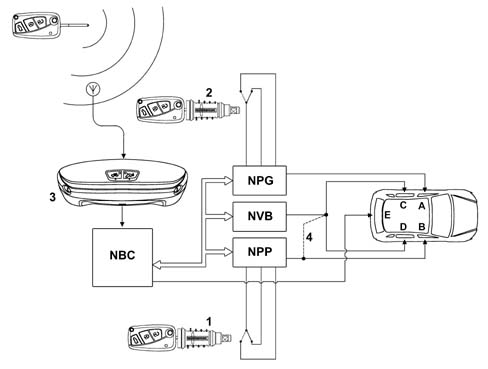
A - Left front door lock
B - Right front door lock
C - Left rear door lock
D - Right rear door lock
E - Boot lock
1 - Right front door catch
2 - Left front door catch
3 - Courtesy light
4 - Connection if NVB is not fitted
LOCKING
According to the locking command sent the NBC updates the locked/unlocked status of the individual doors and then transmits the information to the B - CAN network.
AUTOMATIC LOCKING
The locking of the locks can be activated automatically if the doors or the boot is not opened or the igniton switched on within 30 seconds after the R.F. remote control has been used to unlock the doors.
There are no signals (blinker/LED) for the automatic locking (re-locking) command.
The automatic locking of the doors when a speed of 20 Km/h is exceeded can be enabled or disabled using the setup menu in the NQS. This only takes place after all the doors have been closed and the first time that a speed of 20 Km/h is exceeded; the user can unlock the doors at any time and they will NOT be re-locked even if the speed is above 20 Km/h.
With the doors locked, if the speed goes below this level, the doors will not be automatically unlocked.
UNLOCKING
The unlocking of the locks can be set as follows using the setup menu in the NQS or the CONNECT (NIT) (if fitted):
- central for all the locks
- driver's door only
If the CONNECT is fitted, the central locking setup can only be carried out using the CONNECT commands and not the NQS MODE buttons. This setting is memorized in the NQS which has the task of transmitting it to the B - CAN network.
Functional diagram with Connect
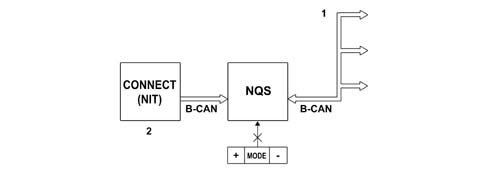
1 - Door unlocking information in B-Can
2 - Door unlocking setting
UNLOCKING
Functional diagram without Connect
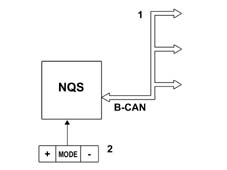
1 - Door unlocking information in B-Can
2 - Door unlocking setting
UNLOCKING
The unlocking action can also take place in this case using the R.F. remote control or the mechanical key in the door catch through the unlocking switch transmitted to the NPG for the left catch and the NPP for the right one, which send the information to the NBC via the CAN network.
At this point the NBC sends the unlocking command to the following nodes via the B - CAN network:
- NPG if the 'driver's door only' option is set
- NPG, NPP and NVB (if fitted) if the central unlocking function is set (default setting)
In the first case only the NPG commands the driver's door lock unlocking motor, whilst the other locks remain locked.
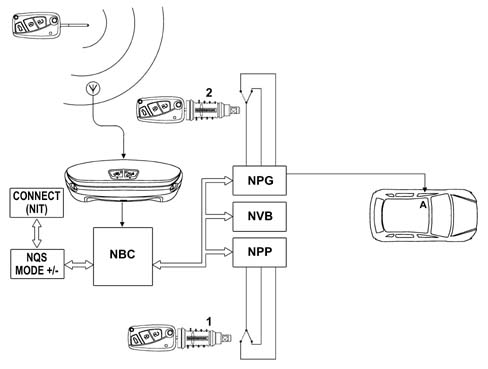
A - Left front door lock
1 - Right front door catch
2 - Left front door catch
UNLOCKING
It should be remembered that within 1 second of the first unlocking action a second unlocking action is carried out and the NBC will command the NPP and the NVB (if fitted) (via the CAN) to unlock the other locks.
In the second case the NPG will unlock the driver's door lock and the NPP will unlock the passenger door lock on 3 door versions.
LOCKING / UNLOCKING 5 DOOR version
On 5 door versions the rear windows are manually (not electrically) operated and the NPP will also command the locking / unlocking of the rear locks (not via the CAN).
If, on the other hand, the rear windows on the vehicle are electrically operated, the NPP will limit the command to the front passenger door lock, whilst the NVB will be fitted and will command the locking / unlocking of the locks for the two rear doors after having received the command from the NBC via the CAN.
CENTRAL LOCKING / UNLOCKING BUTTONS ON DRIVER'S DOOR
When the locking or unlocking button, on the driver's door, is pressed, the NPG will send the information via the B - CAN and request the NBC to centrally lock or unlock the doors.
The NBC will then order the NPG, NPP and NVB nodes (if fitted), via the CAN, to lock or unlock the locks.
Each time it is pressed the NPG will always produce a command, irrespective of whether the door is locked or unlocked.
It should be remembered that if the doors have been locked from the outside (remote contol, catch, Passive Entry, automatic re-locking after time out) and/or the dead-lock is applied, the buttons will be DISABLED.
They will be enabled again after an unlocking command from the remote control, catch, Passive Entry or FIS.
DEAD - LOCK
The NBC acquires the request to activate or de-activate the Dead-Lock (remote control, catches from NPG or NPP) and the state of the doors open switch and transmits the commands to activate or de-activate the dead-lock to the B - CAN network which are implemented by the nodes which operate the dead-lock motors.
Following an unlocking request, the NBC orders the NPG, NPP and NVB nodes (if fitted) to remove the dead-lock from all the doors, irrespective of the setting at the NQS or the CONNECT.
With the dead-lock engaged, the central locking / unlocking buttons on the driver's door trim are disabled.
LOCKING / UNLOCKING THE BOOT
The boot is considered as a door to all intents and purposes and it is managed by the NBC which changes its logic state according to the locking and unlocking commands; the function is the logic type because there are no locking / unlocking activation motors in the boot lid.
In other words, after an unlocking command, the boot lock logic state is in the 'unlocked' state and therefore allows the opening of the boot using the electric handle.
Converserly, after a locking command, the boot lock logic state is in the 'locked' state and does not allow the boot to be opened using the electric handle, but only using the R.F. remote control.
As far as locking is concerned, the boot follows the operation of the doors for central locking.
As far as unlocking, on the other hand, is concerned, there are two possible methods:
- subject to the central locking: in this case the state of the boot follows that of the door locks. In other words, the logic also depends on whether the unlocking of all the doors is enabled or only that of the driver's front door as described below: Driver's door unlocking only activated (the boot does not unlock), Central unlocking activated (the boot unlocks).
- independent: the boot is locked when the doors are locked, whilst it can only be unlocked indepedently of the unlocking of the doors; in other words when the doors are unlocked the boot remains locked.
The boot can then be unlocked using the remote control or opened using the mechanical key in the catch; the two switches in the catch are connected directly to the NBC.
These two settings can be made by the user through the MODE +/- buttons of the NQS or using the CONNECT, but in this case too it will still be the NQS which supplies this information to the B - CAN.
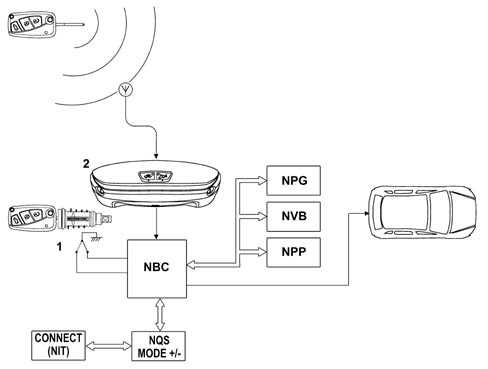
1 - Boot catch
2 - Courtesy light
FUEL FLAP
The fuel flap is managed directly by the NPG and is therefore linked to the locked / unlocked state of the driver's door.
The fuel flap is unlocked by:
- central locking / unlocking command at the driver's door, by the catch, by the R.F. remote control, by Passive Entry; it is therefore connected to the driver's door (at H.W. level to the NPG)
- When the driver's door is opened if this door has been 'locked'. Therefore when the driver's door is opened the door open switch signals the opening to the NBC which supplies this information to the B - CAN network; the NPG reads the change in status from the network from door closed to open and energizes the central locking motor to also unlock the fuel flap.
UNLOCKING DOORS THROUGH F.I.S. SIGNAL
The FIS sensor status is acquired directly from the NBC therefore the NBC commands the unlocking of all the doors even if only that of the driver's door has been set according to the central locking strategy described previously.
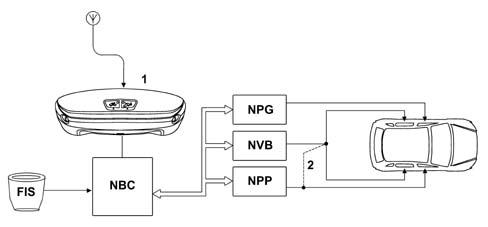
1 - Courtesy light
2 - Connection if NVB is not fitted
UNLOCKING DOORS THROUGH F.I.S. SIGNAL
The FIS only unlocks the boot only if the boot is subject to the doors.
If the boot is set at 'always locked' then the FIS does not operate the boot.
INHIBITION DUE TO A HIGH NUMBER OF MANOEUVRES
If 10 locking / unlocking manoeuvres are carried out within 25 seconds then the NBC inhibits the locking / unlocking commands for 30 seconds.
As a result, the last manoeuvre, before the inhbition, can be an unlocking or a locking one.
DOORS / BOOT / BONNET LID OPEN ACOUSTIC SIGNAL
The NQS acquires the door, boot and bonnet lid signal (only if the alarm is fitted) and the vehicle speed signal from the B - CAN network.
If one of the doors or the boot or bonnet lid is open and the speed is above 4 Km/h then an acoustic signal is emitted.
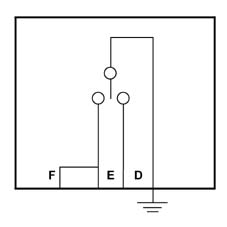
The Mini F.L.Ore.N.C.E. sytem interfaces with the electric locks and switches as illustrated in the tables below.
KEY:
- M1 Dead-lock motor
- M2 Locking/unlocking motor
- M3 Opening motor
- M4 Boot opening actuator
- A Locking signal motor bar (inside locking)
- B Door/tailgate open signal
- C Key catch (outside locking)
- D Door/tailgate closing switch
- E Door/tailgate opening switch
- F Passive Entry door/tailgate opening switch
- G Boot light control
Front lock
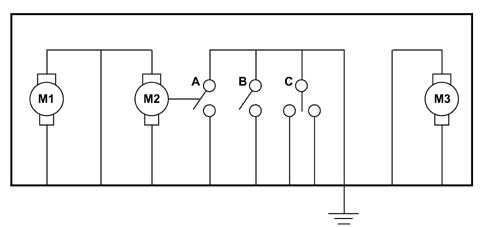
Rear lock
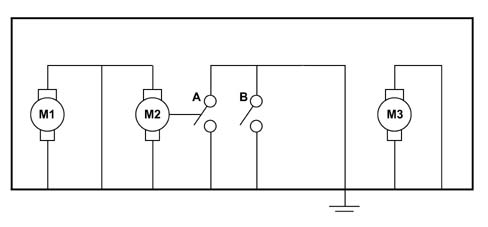
Tailgate lock
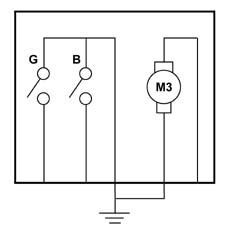
Switch on door/tailgate handle
The contact F is only fitted on the tailgate handle.
SPECIFICATIONS:
The PASSIVE-ENTRY (NPE), connected to the B - CAN network, is a node used to manage car protection, passenger compartment access and engine start-up.
The system consists of the Node plus a device known as a CID (Customer Idenification Device).
This contains a transponder with programmed immobiliser codes (as in the II generation Code key), a battery supplying the Alarm/Door Lock system remote control sending unit and 3 lock, release and boot opening buttons. The system also includes a mechanical key for emergencies if the keyless go system does not work and to activate/deactivate the passenger airbag module.
This car cannot be used to start the car.
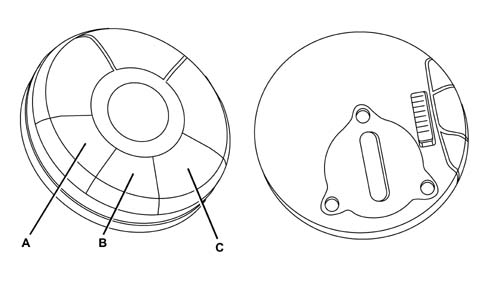
A - Door release button
B - Door lock button
C - Boot release button
SPECIFICATIONS:
Indication leds on the CID light up during transmission
The car is not fitted with an ignition. Instead a button on the facia is used to turn the car on and off and start it up in the same was as with the old ignition system.
Because a conventional ignition is no longer present, a Node is fitted to activate and deactivate the steering lock (see Steering Lock Node chapter -NBS). This is connected to the B-CAN network.
The door/boot handles are also slightly different; they contain 2 switches and are able to carry out 2 types of manoeuvre from a stable position:
- PULL HANDLE: the handle is pulled out to open the door
- PRESS HANDLE: the handle is pressed in to lock the catch (the boot handle also acts like a door handle)
All functions such as the DEAD-LOCK, door/boot release set from NQS/NI, central locking and signals described in central lockign and alarm chapters also apply to NPE - keyless-go
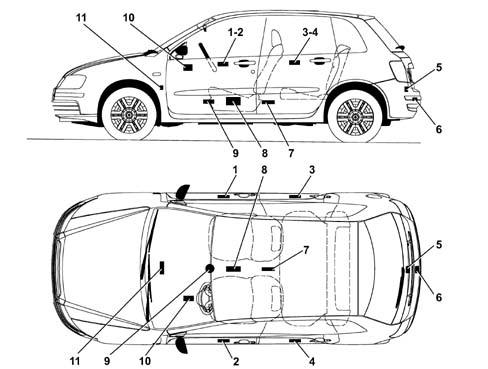
1 - Aerial on front passenger door
2 - Aerial on front driver's door
3 - Aerial on right rear door
4 - Aerial on left rear door
5 - Aerial inside luggage compartment
6 - Aerial on rear crossmember (behind the bumper)
7 - Aerial under vent in tunnel
8 - NPE
9 - Garage aerial
10 - NBS fitted in place of the mechanical steering lock
11 - Aerial behind the climate control system control unit
UNIVERSAL CODE
UNIVERSAL CODE: this is the code which an unprogrammed NBC sends to the NCM when it has detected the presence of a CID in the passenger compartment.
IMMO CODE
The basic code converted, via a special algorithm, to a SECRET CODE and FIX CODE.
Each car is provided with a randomly generated IMMO CODE.
In cars without Passive Entry, this is stored (end of line) in the NBC.
In cars with Passive Entry, it is stored (end of line) in the NPE.
SECRET CODE
It is obtained from the IMMO CODE and resident in the key transponder or CID
Iti s stored during end of line key/CID programming in the NBC for cars without Passive Entry and in the NPE in cars with Passive Entry.
FIX CODE
This is obtained from the IMMO CODE. It is stored in the NBC at end of line and used in communication between the NBC and NCM for start-up.
ELECTRONIC CODE
Obtained from the FIX CODE and printed on the Code Card given to the customer.
Used for emergency starting via the accelerator pedal or Examiner and to gain protected access to the NBC memory in order to program new keys/CID or reprogram those already in the memory and/or carry out specific diagnostic functions.
IDENTIFIER CODE
Resident in the transponder/CID and different for each transponder/CID
Stored in the NBC or NPE for cars with Passive Entry during the programming procedure.
Storing CODE II system codes - without Passive Entry
Up to 8 keys can be stored
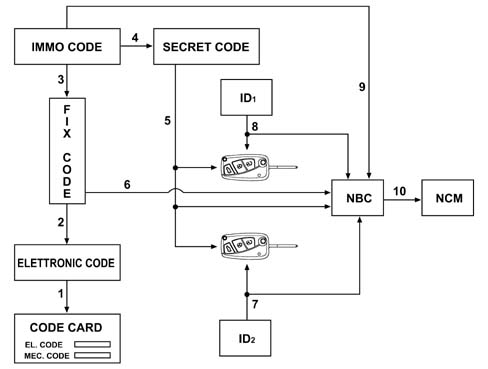
1 - Printing on Code Card
2 - Algorithm
3 - Algorithm
4 - Algorithm
5 - Stored at end of line
6 - Stored at end of line
7 - ID2 stored in:
8 - ID1 stored in:
9 - Stored at end of line
10 - FIX CODE: stored at first +15
Storing CODE II system codes - with Passive Entry
Up to 8 codes/cid may be stored
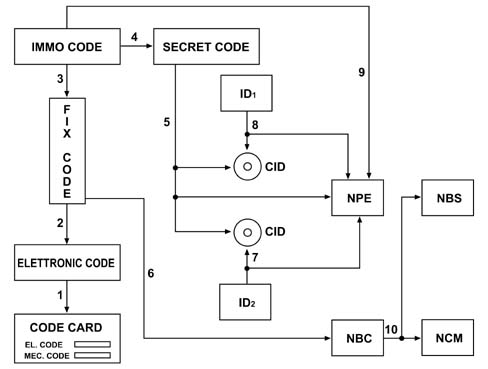
1 - Printing on Code Card
2 - Algorithm
3 - Algorithm
4 - Algorithm
5 - Stored at end of line
6 - Stored at end of line
7 - ID2 stored in:
8 - ID1 stored in:
9 - Stored at end of line
10 - FIX CODE: stored at first +15
CID detection
The NPE identifies the CID in the position indicated by the handle, which is pulled to wake up the B-CAN network and energize the door aerial for the activated handle.
The CID search takes place via 8 125 KHz IMMO aerials arranged as shown in the following figure.
If more than one door handle is pulled simultaneously (or nearly), the CID is detected in the order of priority described below:
Once CID position has been checked, the CID responds by sending a code to the radio aerial (433.92 MHz) connected to the NPE. (The aerial is connected to the courtesy light in versions without Passive Entry)
Keyless-go operation from customer viewpoint
The Keyless-go is a passenger compartment access and engine start-up system th at allows customers to enter their cars and start their engines without using a key but simply by carrying a CID.
Customers carrying a CID (e.g. in their pockets) approach the locked car and pull the handle. The system automatically recognises them, unlocks the doors and turns off the alarm.
Once customers are sitting in the driver's seat, they press a button on the facia to enable a further CID detection and the engine starts.
When customers reach their destination, they press the button again and the engine is turned off.
When customers have left the car, they can lock the doors and activate the alarm by pressing a button on the exterior handle. If the system has previously been set to NQS/NIT, it automatically locks the car after the customer has walked away. The entire car use cycle is therefore carried out without needing a key to open/close the car (remote control function) or to turn the engine on/off (ignition key function)
Keyless-go operation at system level
The Passive - Entry can manage 2 user actions:
- entering the car, leaving the car
- engine starting
ENTERING/LEAVING THE CAR
The block diagram in the following figure illustrates the car entry/leaving functions.
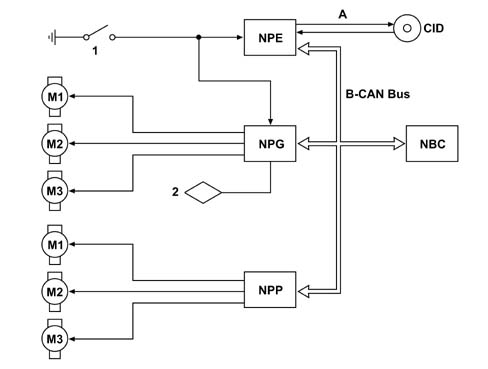
1 - Handle switch (open)
2 - Door led
A - Check for CID
M1 - Dead-lock motor
M2 - Lock/release motor
M3 - Opening motor
ENTERING/LEAVING THE CAR
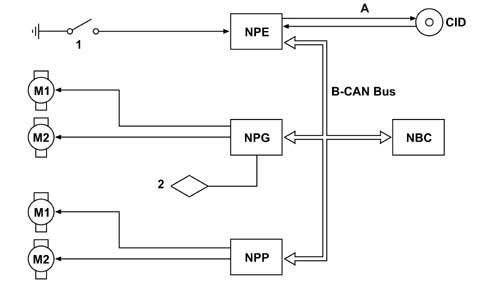
1 - Handle switch (open)
2 - Door led
A - Check for CID
M1 - Dead-lock motor
M2 - Lock/release motor
ENTERING/LEAVING THE CAR
During normal operation, the NBC sends information on car status via the networ, i.e. whether it is:
- closed/open,
- locked/unlocked
- alarmed/not alarmed
The NQS sends information on the settings entered by the user before leaving the car, i.e.
- boot controlled by central locking/boot always locked,
- release of all doors/release of driver's door only
- Autoclose activated/autoclose deactivated
Access to Car Blocked
Car owners with a CID approach the car and pull the handle: the lock is triggered and the door opens to allow access to the passenger compartment.
The door panel led cuts off the deterrent led flashing and the turn signals indicate that the doors have been released.
Let's see how this works from an operational viewpoint:
- 1 - pull handle
- 2 - the handle switch informs NPE and NPG / NPP / NVB of the action
- 3 - NPE, NPG, NPP and NVB wake up the network
- 4 - the door nodes await authorisation from NPE
- 5 - NPE checks the CID by means of the door aerial
- 6 - If no CID is present, nothing happens and the system returns to sleep mode.
- 7 - If a CID is present, NPE sends a command via the B-CAN network to NPx/NVB to authorise opening and a car release command to NBC
- 8 - NPx / NVB supply the door opening motors
- 9 - NBC sends a release control to all Nodes, turns off the alarm and sends out the relevant signals
Indpendent driver door release
If the independent driver doro release setting is active, the other vehicle doors remain locked when the driver's door is opened.
All doors may be released by pressig the central release key on the door panel when the driver's door is open.
When the car is entered through one of the other doors, they are released centrally.
Leaving the car and locking it
When car owners with CIDs press any of the door handles, the locks are locked centrally.
Leds on the driver's door and turn signals indicate locking has taken place in the same way as with the remote control system.
Let's see how this works from an operational viewpoint:
- 1 - Close door
- 2 - Press handle
- 3 - The handle switch informs the NPE of the action
- 4 - NPE wakes up the network
- 5 - NPE checks the CID by means of the door aerial
- 6 - If no CID is present inside, nothing happens and the NPE checks inside the car: if a CID is present inside the car, NPE orders NBC to issue the relevant signals.
- 7 - If a CID is present, NPE sends a car lock command to NBC via the B-CAN network
- 8 - NBC sends a lock command to all nodes, turns on the alarm and issues the relevant signals
Lock request refused
The system will not accept release commands when the handle of an open door is pressed.
It also rejects a lock command under the following conditions:
- A - Handle pressed by someone not in possession of a CID and no CIDs in the car. The system issues no signals (condition applies also when car closed); an open car therefore stays open and a closed car stays closed.
- B - If the handle is pressed by someone without a CID and oen or more CIDs are in the car (passenger compartment or boot) or if a +15 is present or engine is running at the time of closure, the driver side Leds and turn signals flash for 3 secs: door lock is refused so that people cannot be inadvertantly shut out
Locking from boot
The catch can also be locked from the boot handle (the boot is treated as another door)
In emergencies
If the internal CID battery is flat or faulty, the doors are unlocked to give access to the passenger compartment using a mechanical insert.
The mechanical lock is also used to lock the car, but the dead lock cannot be inserted
AUTO - CLOSE function
The AUTO - CLOSE is activated and deactivated via a control panel or Connect. It allows automatic car locking after the customer has walked away. Once all the doors are closed, the system begins checking periodically for one or more CIDs inside and outside the car.
When no CID is deteced, the system assumes the customer has walked away and locks the catches. This is indicated by a bleep from the alarm.
The AUTO - CLOSE does not turn on the alarm system, does not engage the il DEAD - LOCK and does not allow steering to be locked (by NBS). If a fault is detected in the CID identification system, the AUTO - CLOSE function is disabled to preven a CID from being locked into the passenger compartment.
Let's see how this works from an operational viewpoint:
- 1 - close last door/boot
- 2 - NPE does not activate the function if a fault is present in the aerial
- 3 - NPE checks for a CID outside and inside the car in the following sequence: driver's door - rear door LH - boot - passenger door - rear door RH
- 4 - If no CID is present inside and outside the car, NPE orders NBC to carry out central locking after about 2 seconds
- 5 - NBC sends a door lock command to the door nodes and issues signals but does not turn on the alarm
DEAD - LOCK function
The dead-lock function is engaged when the doors are locked by pressing the locking button a second time within 1 second of the first time it is pressed.
The door leds and turn signals indicate activation in the same way as described for the door lock system.
Let's see how this works from an operational viewpoint:
- 1 - Close door
- 2 - Press handle
- 3 - The handle switch informs the NPE of the action
- 4 - NPE wakes up the network
- 5 - NPE checks the CID by means of the door aerial
- 6 - If no CID is present inside, nothing happens and the NPE checks inside the car: if a CID is present inside the car, NPE orders NBC to issue the relevant signals.
- 7 - If a CID is present, NPE sends a car lock command to NBC via the B-CAN network
- 8 - NBC sends a lock command to all nodes, turns on the alarm and issues the relevant signals
- 9 - NPE downloads the second handle switch depression (within 1 second of the first)
- 10 - NPE sends a dead-lock activation command to NBC
- 11 - NBC checks that all doors and the boot are properly closed
- 12 - NBC sends a dead-lock activation command to all door nodes and issues the relevant signals
- 13 - NPx and NVB supply the dead-lock activation motor
Inhibition: door release/dead lock activation from remote control
The CID is fitted with remote control functions and the dead lock can therefore be activated by means of buttons on the CID. If a CID button is pressed by accident when inside the car, the Passive Entry system does not engage the dead lock so that the customer is not left shut inside the car by accident.
Let's see how this works from an operational viewpoint:
- 1 - press lock key on CID
- 2 - NPE receives command via radio aerial
- 3 - NPE orders NBC to lock the doors
- 4 - NBC sends a lock command via the B-CAN network, issues the relevant signals and turns on the alarm
- 5 - As point 3 is being carried out, NPE checks for the presence of the CID that send the command by means of the interior aerials
- 6 - If the CID is inside the passenger compartment, NPE sends a release command to NBC within 2 seconds
- 7 - NBC sends a door release command via the B-CAN network, issues the relevant signals and deactivates the alarm
- 8 - NPx and NVB release the door
ENGINE START-UP
The bock diagram in the following figure illustrates engine start-up
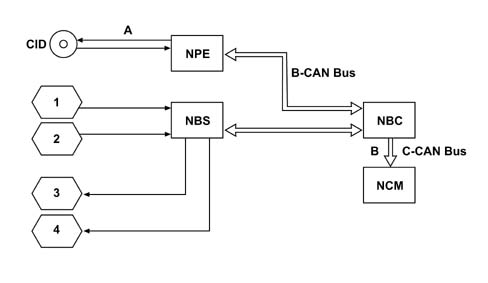
1 - START button
2 - Clutch switch (brake for automatic clutch)
3 - Steering release actuator
4 - +15/+50/INTA
A - Check for CID
ENGINE START-UP
The engine start-up controls are as follows:
- start/stop button on the facia
- electric steering lock (NBS) to lock/release the steering column
- clutch pedal, used for start-up enablement
- brake pedal (only for automatic transmission) used for start-up enablement
- accelerator pedal for emergency starting in the case of system malfunction
Steering release and instrument panel activation
When the start button is pressed on the facia, the car checks for an authorised CID in the passenger compartment (stored)
The CID must be near one of the car seats to be detected (front or rear)
If no valid CID is present in the car, pressing the start button will not have any effect on the system and the message ELECTRONIC KEY NOT DETECTED will appear on the instrument panel.
Let's see how this works from an operational viewpoint:
- 1 - NBS downloads the start/stop button depression
- 2 - NBS wakes up the network
- 3 - NBS sends NBC a +15 enablement request
- 4 - NBC asks NPE to check the CID inside the passenger compartment
- 5 - NPE checks for a CID in the passenger compartment or in garage position If a CID is present, NPE sends confirmation to NBC, which in turn enables NBS at +15. NBS then releases the steering, checks release has taken place and activates +15. If no CID is present, NPE informs NBC that the CID has not been found. NBC relays the information to NQS and NQS displays the CID not detected information on the display.
Second depression:
- 6 - NBS downloads a second depression of the start button
- 7 - NBS deactivates the panel (because + 15 is already present)
Engine start-up
To start the engine, press the clutch pedal and then the star button on the facia.
The clutch pedal must be pressed to confirm that the user actually wishes to start the engine.
The start-up manoevre is not power-assistend. When the start button is released, the starter motor is therefore released.
If the CID is not inside the passenger compartment during the CID start-up manoevre, of if the CID battery is flat, the instrument panel is activated and displays the message: ELECTRONIC KEY NOT DETECTED to indicate the car cannot be started. The motor is not therefore cranked.
Let's see how this works from an operational viewpoint:
- 1 - NBS downloads the start/stop button depression
- 2 - NBS wakes up the network
- 3 - NBS sends NBC a +15 enablement request
- 4 - NBC asks NPE to check the CID inside the passenger compartment
- 5 - NPE checks for a CID in the passenger compartment or in garage position If a CID is present, NPE sends confirmation to NBC, which in turn enables NBS at +15. NBS then releases the steering, checks release has taken place and activates +15. If no CID is present, NPE informs NBC that the CID has not been found. NBC relays the information to NQS and NQS displays the CID not detected information on the display.
- 6 - NBS checks the button is pressed
- 7 - NBS checks the clutch/brake pedal is pressed
- 8 - NBS sends NBC a start-up enablement request (+50)
- 9 - NBC sends a CID verification request to NPE
- 10 - NPE checks for a CID in the passenger compartment or in garage position and sends a response to NBC
- 11 - NBS sends start-up enablement to NBS
- 12 - NBS receives enablement and activates the +50 supply
- 13 - NBS downloads start/stop button release and deacivates +50
If the start-up manoeuvre is carried out within 5 seconds of key-on, points 9 and 10 are not carried out because the CID detection carried out at steering lock released and instrument panel activation points 4 and 5 is considered valid.
The engine cannot be started if the CID is in the boot.
The system may not be able to detect the CID at the time the start button is pressed because it is not working or because the CID battery is flat. In that case, the CID is set to garage position, i.e. to the old immobiliser aerial on the central console. With key-on, the aerial is activated in the same way as with the old code II system and the magnetic field generated activates the CID transponder which enables the start-up system if it is detected. If the CID is removed from garage position while the car is driving, the engine keeps running. Return the CID to garage position next time the car is started.
Quick start
The car can be started quickly simply by pressing the clutch and start button: steering is released, the instrument panel and electrical services are activated and the engine is started.
Start-up antirepetition
If start-up was unsuccessful, next time the start button is pressed the system introduces a starter motor activation delay to avoid damage to the mechanical starter motor/crankshaft coupling system.
The delay is implemented by the Steering Lock Node (NBS)
Checking presence of CID in passenger compartment with engine already running
With the instrument panel on or the engine running, when the door is closed the system checks the CID in the passenger compartment.
If the CID is no longer present (because the driver has walked off or the services are no longer available for some reason), the system displays the message ELECTRONIC KEY NO LONGER PRESENT IN VEHICLE on the panel
Stopping the engine
With the car running and the car at a standstill, the engine is turned off when the start/stop button is pressed and the instrument panel and electrical services are deactivated.
If the car is not at a standstill (speed > 10 km/h), the button must be pressed for longer than 2 seconds (voluntary action in case of emergency).
Let's see how this works from an operational viewpoint:
- 1 - NBS downloads the stop button depression
- 2 - NBS checks car speed (from a message on the B-CAN network)
- 3 - If car speed is greater than 10 km/h, NBS removes +15
- 4 - If car speed is greater than 10 km/h, NBS waits 2 seconds of continuous depression of the stop button and then removes +15.
Steering lock
The steering is locked when the car doors are locked by Passive Entry or by means of a mechanical key
Let's see how this works from an operational viewpoint:
- 1 - Close door
- 2 - Press handle
- 3 - The handle switch informs the NPE of the action
- 4 - NPE wakes up the network
- 5 - NPE checks the CID by means of the door aerial
- 6 - If no CID is present inside, nothing happens and the NPE checks inside the car: if a CID is present inside the car, NPE orders NBC to issue the relevant signals.
- 7 - If a CID is present, NPE sends a car lock command to NBC via the B-CAN network
- 8 - NBC sends a lock command to all nodes, turns on the alarm and issues the relevant signals
- 9 - NBC waits 2 seconds
- 10 - NBC checks for absence of +15
- 11 - NBC sends the steering lock command via the B-CAN network to NBS
- 12 - NBS receives the command, checks for absence of +15 (redundancy) and then locks the steering.
Specifications
The driver's door node is located in the armrest on the driver's door panel, as illustrated in the diagram.
Its functions, listed below, are:
- 1 - Key status
- 2 - Management of ideogram dimmed lights on command in day/night mode
- 3 - Memorizing of 3 positions for driver's seat and exterior mirrors
- 4 - Management of front and rear map reading lights and courtesy lights
- 5 - Management of front puddle lights
- 6 - Management of doors/boot and fuel flap locking / unlocking
- 7 - Front electric windows with manual and automatic up/down and anti-crush safety function
- 8 - Rear electric windows with manual and automatic up/down and anti-crush safety function
- 9 - Inhibition of rear window movement from driver's seat
- 10 - Electric exterior mirrors
- 11 - Management of timed defrosting
- 12 - Management of outside temperature
- 13 - Electric opening of doors/boot
- 14 - Clutch catches with switch
- 15 - Switching dead-lock on/off
- 16 - Vehicle protection system signals
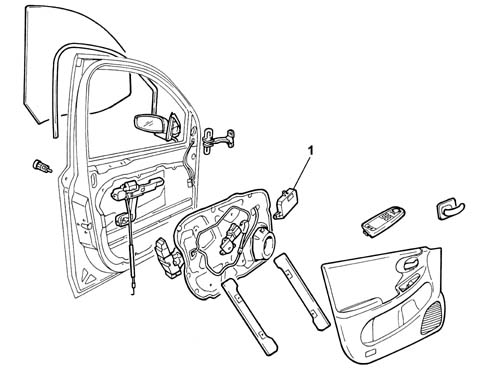
1 - Door Node
Specifications
As far as the functions for points 2, 6, 13, 14, 15 and 16 are concerned, they have already been dealt with in chapters on the panel and vehicle access and protection, whilst point 1 is a standard function for all nodes, i.e. the acquisition of the key status (key on / key off) emitted by the NBC.
The function in point 3 will be described in the DRIVER'S / PASSENGER GEOMETRY NODE chapter.
The NPP functions are listed below:
- 1 - Key status
- 2 - Management of ideogram dimmed lights on command in day/night mode
- 3 - Memorizing of 3 positions for driver's seat and exterior mirrors
- 4 - Management of front and rear map reading lights and courtesy lights
- 5 - Management of front puddle lights
- 6 - Management of doors/boot and fuel flap locking / unlocking
- 7 - Front electric windows with manual and automatic up/down and anti-crush safety function
- 8 - Electric exterior mirrors
- 9 - Management of timed defrosting
- 13 - Electric opening of doors/boot
- 14 - Clutch catches with switch
- 15 - Switching dead-lock on/off
- 16 - Vehicle protection system signals
Driver's door node
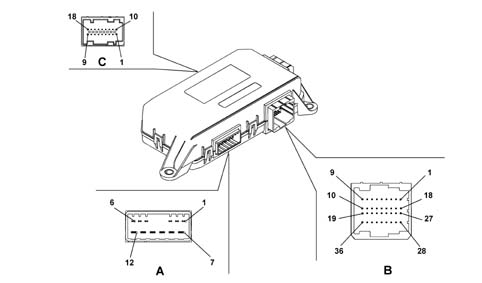
Specifications
Connector A 6+6 way
| PIN | FUNCTION |
|---|---|
| 1 | Door opening geared motor (negative) |
| 2 | Door opening geared motor (positive) |
| 3 | Dead-lock geared motor |
| 4 | Door locking / unlocking geared motor |
| 5 | Fuel flap locking / unlocking geared motor (connection with F4) |
| 6 | Common lock motors (security/dead-lock) |
| 7 | Power earth |
| 8 | Supply for electric windows and mirror actuators from F-47/F48 CPL |
| 9 | Window closing positive command |
| 10 | Window opening positive command |
| 11 | +30 from F-32 |
| 12 | Fuel flap locking / unlocking geared motor (connection with F6) |
Connector B 36 way
| PIN | FUNCTION |
|---|---|
| 1 | Analogue signal from right rear electric window controls |
| 2 | Window anti-crush sensor (signal) |
| 3 | Negative signal from rear electric windows exclusion button / mirror folding - if fitted |
| 4 | Earth for interior handle lighting LED (connection with SB19) |
| 5 | Window anti-crush sensor (negative, connection with SB19) |
| 6 | Earth for LED indicating door status (connection with SB19) |
| 7 | Positive command for LED signalling rear electric window buttons in rear doors |
| 8 | Door status LED positive control |
| 9 | Interior handle lighting LED positive command |
| 10 | not connected |
| 11 | not connected |
| 12 | Positive signal from left/right rear map reading light on button |
| 13 | CVB services relay positive control |
| 14 | Rear courtesy light timed/dimmed negative control L/R |
| 15 | B-CAN B |
| 16 | B-CAN A |
| 17 | Puddle lights timed negative control |
| 18 | Protected supply for puddle lights |
| 19 | Electronic earth |
| 20 | Negative signal from N.C. motor switch (unlock) |
| 21 | Negative opening signal from outside handle switch |
| 22 | Earth for lock (connection with SB19) |
| 23 | Negative signal from N.A. motor switch (lock) |
| 24 | Negative signal from switch in lock to engage dead-lock |
| 25 | Negative signal from switch in lock to release dead-lock |
| 26 | not connected |
| 27 | Analogue signal from left rear electric window controls |
| 28 | Analogue signal to control electric rear view mirrors (up/down movement) |
| 29 | Analogue signal to control electric rear view mirrors (left/right movement) |
| 30 | Analogue signal to control electric rear view mirrors selection (driver's side/passenger side) |
| 31 | Analogue signal from front electric window controls driver's side |
| 32 | Analogue signal from front electric window controls passenger side |
| 33 | Switch panel earth (connection with SB13) |
| 34 | Door locking control signal from button |
| 35 | Door unlocking control signal from button |
| 36 | Switch panel on armrest dimmed light positive control |
Connector C 9+9 way
| PIN | FUNCTION |
|---|---|
| 1 | Mirror folding motor positive control (closing) |
| 2 | Signal from outside temperature sensor |
| 3 | Left/right mirror deflector implementation |
| 4 | Mirror deflector motors |
| 5 | High/low mirror deflector implentation |
| 6 | Outside temperature sensor negative |
| 7 | Mirror defroster protected supply (connection with B18) |
| 8 | Mirror folding motor positive control (opening) |
| 9 | Mirror defroster timed negative control |
| 10 | Signal from potentiometer for memorizing deflector horizontal position |
| 11 | Signal from potentiometer for memorizing deflector vertical position |
| 12 | not connected |
| 13 | not connected |
| 14 | not connected |
| 15 | Ref. for mirror deflector position signal potentiometer negative |
| 16 | Protected supply for puddle lights in mirror (connection with B18) |
| 17 | Supply for mirror deflector position signal potentiometers |
| 18 | Timed negative control for puddle lights in mirror (connection with B17) |
Passenger door node
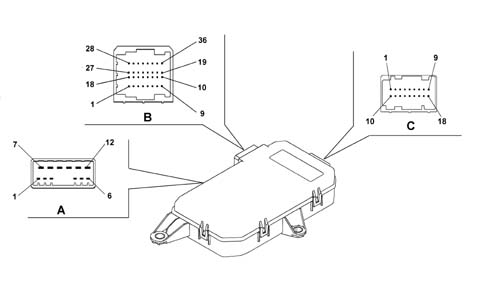
Specifications
Connector A 6+6 way
| PIN | FUNCTION |
|---|---|
| 1 | Door opening geared motor (negative) |
| 2 | Door opening geared motor (positive) |
| 3 | Dead-lock geared motor |
| 4 | Door locking / unlocking geared motor |
| 5 | not connected |
| 6 | Joint lock motors (security / dead-lock) |
| 7 | Power earth |
| 8 | Supply for electric windows and mirror actuators from F-47/F48 CPL |
| 9 | Window closing positive control |
| 10 | Window opening positive control |
| 11 | +30 from F-32 |
| 12 | not connected |
Connector B 36 way
| PIN | FUNCTION |
|---|---|
| 1 | not connected |
| 2 | Window anti-crush safety sensor (signal) |
| 3 | not connected |
| 4 | Earth for interior handle lighting LED (connection with SB19) |
| 5 | Window anti-crush sensor (negative, connection with SB19) |
| 6 | Earth for door status LED (connection with SB19) |
| 7 | not connected |
| 8 | not connected |
| 9 | Interior handle lighting LED positive control |
| 10 | Rear lock motors switching relay positive control |
| 11 | Rear lock dead-lock motors relay positive control |
| 12 | Positive signal from left/right rear map reading light on button |
| 13 | not connected |
| 14 | Rear courtesy light timed/dimmed negative control L/R |
| 15 | B-CAN B |
| 16 | B-CAN A |
| 17 | Puddle lights timed negative control |
| 18 | Protected supply for puddle lights |
| 19 | Electronic earth |
| 20 | Negative signal from N.C. motor switch (unlock) |
| 21 | Negative opening signal from exterior handle switch |
| 22 | Earth for lock (connection with SB19) |
| 23 | Negative signal from N.A. motor switch (lock) |
| 24 | Negative signal from switch in lock to engage dead-lock |
| 25 | Negative signal from switch in lock to release dead-lock |
| 26 | Rear lock locking / unlocking motors relay positive control |
| 27 | not connected |
| 28 | not connected |
| 29 | not connected |
| 30 | not connected |
| 31 | not connected. |
| 32 | Analogue signal from front electric window controls passenger side |
| 33 | Switch panel earth (connection with SB13) |
| 34 | not connected |
| 35 | not connected |
| 36 | Switch panel on armrest dimmed light positive control |
Connector C 9+9 way
| PIN | FUNCTION |
|---|---|
| 1 | Mirror folding motor positive control (closing) |
| 2 | not connected |
| 3 | Left/right mirror deflector implementation |
| 4 | Mirror deflector common motors |
| 5 | High/low mirror deflector implementation |
| 6 | not connected |
| 7 | Mirror defroster protected supply (connection with B18) |
| 8 | Mirror folding motor positive control (opening) |
| 9 | Mirror defroster timed negative control |
| 10 | Signal from potentiometer for memorizing deflector horizontal position |
| 11 | Signal from potentiometer for memorizing deflector vertical position |
| 12 | not connected |
| 13 | not connected |
| 14 | not connected |
| 15 | Ref. for mirror deflector position signal potentiometer negative |
| 16 | Protected supply for courtesy light in mirror (connection with B18) |
| 17 | Mirror deflector position signal potentioemter supply |
| 18 | Timed negative cnotrol for courtesy light in mirror (connection with B17) |
Management of front and rear map reading and courtesy lights
The diagram below illustrates the management of the front and rear map reading lights and courtesy lights
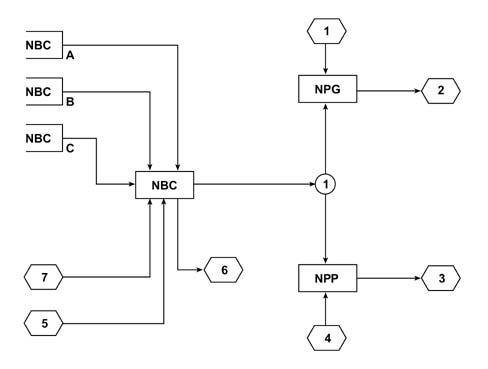
A - 4 door status
B - Activation of courtesy light by FIS
C - Activation for locking/unlocking
1 - Rear map reading light control (driver's side)
2 - Rear map reading light (driver's side)
3 - Rear map reading light (passenger side)
4 - Rear map reading light control (passenger side)
5 - Centre front courtesy light; Left front map reading light; Right front map reading light;
6 - Vehicle interior lighting control; Left map reading light control; Right map reading light control
7 - Transponder reading
Management of front and rear map reading and courtesy lights
The logic for switching the front and rear courtesy lights on/off is centralized in the NBC.
The states (open/closed) of the front/rear doors comply with the switching on of the front and rear courtesy lights.
The NPG and NPP manage the left front and right rear spot lights, respectively, activated by the appropriate buttons.
When any of the doors is opened (either front or rear):
- the front courtesy light comes on;
- the rear courtesy light comes on;
- a timer is activated for 3 minutes.
If another door is opened during this 3 minute period, the current timing is reset and another 3 minute period is started.
At the end of the timed period:
- the front courtesy light goes out;
- the rear courtesy light goes out.
If all the doors are closed again during this period of 3 minutes, then the timed period is stopped and a second period of 20 seconds is activated which is interrupted if the ignition is turned ON and the doors are closed.
In all the cases described the switching on and off of the courtesy lights should take place:
- simultaneously;
- gradually (dimmer) lasting 2 seconds.
The (unstable) button on the front courtesy light operates both the front and rear courtesy lights.
In particular:
- if the courtesy lights are off, pressing the button switches them on
- if the courtesy lights are on, pressing the button switches them off (even with the FIS activated).
The courtesy light timer is activated by the button 15 minutes from the key off whilst there is no timer at the key on.
FIS operating logic
If the inertia switch (FIS) is activated, the front and rear courtesy lights come on for 30 minutes.
If the FIS is reset the courtesy lights go off.
Management of front puddle lights
The diagram below illustrates the management of the front puddle lights
A - Door status
B - Door status
1 - Driver's side front door puddle light bulb
2 - Passenger side front door puddle light bulb
Management of front puddle lights
The NBC informs the NPG and NPP of the status of the front doors (open / closed).
The NPG and NPP nodes manage the timing of the puddle lights.
With the door open, the timing for the puddle lights is 3 minutes.
If the door is closed within the 3 minute period, the NPG and NPP switch the puddle lights off.
Front electric windows with manual and automatic up/down and anti-crush safety function
The NPG receives the electric window commands for both the driver's front door and the passenger front door. It also directly controls its own electric window motor and transmits the commands for the NPP via the CAN.
The NPP only receives commands for the passenger front door and controls its own motor directly.
The motors for the driver's and passenger doors are controlled both manually and automatically, according to the logic:
- the manual mode involves starting and stopping the window manually by the user through the button for a time of: 50 ms < Ta < 300 ms (short control) and when the latter is released, the motor stops;
- the automatic mode involves starting the window manually by the user using the button for a time of: ta > 300 ms (long control).
The node should stop the operation of the window in the following cases:
- when the automatic movement is in progress and the up or down control is pressed again;
- in the upper or lower end of travel position during manual movement (time of 400 ms ±50ms) or automatic movement (time of 300ms +/- 30ms)
this is regulated exclusively by checking the motor current;
After a key off the front windows can be operated either manually or automatically for a period of 2 minutes managed by the NPG and NPP. When this period elapses, the node no longer receives new commands, but brings any received before the 2 minute has elapsed to a conclusion;
If, during the timing, the NPs detect the opening of one of the doors, the node no longer receives new commands, but brings those received before the door was opened to a conclusion;
If one of the doors was already open at the key off, the NPx bring any commands received before the door was opened to a conclusion.
Central closing of windows/sun roof
This function makes it possible to close all the windows and the sun roof in a single operation.
The central closing function using the remote control or lock catch in the driver's and passenger front door outside handle (signals managed by the NBC) is only activated at the key off.
The central closing of the windows can only be carried out using a specific signal sent to the CAN network by the NBC. This command is received directly by the NPG and NPP (by the NVB as well for the management of the rear electric windows) which implement the movement of the appropriate windows.
Central opening of windows/sun roof
This function makes it possible to open all the windows and the sun roof in a single operation.
The central opening function using the remote control or lock catch in the driver's and passenger front door outside handle (signals managed by the NBC) is only activated at the key off.
The central opening of the windows can only be carried out using a specific signal sent to the CAN network by the NBC. This command is received directly by the NPG and NPP (by the NVB as well for the management of the rear electric windows) which implement the movement of the appropriate windows.
The activation of the central opening / closing of the windows is not simultaneous for the 4 windows and the sun roof but takes place as indicated in the table:
| Electric sun roof | Immediate operation | Managed by CTA |
|---|---|---|
| Left rear electric windows | Operation delayed by 30 ms in relation to the command | Managed by NVB |
| Right rear electric windows | Operation delayed by 60 ms in relation to the command | Managed by NVB |
| Left front electric windows | Operation delayed by 90 ms in relation to the command | Managed by NPG |
| Right front electric windows | Operation delayed by 120 ms in relation to the command | Managed by NPP |
Inputs from window closing safety devices (anti-crush function)
If the anti-crush function is activated, the node which manages the movement of the window receives information that the seal is compressed through a resistive sensor fitted in a special casing fitted to the driver (NPG) or passenger (NPP) window upper trim.
The sensor is the resistive type.
There are two inputs for each sensor: signal and earth from control unit.
Operating condition if the anti-crush casing is pressed or there is a fault following a command
There are inputs on the node designed to receive information from their own door and signal the possible presence of an obstacle whilst the windows are closing (anti-crush safety function).
This occurs in both manual and automatic operation.
As a consequence of this event, the node immediately interrupts the travel of the glass and reverses it to the lower buffer position.
The node does not accept any type of command during this period.
If the anti-crush safety function intervenes three consecutive times within a minute or is faulty, the NPs inhibit the automatic closing operation only allowing it in steps of 500 ms when the button is released for the next manoeuvre.
In order to be able to restore the correct operation of the system one of the following conditions must be satisfied:
- a key off - key operation
- a downwards movement of the glass in question carried out by the user
Rear electric windows with manual and automatic up / down and anti-crush safety function
The NPG receives the electric window commands for the left and right rear doors and transmits them to the NVB via the CAN network.
The NVB receives the commands for the left and right rear doors and controls the motors directly.
The motors for the driver's and passenger doors are controlled both manually and automatically, according to the same logic used for the electric front windows described previously.
The node must cut off window operation in the following cases:
- when automatic movement is in progress and either the up or down control is pressed again;
- at the upper or lower end of travel position during both manual and automatic movement, regulated exclusively by controlling the motor current.
The movement of the rear windows is managed by the NVB using local commands (one per window) or those received via the CAN network from the NPG.
Rear window movement: local commands
The left and right rear windows can be moved upwards or downwards both manually and automatically using the buttons on the rear panels.
Rear window movement: commands received by the NPG (via CAN)
The rear windows can be operated using the buttons on the NPG trim.
The NPG sends the up and down commands for the rear windows to the NVB via the CAN, and the NVB manages the downward movement of the left and right rear windows both manually and automatically, whilst it only manages their upwards movement manually.
To activate the central closing / opening of the rear windows, through the remote control or the catch and the anti-crush safety function, the previous description is valid.
The movement of the rear windows can be inhibited from the driver's front door
The movement of the rear windows can be inhibited from the driver's side both during the key on and for two minutes after the key off or until one of the doors is opened.
The enabled / disabled state for the movement of the electric rear windows is memorized by the NPG. This is designed to ensure that the information is not lost after a key off / key on.
Electric external mirrors
There are two types of trim level depending on whether the NAG (Driver's Geometry Node) is fitted or not:
- NAG NOT fitted: the external rear view mirrors can only be moved
- NAG fitted: the external rear view mirrors can be moved, 3 defined positions can be memorized / recalled and the passenger rear view mirror will be automatically positioned after reverse gear is enaged.
The NPG receives the adjustment commands for both external rear view mirrors. The commands are produced by a joystick for the adjustments and two separate buttons for the mirror selection (one to select the left mirror and the other for the right mirror).
External rear view mirrors on vehicles without NAG
In this case the NPG receives the movement commands for both the driver's mirror and the passenger mirror.
The NPG manages the movement of the driver's external mirror directly and transmits the commands for moving the passenger external mirror via the B-CAN.
The NPP receives the commands and manages the passenger external mirror directly.
External rear view mirrors on vehicles with NAG
In this case, in addition to what has been described in the previous paragraph, the following additional functions exist:
placing of the mirrors in positions memorized previously by the NAG.
automatic positioning of the passenger rear view mirror when reverse gear is engaged.
The NAG transmits the position that the two rear view mirrors should be in to the B-CAN. When this position is received, the NPG and the NPP should move the respective mirrors until they are in the correct position.
If simultaneous commands are received from the NAG and joystick, the latter take priority and the NAG commands are cancelled.
Timed defrosting management
The defrosting function follows the same logic as the:
- heated rear windscreen (managed directly by the NBC)
- front windscreen washer jets (managed directly by the NBC)
- rear view mirrors (left, right) managed by the door nodes (NPG and NPP)
The implementation of the mirror defrosting, heated rear windscreen and jets is activated by:
- command from the button on the heater/climate control which is received by the NBC.
- remote command from the Max Defrost function.
The operation of the mirror defrosting, heated rear windscreen and windscreen washer juets coming from the Max Defrost function follows the same logic as the specific control on the heater / climate control.
Timing logic
The activation of the defrosting function lasts a maximum of 20 minutes at the end of which it is switched off.
The defrosting activation / deactivation logic is as follows:
- for the first 15 minutes operation does not depend on the engine speed.
- afterwards the operation depends on the engine conditions, namely if the engine speed is below 1000 rpm for 10 seconds, the defrosting function is deactivated, if the engine speed is above 1000 rpm for 5 seconds, the defrosting function is activated once again.
The automatic activation cycle (20 minutes) is reset upon each activation COMMAND through the dedicated button.
At the KEY OFF, the NBC should reset the heated rear windscreen control without memorizing the state.
The heated rear windscreen and the windscreen washer jet defroster are electrically connected to the heated rear windscreen control, controlled directly by the NBC; whilst the defrosting of the left and right mirrors is controlled by the NPG and the NPP, respectively.
The defrosting logic resides in the NBC.
The diagram below illustrates the timed management of the defrosting if no NCL is fitted
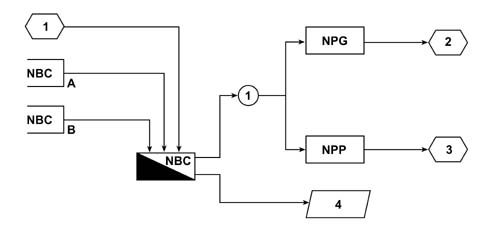
A - Battery voltage
B - Engine rpm
1 - Heated rear windscreen control
2 - Left mirror defrosting
3 - Right mirror defrosting
4 - Heated rear windscreen relay Heated rear windscreen LED in button
Timing logic
The diagram below illustrates the timed management of the defrosting with the NCL fitted
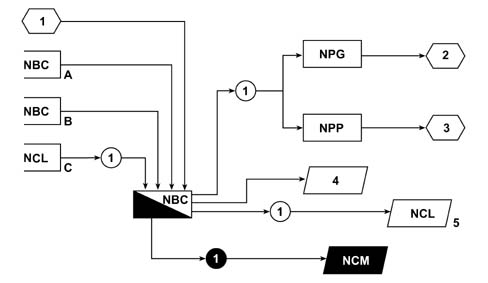
A - Battery voltage
B - Engine rpm
C - Max Defrost control
1 - Heated rear windscreen control
2 - Left mirror defrosting
3 - Right mirror defrosting
4 - Heated rear windscreen relay
5 - Heated rear windscreen LED in button
Outside temperature management
The NPG receives the outside temperature information through the specific NTC sensor located under the left external rear view mirror and periodically transmits this value through the CAN network.
Depending on the outside temperature, the NQS or the CONNECT should display the outside temperature value and warn the user of the possibility of ice through a symbol and specific message.
The Climate Control Node receives the outside temperature value from the B - CAN network for the management of the passenger compartment climate control.
SPECIFICATIONS
Below are a list of the functions for the two Driver and Passenger Position nodes
For the NAG:
- 1 - Key status
- 2 - Seat heating
- 3 - Memorizing of 3 driver's seat and external rear view mirror positions
- 4 - Driver's front seat and mirror movement management
- 5 - Passenger rear view mirror position with reverse gear engaged reset and memorizing management
- 6 - Easy entry / exit
For the NAP:
- 1 - Key status
- 2 - Seat heating
- 3 - Passenger front seat movement
- 4 - Easy entry / exit
The following adjustments can be made electrically to the driver's seat: longitudinal, lumbar, backrest angle and height.
Seat heating
On vehicles not equipped with the NAG and NAP, the seat heating (the supply for the heat pads) is managed directly by the controls of the seat carrier. (see wiring diagram in manual)
On vehicles equipped with the NAG and NAP, the seat heating is managed directly by the two Driver and Passenger Position nodes.
The diagram below illustrates the management of the seat heating
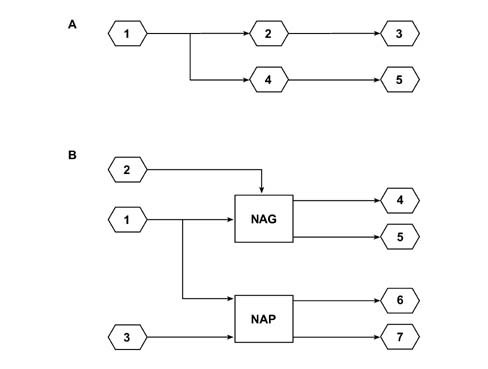
A - version without NAG/NAP
1 - INT/A
2 - Control with on warning light for left seat heating; Control button ideogram lighting
3 - Left front seat heat pad
4 - Control with on warning light for right seat heating; Control button ideogram lighting
5 - Right front seat heat pad
B - version with NAG/NAP
1 - INT/A
2 - Control for left seat heating
3 - Control for right seat heating
4 - Left front seat heat pad Heating warning light
5 - Control button ideogram lighting
6 - Right front seat heat pad Heating warning light
7 - Control button ideogram lighting
Memorizing 3 driver's seat and external rear view mirror positions
The functional diagram is illustrated below.
The diagram illustrates the memorizing of the 3 driver's seat and external rear view mirror positions
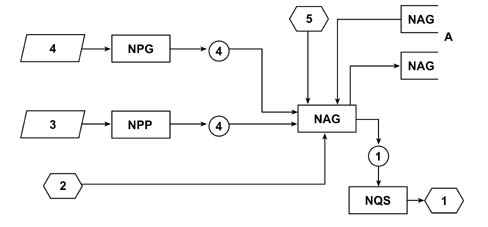
A - 'Mcorr' current memory
1 - Buzzer activation for memory acoustic feedback
2 - Selection '1' control; Selection '2' control; Selection '3' control
3 - Passenger mirror vertical position; Passenger mirror position
4 - Driver's mirror vertical position; Driver's mirror position
5 - Driver's seat longitudinal position; Driver's seat backrest angle position; Driver's seat height position
Memorizing 3 driver's seat and external rear view mirror positions
The NAG can memorize the following positions:
- 1- Driver's seat longitudinal position
- 2 - Driver's seat backrest angle
- 3 - Driver's seat height
- 4 - Driver's external rear view mirror - vertical position
- 5 - Driver's external rear view mirror - horizontal position
- 6 - Passenger external rear view mirror - vertical position
- 7 - Passenger external rear view mirror - horizontal position
The logic for memorizing these positions is as follows:
- the NAG receives one of the memory position buttons 1', 2', 3' (there are three memories available M1-M2-M3). The button should be pressed for at least 3 seconds to memorize the current position.
- the NAG receives the current position of the driver's set directly.
- the NAG receives the current position of the external rear view mirrors from the NPG and the NPP via the B-CAN network.
- Together with the position data the NAG receives the direction from which the mirrors have reached this position, from the NPG and the NPP, so that it can recover the mirror clearance during the memory recall stage and produce an actual position as close as possible to the position memorized.
- after the three seconds have elapsed, the NAG memorizes the current positions of the driver's seat and the external electric mirrors in the memory location (M1-M2-M3).
- later on, the NAG sends the NQS the signal, via the B-CAN network, to activate the buzzer which notifies that the memorizing has taken place.
- having received the command, the NQS activates the buzzer
If one of the buttons is pressed and released within 3 seconds, when it is released it is learnt that the seat and mirror system should move to the position already memorized previously.
The current driver's seat and external electric mirror positions whilst driving are also memorized during the process of memorizing the position of the passenger external rear view mirror when reverse gear is engaged.
Management of data memorized in the NAG
In rest conditions (key on, no recall or memorizing requested, reverse gear not engaged)
The NAG has three memory locations, M1-M2-M3, where the position of the driver's seat and external rear view mirrors, personalized by the user, are memorized. There is also a further memory location 'Mcorrente' (current memory) which allows it to manage the current position of the external rear view mirrors whilst driving and that of the passenger mirror when reverse gear is engaged.
The NAG periodically receives the current position of the external rear view mirrors via the CAN network from the NPG and the NPP. These positions are memorized in the current memory in the following cases: from going from key on to key off, when reverse gear is engaged/released, during a memorizing process (pressing buttons 1, 2, 3 for more than 3 seconds)
The NAG also periodically sends the NPG and the NPP the data memorized in the current memory for the external rear view mirrors via the network.
Movement of driver's front seat through manual controls
The NAG receives the commands for managing the electrical movement of the driver's seat directly from the adjustment knobs and then implements them.
Driver's front seat and external rear view mirror positions memorized recall
- the NAG receives the 1-2-3 memory recall commands for the driver's seat and external rear view mirror positions memorized previously.
- As a result it operates the driver's seat directly and places it in the correct position.
- It also transmits the positions for the external rear view mirrors according to the button pressed (1 - 2 - 3) to the NPG and the NPP via the CAN network. Together with the position data, the NAG sends the NPG and the NPP the direction from which this position should be reached so that the mirror clearances can be recovered and so that the actual position is as close as possible to the one memorized.
- The driver's seat can still be moved (both by resetting and manually) for 1 minute after the key off. If, during this period, a position in the memory is recalled, the function is enabled until the movment of the seat is completed (conversely, the mirrors are immediately locked after the key off). When the period of one minute has elapsed, the NAG inhibits any new movements requested by the user.
- If the NAG recognizes a starting manoeuvre whilst a recall movement is in progress, it momentarily stops the movement of the seat and automatically resumes it straight after the starting operation.
- The NAG receives the vehicle speed signal via the CAN and if the vehicle speed is above 10 Km/h, it inhibits the request for a memory recall movement. If a speed of 10 Km/h is exceeded whilst a recall manoeuvre is in progress, the movement is completed and not interrupted.
Management of memorizing and recall of passenger external rear view mirror position with reverse gear engaged
This function makes it possible to memorize a specific position for the passenger rear view mirror when reverse gear is engaged in order to facilitate parking manoeuvres.
This position is automatically reset when reverse gear is engaged.
Memorizing parking positino for passenger external rear view mirrors:
The memorizing sequence for the parking position of the passenger external rear view mirror is as follows:
- 1 - At the key on with the vehicle stationary, the NAG receives the reverse gear engaged signa;
- 2 - The NAG recognizes that one of the memory buttons 1', 2', 3' is pressed. The buttons are the same as those that manage the memorizing/resetting of the driver's seat and external rear view mirror positions.
- 3 - The NAG memorizes the parking position for the passenger external rear view mirror and the direction from which it was reached in the memory location selected M1-M2-M3.
- 4 - At the same time it also memorizes the position of the driver's seat and external rear view mirrors in driving conditions, information stored in the current memory;
- 5 - Three seconds after the button 1' 2' 3' is pressed continuously, the NAG sends the NQS the signal to activate the buzzer as acoustic feeback confiming that the memorizing process has taken place
- 6 - Having received the command, the NQS activates the buzzer;
The memorizing of the passenger rear view mirror in the reversing position only takes place with reverse gear engaged.
Recall of parking position for passenger external rear view mirror:
The automatic resetting of the parking position for the passenger external rear view mirror takes place as follows:
- During the key on the NAG receives the reverse gear engaged signal from the NBC via the CAN network;
- The NAG transmits the desired position for the passenger mirror and the direction it is coming from, via the CAN network, so that the mirror can be correctly positioned.
- The NPP receives the message coming from the NAG and implements the movement of the passenger external rear view mirror.
The passenger external rear view mirror returns to its original position 10 seonds after the NAG receives the reverse gear disengaged signal via the CAN or as soon as a speed of 10 Km/h is exceeded, irrespective of the gear engaged.
Obviously, with reverse gear engaged, it is also possible to memorize a different position for the driver's mirror.
The procedure is the same as the one for the passenger mirror (therefore with reverse gear engaged, the position of the driver's mirror is also adjusted).
During normal operation, with reverse gear engaged, the NPP adjusts the passenger mirror whilst the NPG adjusts the driver's mirror, after having received the command from the NAG.
If the user does not memorize any reverse gear position, when reverse gear is engaged the passenger mirror should be lowered by a pre-set Delta in relation to the current position.
Easy entry / exit
This function is only fitted on 3 door versions.
Irrespective of the state of the key (key on/key off) when the NAG and the NAP recognize that the backrest is folded over they implement the following strategy:
- memorizing initial longitudinal position of the relevant seat;
- moving the relevant seat to the front lengthwise end of travel position to allow passenger access to the rear seats;
- on recognizing that the backrest is not folded over, moving the relevant seat to the rear lengthwise end of travel position until the initial position memorized previously is reached.
When the backrest release lever is used to fold it over, a bowden cable releases the adjuster which joins the backrest to the seat (but does not release the motor inside the backrest which acts on a bar) and there is a switch inside the adjuster which informs the Driver / Passenger Position Node of the position of the backrest.
The diagram below illustrates the Easy entry / exit function
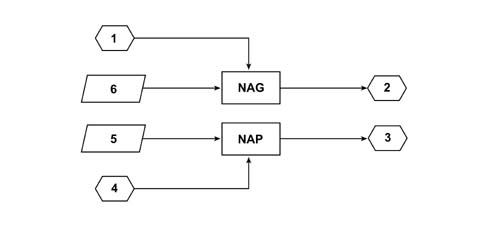
1 - Driver's seat longitudinal position
2 - Seat position longitudinal movement/resetting
3 - Seat position longitudinal movement/resetting
4 - Passenger seat longitudinal position
5 - Backrest folded switch
6 - Backrest folded switch
NAP OPERATION
As far as the NAP is concerned, its functions relate exclusively to the heating of the passenger seat and the movement of the passenger seat but no memorizing is possible except for the current one carried out when the passenger seat backrest is folded over for the subsequent repositioning of the seat (easy entry / exit function).
The management of these functions as the same as for the NAG.
The following adjustments can be made electrically to the passenger seat: longitudinal, lumbar, backrest angle and height.
Introduction
The tyre inflation pressure monitoring system consists of:
- 4 R.F. transmitter pressure sensors located inside the tyre on the wheel rim;
- 4 125 KHz aerials for activating the sensors under the wheel arch liners
- 1 R.F. reception and management control unit on the vehicle;
- 'LOW TYRE PRESSURE and 'SYSTEM FAILURE signals in the instrument panel or the Connect.
The sensors located inside the tyres are designed to check the temperature and pressure and, if the pressure goes below a certain level, the sensor transmits information, via a 433.92MHz radiofrequency signal, to the reception control unit which instantly signals the problem through the dedicated warning light in the vehicle control panel.
The sensors are designed to prevent false alarms caused by the differences in pressure as a result of:
- weather conditions (compensation of pressure measured according to temperature) and environmental conditions (compensation of pressure measured according to altitude);
- normal usage of the vehicle;
- there is an integrated strategy for compensating for the measurement of pressure according to temperature;
The system has a collision strategy that only allows 4 (or 5) sensors on the same vehicle to be correctly received;
The reception control unit is also equipped with a diagnostic function to evaluate the effective operation of each sensor following no response from a sensor(s) (incorrect operation or batteries flat) or when programming new sensors.
There are 5 sensors (4 wheels + the spare) and when one of the wheels is replaced with the spare wheel, if the tyre is deflated or punctured, the control unit will signal the problem as coming from the spare wheel.
As it works on a frequency of 433.92 MHz this product cannot be used on vehicles exported to the United States, Japan, Israel, Australia and New Zealand and all countries operating on different radio frequencies to Europe
TPMS system structure
The diagram below illustrates the TPMS system structure
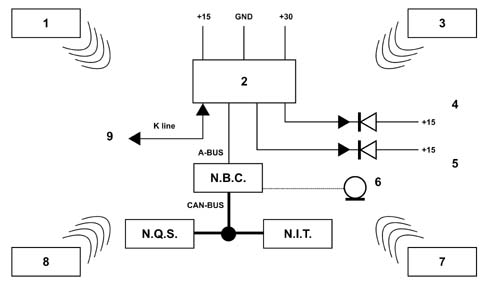
1 - TX1 - Left front transmitter sensor (inner wheel)
2 - Rx TPMS control unit fitted under the vehicle floor panel which manages the signals
3 - TX2 - Right front transmitter sensor (inner wheel)
4 -System failure intelligent bulb (amber LED)
5 - Low tyre pressure intelligent bulb (red LED)
6 - Buzzer
7 - TX3 - Right rear transmitter sensor (inner wheel)
8 - TX4 - Left rear transmitter sensor (inner wheel)
9 - Diagnostic / programming
NQS - Instrument Panel Node
NIT - Info Telematic Node
NBC - Body Computer Node
A-BUS - Serial line
CAN BUS - Can
K-LINE - Serial line dedicated to programming and fault diagnosis of control unit and complete system
Tyre Pressure Sensor
This device monitors the pressure inside the tyre using a dedicated sensor that is linked to electronics for acquiring and processing the signals and transmits signals on a radio frequency of 433.92 MHz. The signals transmitted are then received by a dedicated control unit and the readings are displayed on the vehicle's instruments.
The sensor receives a power supply from a 3V lithium battery which lasts 8 - 10 years in normal usage conditions. The sensor management software implements a compensation strategy for managing pressure that varies according to the temperature.
Each sensor has a transponder with an identification code that is transmitted to the tyre pressure control unit, at 125 KHz via the aerial under the wheel arch liners, where it is memorized.
The sensor incorporates a centrifugal switch that closes when the wheel rotates (minimum speed - 16 Km/h); after it closes the sensor measures the pressure and transmits this data within 5 secs.
The pressure and temperature measurements are taken every 5 secs and transmitted every 4 - 8 mins as long as the pressure and temperature values are within the limits: when, on the other hand, an excessive fall in pressure or an increase in temperature of more than 80°C is detected, there is a transmission every 5 secs.
If the sensor detects a fall in pressure of 0.3 bar per minute, the parameters are immediately tansmitted to the NBC.
At this point the pressure and temperature readings are taken every 5 secs and the data transmitted to the NBC.
The same takes place if there is an increase in temperature of more than 80° C.
When the vehicle is stationary the pressure and the temperature are measured every 5 seconds, but not transmitted to the NBC. After 22 mins with the centrifugal switch open, the sensor moves into a state known as SLEEP MODE.
This SLEEP MODE is the state in which the sensor usually finds itself when the vehicle is stationary; measurements are taken every 19 mins, with no transmissions.
If pressure faults are detected, the transmission takes place, as described previously, at the first key on with the fault displayed in the panel or the Connect.
Technical Data:
- absolute pressure range that can be measured: 0.5 - 4.5 bar
- average nominal pressure: 1.9 - 2.5 bar
- LOW BATTERY VOLTAGE level (below which the fault signal is sent): 2.2 V
- temperature range that can be measured: - 40°C / + 115°C
- maximum temperature above which a fault signal is sent: 80°C
There is an opening in the sensor that allows the pressure to be measured and it should not be blocked (e.g. by rubber sprays from canisters for fast repairs and inflation).
Fitting the sensor
The tyre pressure sensor is fitted on the rear part of the tyre inflation valve and there are two components, the valve and the sensor, that can be separated.
The fitting and dismantling of the tyre becomes particularly important because special equipment must be used by specialist personnel so that the sensor is not permanently damaged.
Reception control unit
This is an RF 433.92 MHz control unit which contains identification codes for the 4 (or 5) sensors and is therefore capable of checking the pressure of each individual tyre.
The control unit memorizes a minimum pressure level and a maximum temperature level and once one or both of these levels is exceeded, the customer is informed via the NQS or the Connect.
The control unit and PIN OUT are illustrated below:
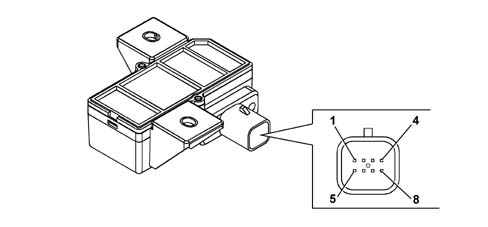
Reception control unit
PIN-OUT
| Pin | Function |
|---|---|
| 1 | n.c. |
| 2 | n.c. |
| 3 | A-BUS serial line |
| 4 | Diagnostic line K |
| 5 | INT from F-51 |
| 6 | RF aerial lead |
| 7 | Earth |
| 8 | + 30 from F-39 |
If there is a break in the power supply, the sensor identification codes do not require a new memory.
If there is a +15 signal and the control unit does not detect signals from one or more of the sensors for 9 mins, then a failure is signalled via the AMBER warning light.
If there is a 5th sensor in the spare wheel, the control unit should be able to exclude this sensor because it does not allow the centrifugal sensor to close as it is not turning.
The first time the level of 16 Km/h is exceeded, the sensors carry out a measurement and transmission to test the control unit.
The identification codes and the position of the sensors are stored in the control unit memory.
The control unit contains a SW strategy that compensates for the pressure value measured as the temperature of the tyre changes.
The control unit receives information concerning the internal battery charge from the sensors and, if it is flat, this information is sent to the NBC which transmits it to the NQS via the CAN.
Receiver Intervention Levels
The receiver (control unit) has 2 intervention levels stored in its memory:
- the first is known as the CHECK and is designed to signal when the pressure in one or more tyres is slightly below the optimum level so that it can be corrected. This value is: 0.3 bar
- The second is known as the WARNING and is designed to signal a constant or sudden drop in pressure when there is a puncture. This value is: 0.6 bar
These intervention levels refer to RELATIVE and not ABSOLUTE values because Fiat Auto uses tyres with different optimum inflation pressures and the pressure value for each vehicle is stored in the control unit memory at the end of the production line.
Signalling of:
- CHECK level exceeded: RED warning light FLASHING
- WARNING level exceeded: RED warning light ON CONSTANTLY plus a buzzer (in this situation the driver should not exceed 80 Km/h and a range of about 200 Km. Given the specifications of the RUN-FLAT tyres, assistance should be sought from the nearest tyre repairer)
The fault situation is not memorized at the key off so no fault that was present before the key off will be displayed at the next key on. This means that if the customer changes the wheel after a puncture the warning light will not remain on and the system does not have to be reset.
Control unit programming
Once fitted on the vehicle the sensor identification codes (ID) should be programmed in the control unit and the nominal inflation pressure for the tyres fitted on the vehicle will be memorized.
If the control unit is not programmed both the warning lights in the panel will flash to signal that there is no data in the memory.
The sensor codes are memorizedin the factoryusing special equipment, combining them with the position of the wheels on the vehicle.
The NBC detects the presence of the TPMS (tyre pressure) control unit.
If the sensor is replaced in a service situation, stick to the sensor torque figure (4 Nm +/- 0.5 ).
Codes for new sensors can be programmed using the Examiner after the codes for existing sensors have been replaced or repositioned after the front / rear wheels have been swapped over for wear reasons.
It will also be possible to check the charge of the battery inside the sensor and set the correct optimum pressure for the tyres if the control unit is replaced.
If the rims and/or tyres are replaced with those that have different dimensions to the ones fitted originally, it should be remembered that the sensors have to be repositioned and a NEW nominal pressure value reset in the control unit.
If there is a code setting and/or pressure error the programming procedure can be repeated.
It is possible to check the following using the Examiner:
- Which sensor has signalled the fall in pressure;
- Which sensor has signalled the increase in temperature;
- Low battery level;
- The battery charge for each sensor;
- Which sensor is faulty or not responding;
- Short circuit or open circuit in the supply;
- Short circuit or open circuit in the bulb operating lines;
- Short circuit or open circuit in the diagnostic lines (K and A-BUS);
- Programming of new sensors and cancelling of faulty and/or stolen ones;
Parts & tools for this job For 2001 Fiat Stilo
- TOOLDigital multimeterSearch: automotive digital multimeter
- PARTAssorted fuse kitSearch: car fuse assortment kit
- TOOLWire crimper and connector kitSearch: wire crimper connector kit
Links open Amazon search results in a new tab. As an Amazon Associate I earn from qualifying purchases.