
Introduction - INSTRUMENT PANEL
- Make
- Fiat
- Model
- Stilo Factory Service Manual
- Year
- 2001–2007
- Section
- Instrument panel › Introduction - INSTRUMENT PANEL
Introduction - INSTRUMENT PANEL
SPECIFICATIONS
The Instrument Panel Node (NQS) comes in two versions: LOW version with an alphanumeric LCD + a 14 character SEMI DOT - MATRIX HIGH version, with a DOT --MATRIX LCD + two LCDs,
On the LOW version there is also a variant for Automatic Transmission with an extra LCD in the rev counter section to display the gear engaged and the gearbox operating mode.
There are 12 different variants for the Instrument Panels because each time of instrument (Low, Low CA, and High) are different for the Petrol and Diesel versions and the unit of measurement for the speedometer may be in Km/h or MPH.
The High version of the instrument panel has either white graphics or black graphics.
The NQS is connected to the B - CAN network and one of its functions is to wake the network up again when the NBC cannot do it (e.g. it is faulty).
LOW Instrument Panel
Low Instrument Panel without Selespeed
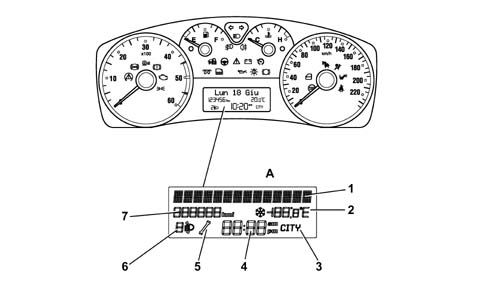
A - TN-LCD
1 - 14 character pseudo dot matrix used for messages
2 - Outside temperature reading and ice warning symbol
3 - CITY mode selection
4 - Time
5 - 'Monkey-wrench' icon which means 'GO TO WORKSHOP
6 - Headlamp alignment adjuster
7 - Milometer reading
LOW Instrument Panel
Low Instrument Panel with Selespeed
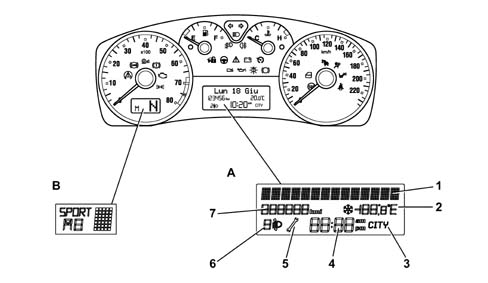
A - TN-LCD
B - TN-LCD dedicated to gearbox
Composition
The Low panel comprises 4 analogue indicators:
- electronic speedometer
- electronic rev counter
- engine temperature gauge (with overheating warning light)
- fuel gauge (with reserve warning light)
All the indicators are moved by stepping motors.
There is a central alphanumeric LCD to show the following functions / scales:
- total mileage
- clock
- outside temperature (and ice danger symbol)
- date
- headlamp alignment correction symbol / indicator
- CITY mode selection symbol / indicator (electric steering)
Still in the centre display, the first line at the top consists of 14 alphanumerical characters where, in additional to displaying the 'dae' in a standard format, the following functions are also displayed (on request or as they occur):
- check stage at key on
- Trip Computer information (general and Trip B)
- warning / service / function activation fault messages
- repetition of the audio / telephone function indications
- vehicle setup menu with setting / adjustment messages
There are 32 housings in the panel for the LEDs and 1 buzzer for reproducing the following acoustic signals: alarm signal, warning signal and roger beep and there are 2 18-way connectors at the back.
On vehicles equipped with automatic transmission, the panel has one extra display in the rev counter section to show the gear engaged and the gearbox operating mode.
Rear view of instrument panel
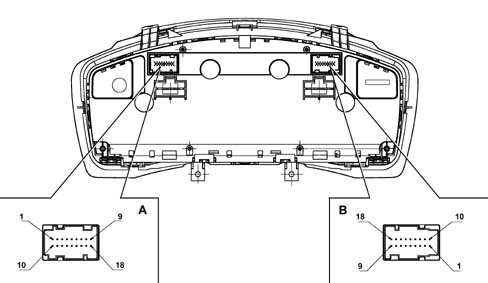
Composition
Connector A Pin Out
| PIN | FUNCTION |
|---|---|
| 1 | INT from F-37/RUN/+15 |
| 2 | +30 from F-53/batteria |
| 3 | B - CAN A |
| 4 | B - CAN B |
| 5 | Headlamp alignment actuator signal reference |
| 6 | + dipped headlamps from F-13 to control headlamp alignment |
| 7 | Earth |
| 8 | Negative signal from trip computer button on steering column switch unit |
| 9 | Signal from controls on PCS: 'Zero Km', 'Mode -' |
| 10 | I.E. failure/EOBD warning light negative signal from NCM |
| 11 | Signal from PCS 'headlamp up alignment', 'headlamp down alignment' |
| 12 | Dimmed positive control for door switch panel lighting LED |
| 13 | CAB failure warning light negative signal (AIR-BAG) |
| 14 | Passenger Air Bag disabled warning light negative signal |
| 15 | Seat belts not fastened neagive signal |
| 16 | Signal at PCS: 'Mode', 'Mode +', light intensity adjustment |
| 17 | Engine oil level sensor supply |
| 18 | Signal from engine oil level sensor |
Connector B Pin Out
| PIN | FUNCTION |
|---|---|
| 1 | Signal from engine oil temperature sender unit |
| 2 | Signal from engine oil pressure sender unit |
| 3 | Spare warning light negative signal |
| 4 | Selespeed buzzer signal |
| 5 | Not connected |
| 6 | Not connected |
| 7 | SCS failure signal |
| 8 | Rear bags disabled warning light negative signal |
| 9 | Not connected |
| 10 | Not connected |
| 11 | Not connected |
| 12 | Not connected |
| 13 | Not connected |
| 14 | Not connected |
| 15 | Not connected |
| 16 | Not connected |
| 17 | Not connected |
| 18 | Not connected |
HIGH Instrument Panel
High Instrument Panel
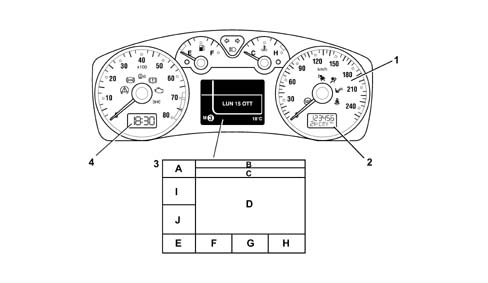
1 - Dual scale speedometer in miles and kilometres
2 - TN-LCD containing information on: Total milometer, headlamp alignment position, driving mode set by user (CITY)
3 - DSTN colour display
4 - TN-LCD dedicated to displaying time
A - example symbol of proposed screen
B - text for messages
C - text for messages
D - graphic symbol
E - change indication or date
F - 1st area for summary symbol for priority 1 faults
G - 2nd area for summary symbol for priority 2 faults
H - temperature reading
I - audio/ACC information
J - audio/ACC information
General characteristics
The High Instrument Panel consists of 4 analogue indicators:
- electronic speedometer
- electronic rev counter
- engine temperature gauge (with overheating warning light)
- fuel gauge (with reserve warning light)
All the indicators are moved by stepping motors.
On the High version there is 1 8 colour passive matrix display (red, green, blue, cornflower blue, magenta, yellow, black and white) for displaying the following functions / scales:
- check stage at key on
- Trip Computer information (general and Trip B)
- outside temperature (and ice warning symbol)
- date
- failure, warning, function activation, service messages and symbols
- repetition of audio, telephone, navigation function indications
- set up menu with setting / adjustment messages
- display of gear engaged and gearbox operating mode
There is 1 LCD for displaying the following functions:
- total mileage
- headlamp alignment symbol / indication
- CITY driving mode selection symbol / indication (electric steering)
Lastly, there is a second display dedicated to showing the clock function
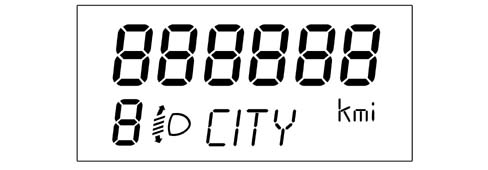
General characteristics
There are 21 housings in the panel for the LED warning lights, 1 buzzer for reproducing the following acoustic signals: alarm signal, warning signal and roger beep.
There are 2 18-way connectors at the back of the panel.
The table below shows the display mode of the various functions in the centre display (High version)
| FUNCTIONS | Always present | At key on | At the occurrence | On request | NOTES |
|---|---|---|---|---|---|
| Clock | In specific TN-LCD | Remains even after key off | |||
| Date | In the matrix display in area E, not present for C.A. or C.R. | If the vehicle has C.A., the gearbox info appears in place of the date | |||
| Outside temperature | In the matrix display in area H | ||||
| Check system | In the matrix display in areas B, C and D (F too on diesel version) | ||||
| Engine oil level | In the matrix display in areas B, C and D | ||||
| Automatic transmission / Selespeed info | In the matrix display in area E | Obviously this information is only available on vehicles with auto. trans. or C.R., otherwise the date is displayed | |||
| Trip | In the matrix display in areas A, B, C and D | ||||
| Planned maintenance (Service) | In the matrix display in areas A, B, C and D | In the matrix display in areas A, B, C and D | |||
| Audio Information Repetition (radio, tape, CD, CDC) | In the matrix display in areas A, B, C and D | In the matrix display in areas A, B, C and D | If there is other 'higher priority' information present, the audio info is moved to area I/J of the matrix display | ||
| Telephone Information Repetition | In the matrix display in areas A, B, C and D | In the matrix display in areas A, B, C and D | |||
| SMS (reception) | In the matrix display in areas A, D / G | ||||
| Pictogram navigation (symbols with arrows with values and units of measurement) | In the matrix display in area D | In the matrix display in area D | |||
| Destination info | In the matrix display in area B/C | In the matrix display in area B/C | |||
| Journey info | In the matrix display in area B/C | In the matrix display in area B/C | |||
| Position info | In the matrix display in area D | In the matrix display in area D | |||
| Cruise Control adjustment info | In the matrix display in areas A, B, C and D I / J | In the matrix display in areas A, B, C and D I / J | |||
| Cruise Control info | In the matrix display in areas A, B and C | In the matrix display in areas A and D | |||
| MENU function | In the matrix display in areas A, B, C and D | In the matrix display in areas A, B, C and D | |||
| AGENDA / MEMORANDUM functions | In the matrix display in areas A, B, C and D | ||||
| Engine oil pressure and temperature | In the matrix display in areas A + B + C + D + I + J |
Interaction between instrument panel display and Connect
On the FIAT STILO the setting logic for some of the functions varies according to whether or not the Connect system is fitted; the different logics are listed below:
- Instrument panel with matrix display which can be reconfigured and dashboard without Connect: all the vehicle settings (setup menu) and the trip coputer and dimming functions are shown on the instrument panel matrix display. The display, memorizing and processing are carried out by the instrument panel.
- Instrument panel with matrix display which can be reconfigured and dashboard with Connect: all the vehicle settings (setup menu) are carried out at the Connect. The display is at the Connect. The memorizing and processing are carried out by the instrument panel (all the setting information is transmitted via the B - CAN network).
There are, however, the following exceptions:
- Speed limit: the setting can be made at either the Connect or the NQS. The warning that the limit has been exceeded is shown on the NQS.
- Dusk sensitivity: with vehicle stationary (speed below 4 Km/h) the dusk sensor can be set by either the NQS or the Connect; with the vehicle moving (speed above 4 Km/h) only by the steering column switch unit
- Planned maintenance (service): the memorizing and processing are conducted by the instrument panel. The NQS shows the expiry period is being reached, the Connect shows all information, on request.
- Trip computer: the relevant information can be displayed at the NQS (one at a time) and at the Connect (all together on a single screen). The settings can be made at either the NQS or the Connect.
- Dimming: the display is shown at the NQS.
In any case, the warning messages are always displayed on the NQS only.
The table below summarizes the setting logics
| Structure | Function | Setting | Memorizing | Processing | Display |
|---|---|---|---|---|---|
| NQS only | Vehicle setup | NQS | NQS | NQS | NQS |
| Speed limit | NQS | NQS | NQS | NQS | |
| Service | NQS | NQS | NQS | NQS | |
| Trip | NQS | NQS | NQS | NQS | |
| Dimming | NQS | NQS | |||
| Dusk (vehicle stationary) | NQS and STEERING COLUMN SWITCH UNIT | BODY / NQS | NQS | ||
| Dusk (vehicle moving) | NQS and STEERING COLUMN SWITCH UNIT | BODY / NQS | NQS | ||
| NQS + NIT opt | Vehicle setup | NIT | NQS | NQS | NIT |
| Speed limit | NQS and NIT | NQS | NQS | NQS | |
| Service | NIT | NQS | NQS | NQS (event) and NIT (on request) | |
| Trip | NQS and NIT | NQS | NQS | NQS and NIT | |
| Dimming | NQS | NQS | |||
| Dusk (vehicle stationary) | STEERING COLUMN SWITCH UNIT/NIT | BODY / NQS | NQS/ NIT | ||
| Dusk (vehicle moving) | STEERING COLUMN SWITCH UNIT | BODY / NQS | NQS | ||
Instrument panel warning lights table
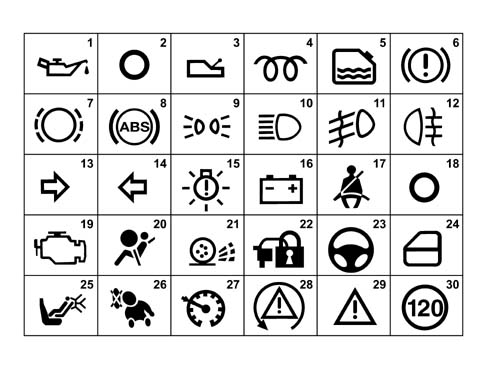
Interaction between instrument panel display and Connect
| WARNING LIGHTS in Instrument Panel | LOW | HIGH | |
|---|---|---|---|
| 1 | Engine oil pressure | YES | in matrix |
| 2 | Engine coolant temperature | YES | YES |
| 3 | Gearbox failure (optional) | YES (*) | in matrix |
| 4 | Heater plugs (diesel only) | YES | in matrix |
| 5 | Water in diesel filter | YES | in matrix |
| 6 | Defective operation of braking system (insufficient brake fluid level / handbrake applied) | YES | YES |
| 7 | Brake pad wear | YES | in matrix |
| 8 | ABS failure | YES | YES |
| 9 | Side lights | YES | YES |
| 10 | Main beam headlamps | YES | YES |
| 11 | Fog lamps | YES | YES |
| 12 | Rear fog lamps | YES | YES |
| 13 | Right direction indicator | YES | YES |
| 14 | Left direction indicator | YES | YES |
| 15 | Lighting failure | YES | in matrix |
| 16 | Battery recharging | YES | in matrix |
| 17 | Seat belt fastening | YES | YES |
| 18 | Fuel reserve | YES | YES |
| 19 | Engine control system failure (EOBD) | YES | YES |
| 20 | Air Bag failure | YES | YES |
| 21 | ASR failure | YES (**) | YES (**) |
| 22 | Vehicle protection system failure | YES | in matrix |
| 23 | Power steering system failure | YES | in matrix |
| 24 | Doors not properly shut | YES | in matrix |
| 25 | Passenger Air Bag manually disabled | YES | YES |
| 26 | Rear Side Bag manually disabled (optional) | YES | YES |
| 27 | Cruise Control on (optional) | YES | in matrix |
| 28 | VDC system failure (optional) | YES | YES |
| 29 | General failure | YES | in matrix |
| 30 | Maximum permitted speed (Arab market only) | YES | YES |
(*) for LOW CVT version (SELESPEED)
(**) not present if VDC system is fitted
Low Panel on Petrol Versions
The display at the key on for a low panel on petrol versions where there are no faults is described below
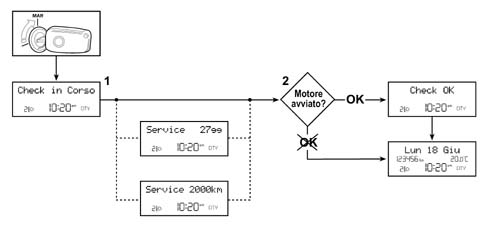
1 - Check in progress
2 - Engine started
Low Panel on Diesel Versions
The display at the key on for a low panel on diesel versions where there are no faults is described below
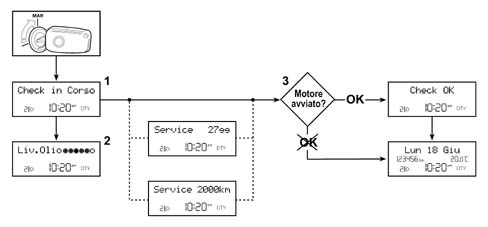
1 - Check in progress
2 - Oil level
3 - Engine started
Low Panel on Diesel Versions
On diesel versions, after 'Check in Progress' has been displayed for 2 seconds, the engine oil level information is displayd for 3 seconds.
The different engine oil level readings are described below.
ENGINE OIL LEVEL OK

1 - Oil level
Low Panel on Diesel Versions
ENGINE OIL LEVEL BELOW MINIMUM VALUE
In this case the readings alternate cyclically on the display
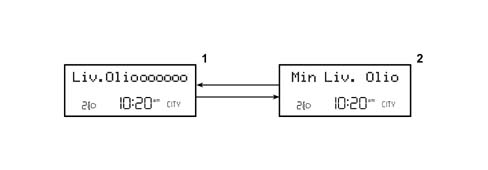
1 - Oil level
2 - Minimum oil level
Low Panel on Diesel Versions
ENGINE OIL LEVEL ABOVE MAXIMUM VALUE

1 - Maximum oil level
SERVICE function
On both versions (petrol and diesel) the SERVICE information is displayed, i.e. the length of time, expressed in days or Km, remaining until the next Service is due to be carried out.
The SERVICE display appears automatically at the key on when there are 2000 Km or 30 days left until the next Service depending on which comes first.
On right hand drive versions the Km figure is converted by the panel into miles.
The SERVICE display is only shown at the key on each time the km / mi or days value is equal to or less than the figure given in the table below:
| Levels in 'km' for Planned Maintenance. | Levels in 'mi' for Planned Maintenance. | Levels in 'days' for Planned Maintenance. |
|---|---|---|
| 2000 km | 1240 mi | 30 days |
| 1800 km | 1116 mi | 27 days |
| 1600 km | 992 mi | 24 days |
| 1400 km | 868 mi | 21 days |
| 1200 km | 744 mi | 18 days |
| 1000 km | 620 mi | 15 days |
| 800 km | 496 mi | 12 days |
| 600 km | 372 mi | 9 days |
| 400 km | 248 mi | 6 days |
| 200 km | 124 mi | 3 days |
| 100 km | 62 mi | |
| 50 km | 31 mi |
From the moment the value of 0 Km, 0 mi or 0 days is reached, the message 'SERVICE DUE 0 Km (0 mi)' or 'SERVICE DUE in 0 DAYS id displayed at each key on
Each time the service period expires, the following should be carried out using the Examiner:
- 'Km' (or mi) counter or day counter rest to the starting value (20,000 Km and 365 days)
- Memorizing that Service has taken place
If the Instrument Panel is being replaced, the following should be done using the Examiner:
- Km or mi reading on old panel total milometer reset.
- Number of services carried out read and recorded in new panel.
- Km / mi and days to next service read and recorded in new panel.
If the battery is accidentally disconnected, the data stored in the panel memory are not lost.
Low Instrument Panel warning lights and signals
The fault signals displayed by the relevant warning light in the panel coming on are accompanied by specific warning messages such as, for example: 'SUPPLIES NEEDED, 'COOLANT OVERHEATING, FRONT LIGHT FAILURE, etc.
In addition to the messages linked to the warning light in the panel coming on, if the fault is serious the following message might also be displayed: 'SWITCH OFF THE ENGINE (such as, for example after signalling 'COOLANT OVERHEATING).
The symbol of a monkey-wrench appearing in the multi-function display means: 'GO TO THE WORKSHOP.
There is a corresponding acoustic signal (buzzer) for each failure display.
Some examples of warning lights coming on the instrument panel and the relevant messages on the display are given below:
INSUFFICIENT ENGINE OIL PRESSURE
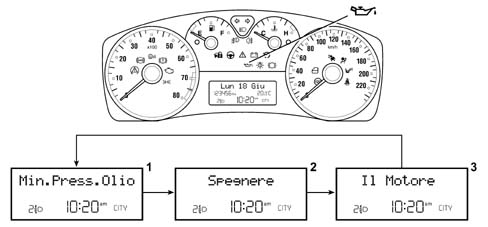
1 - Minimum oil pressure
2 - Switch off
3 - the engine
Low Instrument Panel warning lights and signals
SELESPEED AUTOMATIC TRANSMISSION FAILURE
Depending on the type of problem, there are two possible types of display:
A) gearbox failure warning light on constantly in the display
In this case the automatic transmission fluid is overheating and it is therefore advisable to stop the vehicle keeping the engine running to let the gearbox cool down.
'SWITCH OFF THE ENGINE is shown in the display in the panel, this indication is not correct
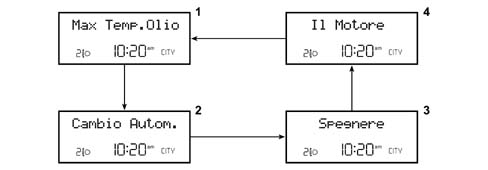
1 - Maximum oil temperature
2 - Automatic transmission
3 - Switch off
4 - the engine
Low Instrument Panel warning lights and signals
B) gearbox failure warning light on the display, flashing
This signals a failure in the Selespeed automatic transmission management system.

1 - Gearbox failure
Low Instrument Panel warning lights and signals
DOORS NOT PROPERLY SHUT
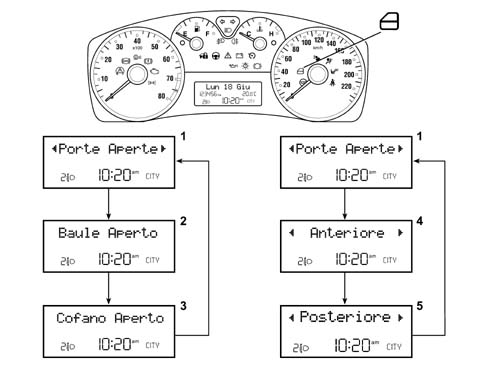
1 - Doors open
2 - Boot open
3 - Bonnet open
4 - Front
5 - Rear
Low Instrument Panel warning lights and signals
Let us now take a look at the vehicle protection system signals
FIAT CODE SYSTEM
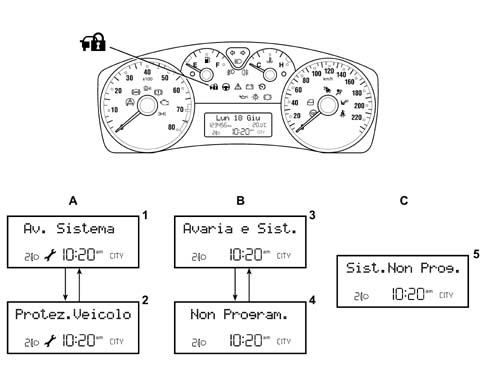
A - Fiat CODE system failure
B - Fiat CODE system failure + not programmed
C - Fiat CODE system not programmed
1 - System failure
2 - Vehicle protection
3 - Failure and system
4 - not programmed
5 - System not programmed
Low Instrument Panel warning lights and signals
ALARM FAILURE
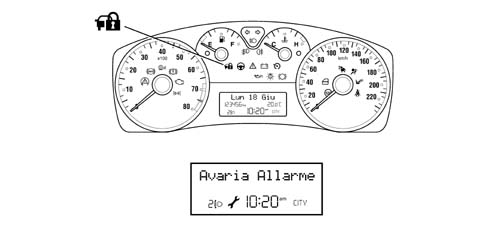
1 - Alarm failure
Low Instrument Panel warning lights and signals
BREAK IN ATTEMPT
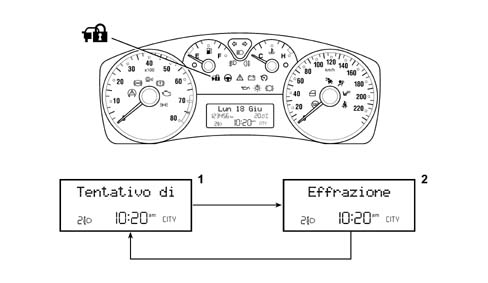
1 - Attempt at
2 - Break in
Low Instrument Panel warning lights and signals
REMOTE CONTROL BATTERY FAILURE
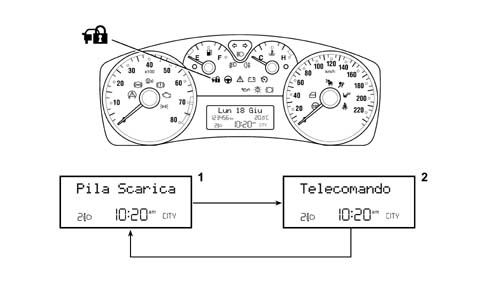
1 - Battery run down
2 - Remote control
Low Instrument Panel warning lights and signals
CID BATTERY FAILURE
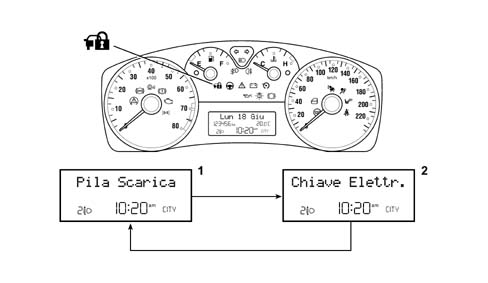
1 - Battery run down
2 - Electronic key
Low Instrument Panel warning lights and signals
ELECTRONIC KEY NOT RECOGNIZED
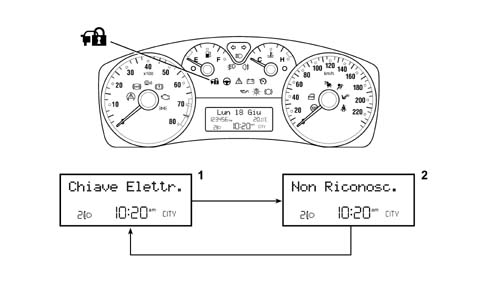
1 - Electronic key
2 - Not recognized
Low Instrument Panel warning lights and signals
ELECTRONIC KEY (CID) NOT IN VEHICLE
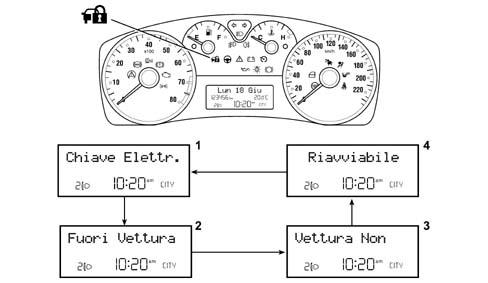
1 - Electronic key
2 - Not in vehicle
3 - Vehicle cannot
4 - Be started up again
Control buttons for display / settings
The LOW panel multi-function display is capable of showing all the information needed whilst driving which is useful.
if the vehicle is equipped with CONNECT, the menu items will be shown on the CONNECT display except for the 'SPEED LIMIT, the 'LIGHT SENSOR and the 'MENU EXIT.
With the vehicle stationary (speed < 3 Km/h), all the displays can be activated; if, on the other hand, the vehicle is moving (speed > 3 Km/h), then only the information for the following functions can be displayed: TRIP, LIGHT SENSOR (dusk), SPEED LIMIT.
Control buttons
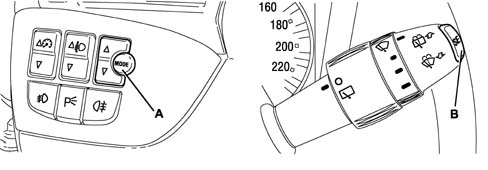
A - Mode button
B - Set button
Control buttons for display / settings
MODE = MENU screen activated / desired selection confirmed
The triangles at the top and bottom inside the MENU screen make it possible to slide upwards or downwards; during the setting operations it is possible to increase or decrease
SET = activation, navigation and TRIP zeroing
Access to MENU screen
After the initial check stage, after the key on, pressing the MODE button activates the MENU ambient.
Use the buttons: top triangle and bottom triangle to navigate inside the menu and press MODE again to confirm a selection.
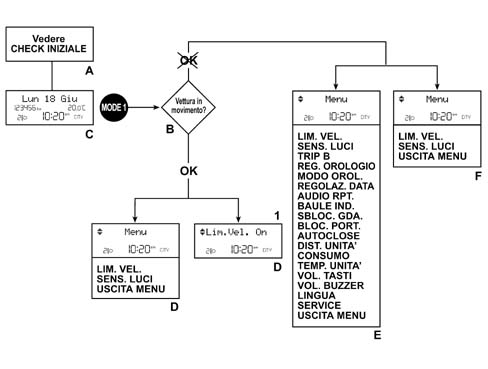
A - See initial check
B - Vehicle moving ?
C - Example of standard screen
D - With or without Connect
E - Menu screen without Connect
F - Menu screen with Connect
1 - Speed limit ON
Access to MENU screen
The items which can be selected from the MENU are listed below:
- SPEED LIMIT: Activation / deactivatino of signal (on/off), Speed limit setting
- LIGHT SENSOR: Adjustment of dusk sensor sensitivity (3 settings)
- TRIP B: Activation / deactivation (on/off) of relevant function
- CLOCK ADJUSTMENT: Hours setting, Minutes setting
- CLOCK MODE: Selection of 12 or 24 hour clock mode
- DATE ADJUSTMENT: Setting of year, Setting of month, Setting of day
- AUDIO RPT.: Activation / deactivation (on/off) of audio repeat in Instrument Panel display
- BOOT IND.: Activation / deactivation (on/off) of boot release together with door opening impulse from remote control
- GDA RELEASE: Activation (on): unlocking of driver's door only through impulse from remote control, Deactivation (off): simultaneous unlocking of doors via impulse from remote control
- DOOR LOCKING: Activation / deactivation (on/off) of automatic locking of doors when vehicle speed exceeds 20 Km/h
- AUTOCLOSE: Activation / deactivation (on/off) of automatic closing of doors when the CID moves away from the vehicle
- DIST UNIT: Selection of one of the following units of measurement: Km or miles
- CONSUMPTION: Selection of unit of measurement for fuel consumption figures (Km/l - l/100 km or mpg) depending on the unit of measurement for the distance previously set (Km or miles)
- TEMP. UNIT: Selection of the following units of measurement: °C or °F
- BUTTON VOL: Adjustment and possible exclusion of button volume
- BUZZER VOL: Adjustment of volume of acoustic signals for faults / warnings
- LANGUAGE: Setting the language for the messages displayed
- SERVICE: Period until the next Service is due, strictly connected to the Planned Maintenance Programme
- MENU EXIT: Exit from the Menu
Here are some setting / display examples:
SPEED LIMIT
This function makes it possible to set the vehicle speed limit which, if exceeded, automatically activates a warning signal for the driver.
The speed figures range from 30 Km/h to 250 Km/h or from 20 mph to 150 mph
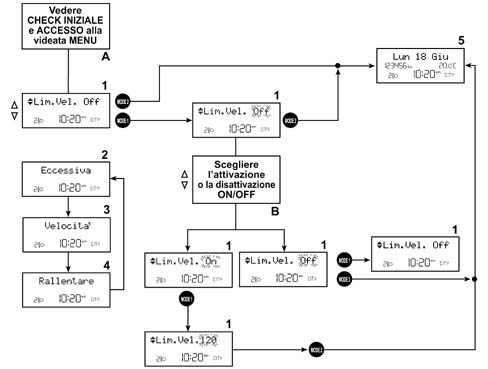
A - see initial check and access MENU screen
B - select activation or deactivation ON/OFF
1 - Speed limit
2 - Too high
3 - Speed
4 - Slow down
5 - data
Access to MENU screen
INDEPENDENT DRIVER'S DOOR RELEASE
To activate / deactivte this function
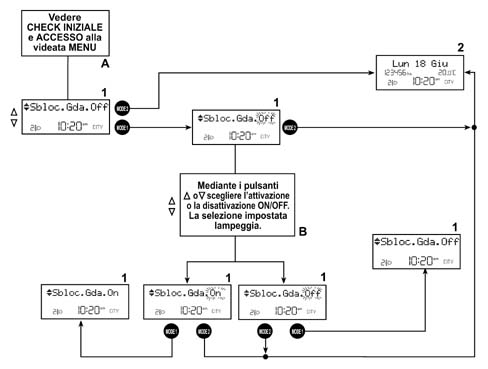
A - see initial check and access MENU screen
B - Using the 'up triangle' and 'down triangle' buttons, select activation or deactivation ON/OFF
1 - Driver's release
2 - data
Access to MENU screen
SERVICE
This is a read only function as far as the mileage or days until the Service are concerned.
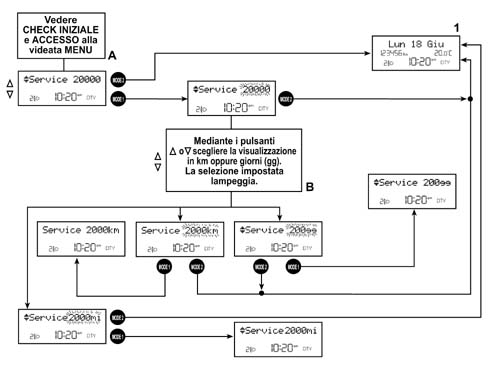
A - see initial check and access MENU screen
B - Using the 'up triangle' and 'down triangle' buttons, select the display in Km or days
1 - data
TRIP COMPUTER
The TRIP function makes it possible to display the journey data on the 14 character matrix line.
There are 2 TRIP ambients:
- GENERAL TRIP (always activated)
- TRIP B (that can be activated / deactivated from the menu)
The TRIP B ambient is found (when activated) inside the GENERAL TRIP.
The table shows the GENERAL TRIP and TRIP B data
General Trip
| General TRIP |
|---|
| Journey distance |
| Average consumption |
| Instant consumption |
| Range |
| Average speed |
| Journey time |
Trip B
| TRIP B |
|---|
| Journey distance - B |
| Average consumption - B |
| Average speed - B |
| Journey time - B |
The units of measurement for the scales are:
| Scales | Units of measurement for decimal metric system | Units of measurement for imperial system |
|---|---|---|
| Journey distance | km | miles |
| Instant comsuption and Average consumption | km/ll/100km | mpg |
| Range | km | mi |
| Average speed | km/h | mph |
| Journey time | hh:mm | hh:mm |
The unit of measurement for the consumption can be set by the customer (Km/l or l/100 Km)
The instrument panel receives the following information to calculate these scales:
| Input for instrument panel | Received from |
|---|---|
| Instant journey (milometer signal) | BodyComputer |
| Fuel level (% in relation to a full tank) | Body Computer |
| Fuel tank capacity, in litres | Memorized in the NQS |
| Actual instant speed | Body Computer |
| Instant consumption (in litres/hour); | Engine Management Control Unit |
| Journey time counted | Clock inside the NQS |
The information transmitted from the Nodes shown in the table to the NQS travel via the B - CAN network.
The displays in the panel for the TRIP function are shown below.
First section
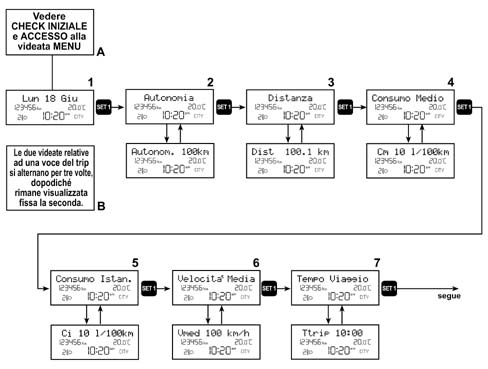
TRIP COMPUTER
Second section
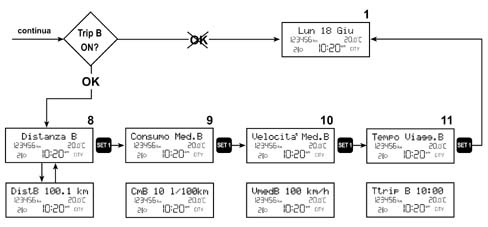
A - see initial check and access to MENU screen
B - the two screens for one TRIP item alternate 3 times, after which the second one remains displayed constantly.
1 - data
2 - Range
3 - Distance
4 - Average consumption
5 - Instant consumption
6- Average speed
7 - Journey time
8 - Distance
9 - Average consumption
10 - Average speed
11 - Journey time
TRIP COMPUTER
TRIP zeroing (reset)
The scales can be zeroed or reset in 2 ways:
- AUTOMATIC: GENERAL TRIP after 9999.9 Km (or miles) or after 99.59 hours of journey time; TRIP B after 9999.9 Km (or miles) travelled
- USING THE 'RES BUTTON: in GENERAL TRIP ambient, keeping the button pressed for more than 2 seconds zeroes both the TRIPs; in TRIP B ambient, keeping the button pressed for more than 2 seconds zeroes the TRIP B only.
High instrument panel display at key on
Petrol Versions
At the key on the check stage starts and the message 'DIAGNOSIS NI PROGRESS is displayed with the symbol of the vehicle which moves on to a magnifying lens; when 5 seconds have elapsed, if:
- 1 - the initial check time for the warning lights in the panel has elapsed (5 seconds)
- 2 - the engine speed exceeds a level of 700 rpm for a time equal to at least 1.5 seconds
- 3 - the check stage concludes and the result is positive (no fault present)
- 4 - the SERVICE information is displayed for 5 seconds (see paragraph on: SERVICE)
the message 'DIAGNOSIS OK should appear and remain for 3 seconds.
If only conditions 1, 3 and 4 are verified (without the engine being started up) the standard screen will appear (without the 'check ok' message).
The 'DIAGNOSIS OK message will be displayed as soon as condition 2 occurs, as long as the other conditions persist.
Diesel Version
At the key on the check stage starts and the message 'DIAGNOSIS NI PROGRESS is displayed with the symbol of the vehicle which moves on to a magnifying lens and the heater plugs symbol remains until the pre-heating stage is over; on the LOW panel, the specific warning light comes on in place of the symbol in the display.
After 2 seconds, the information 'ENGINE OIL LEVEL is displayed and remains for 3 seconds.
When the 3 seconds have elapsed (dedicated to the display of the oil level), if:
- 1 - the initial check time for the warning lights in the panel has elapsed (5 seconds)
- 2 - the engine speed exceeds a level of 700 rpm for a time equal to at least 1.5 seconds
- 3 - the check stage concludes and the result is positive (no fault present)
- 4 - the SERVICE information is displayed for 5 seconds (see paragraph on: SERVICE)
the message 'DIAGNOSIS OK should appear and remain for 3 seconds.
If only conditions 1, 3 and 4 are verified (without the engine being started up) the standard screen will appear (without the 'check ok' message).
The 'DIAGNOSIS OK message will be displayed as soon as condition 2 occurs, as long as the other conditions persist.
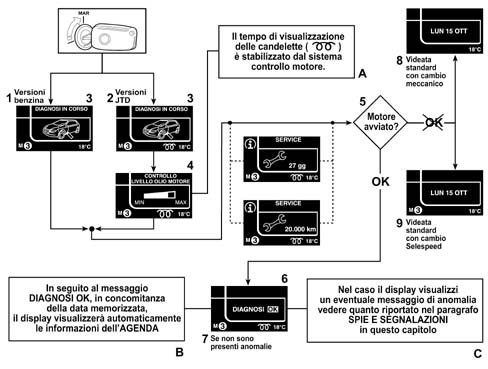
A - The heater plugs display time is established by the engine mangement system.
B - After the 'DIAGNOSIS OK message, together with the memorized data, the display with automatically show the 'AGENDA function information
C - If the displays shows a fault message, see paragraph: WARNING LIGHTS AND SIGNALS
1 - Petrol versions
2 - JTD versions
3 - Diagnosis in progress
4 - Engine oil level check
5 - Engine started?
6 - Diagnosis
7 - If no faults are present
8 - Standard screen with manual gearbox
9 - Standard screen with Selespeed gearbox
High instrument panel display at key on
Petrol and Diesel Versions
During the diagnostic cycle ('CHECK IN PROGRESS screen) if the following is verified: 'Insufficient engine oil pressure' and/or 'Inertia switch operated' then there is an immediate display, whilst in the case of all other faults (priorities 0, 1 and/or2) the cmplete display of the 'DIAGNOSIS IN PROGRESS must be permitted and then the display cycle of fault will follow. In these cases the display logic for the diganostic stage is lost and once the fault display cycle is over, the standard screen is shown.
This is how the ENGINE OIL LEVEL is displayed for the JTD version:
ENGINE OIL LEVEL OK

1 - Engine oil level check
High instrument panel display at key on
ENGINE OIL LEVEL BELOW MINIMUM VALUE

1 - Minimum engine oil level
High instrument panel display at key on
ENGINE OIL LEVEL ABOVE MAXIMUM VALUE

1 - Maximum engine oil level
High instrument panel display at key on
High Instrument Panel warning lights and signals
Like on the Low version instrument panel, in addition to the warning lights coming on in the panel or in the display with the matrix that can be reconfigured, the High version instrument panel also shows warning messages, with different graphics from the Low level panel because the display is different.
There is a corresponding acoustic signal (buzzer) for each fault display.
Below are some examples of the warning lights coming on and the messages on the display:
AIR BAG SYSTEM FAILURE

1 - Air Bag system failure
2 - Switch off the engine and do not continue
High instrument panel display at key on
DOORS NOT PROPERLY SHUT
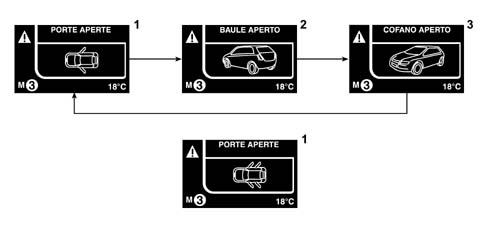
1 - Doors open
2 - Boot open
3 - Bonnet open
High instrument panel display at key on
HEATER PLUGS FAILURE
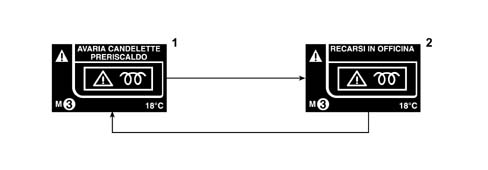
1 - Heater plugs failure
2 - Go to the Workshop
High instrument panel display at key on
ELECTRONIC KEY (CID) OUTSIDE OF THE VEHICLE
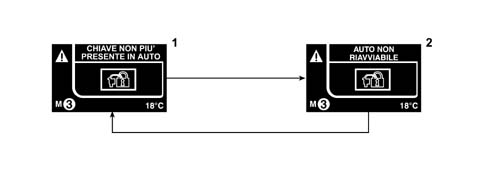
1 - Key no longer present in the car
2 - Car cannot be started again
High instrument panel display at key on
The tables showing the messages displayed on the HIGH instrument panel are illustrated.
The first table shows the degree of PRIORITY, for each failure, the WARNING MESSAGE displayed, whether in 3D GRAPHICS or in ANIMATION and the type of buzzer used.
| Function Number | Message to be shown on the matrix display | Priority | Warning message | 3D Graphics | Animation | BUZZER |
|---|---|---|---|---|---|---|
| F001 | Vehicle Protection System failure | 1 | M1 | 2B | ||
| F001 | System not programmed | 2 | 2B | |||
| F001 | System not programmed and failure | 1 | 2B | |||
| F002 | Fuel needs refilling | 2 | 3C | |||
| F002 | Fuel level sensor failure | 2 | M1 | 2B | ||
| F002 | Failure [indicator faulty] | 2 | M1 | 2B | ||
| F005 | Inertia switch operated | 0 | 2B | |||
| F006 | Alternator afilure | 1 | M3 | 2B | ||
| F016 | Radiator coolant overheating | 0 | M5 | YES | 2B | |
| F016 | Coolant temperature sensor failure | 2 | M1 | 2B | ||
| F016 | Failure [indicator faulty] | 2 | M1 | 2B | ||
| F017 | Engine oil level | |||||
| F017 | Insufficient engine oil level | 0 | M5 | YES | 2B | |
| F017 | Maximum engine oil level | |||||
| F017 | Engine oil level sensor fault | 2 | M1 | YES | 2B | |
| F018 | Failure [engine rpm fault] | 2 | M1 | 2B | ||
| F019 | Insufficient engine oil pressure | 0 | M5 | YES | 2B | |
| F019 | Engine oil pressure sensor failure | 2 | M1 | 2B | ||
| F020 | Failure [speed fault] | 2 | M1 | 2B | ||
| F022 | Engine control system failure | 1 | M1 | 2B | ||
| F024 | Heater plugs failure | 1 | M1 | 2B | ||
| F025 | Cruise Control on | |||||
| F028 | Right front side light failure | 2 | M1 | YES | YES | 2B |
| F028 | Left front side light failure | 2 | M1 | YES | YES | 2B |
| F028 | Right rear side light failure | 2 | M1 | YES | YES | 2B |
| F028 | Left rear side light failure | 2 | M1 | YES | YES | 2B |
| F031 | No. plate lights failure | 2 | M1 | YES | YES | 2B |
| F034 | Left rear fog lamp failure | 2 | M1 | YES | YES | 2B |
| F034 | Right fog lamp failure | 2 | M1 | YES | YES | 2B |
| F034 | Left and right rear fog lamp failure | 2 | M1 | YES | YES | 2B |
| F041 | Control light adjustment | |||||
| F044 | Dusk sensor failure | 2 | M1 | YES | 2B | |
| F048 | Follow me | |||||
| F053 | Left front direction indicator failure | 2 | M1 | YES | YES | 2B |
| F053 | Right front direction indicator failure | 2 | M1 | YES | YES | 2B |
| F053 | Left rear direction indicator failure | 2 | M1 | YES | YES | 2B |
| F053 | Right rear direction indicator failure | 2 | M1 | YES | YES | 2B |
| F060 | Left brake light failure | 2 | M1 | YES | YES | 2B |
| F060 | Right brake light failure | 2 | M1 | YES | YES | 2B |
| F060 | Left and right brake lights failure | 2 | M1 | YES | YES | 2B |
| F060 | Brake lights fuse failure | 2 | M1 | 2B | ||
F091 F101 | Doors open | YES | 2A* | |||
F091 F101 | Door open | YES | 2A* | |||
F091 F101 | Boot open | YES | 2A* | |||
F100 F101 | Bonnet open | YES | 2A* | |||
| F114 | Rain sensor failure | 2 | M1 | YES | 2B | |
| F132 | ABS failure | 1 | M1 | 2B | ||
| F132 | ABS warning light failure | 2 | M1 | 2B | ||
| F132 | EBD system failure | 0 | M5 | 2B | ||
| F133 | ASR system failure | 1 | M1 | 2B | ||
| F133 | ASR warning light failure | 2 | M1 | 2B | ||
| F133 | ASR on | |||||
| F133 | ASR off | |||||
| F134 | VDC system failure | 1 | M1 | 2B | ||
| F134 | VDC warning light failure | 2 | M1 | 2B | ||
| F135 | Tyre inflation pressure too low | 2 | M9 | YES | 2B | |
| F135 | Tyre/s punctured | 2 | M10 | YES | ||
| F135 | Tyre/s punctured (if end of range) | 0 | M11/M6 | YES | ||
| F135 | Tyre inflation pressure monitoring system failure | 2 | M1 | 2B | ||
| F135 | System not programmed | 2 | ||||
| F136 | Brake pad wear | 2 | M1 | 2B | ||
| F139 | Air Bag system failure | 0 | M5 | 2B | ||
| F139 | Warning! Air Bag test not completed | 0 | ||||
| F141 | Speed limit exceeded | 2 | M6 | 2B | ||
| F145 | Insufficient brake fluid level | 0 | M5 | 2B | ||
| F145 | Brake fluid warning light failure | 2 | M1 | 2B | ||
| F179 | Parking sensors failure | 2 | M1 | 2B | ||
| F192 | Danger of ice | 3C | ||||
| F196 | Automatic transmission failure | 1 | M3 | 2B | ||
| F197 | Automatic transmission fluid overheating | 0 | M5 | 2B | ||
| F241 | Power assisted steering system failure | 1 | M3 | 2B | ||
| F251 | Window anti-crush safety system failure (left, right, front, rear) | 2 | M1 | 2B | ||
| F262 | Water in diesel filter | 2 | M1 | 2B | ||
| F262 | Diesel filter sensor failure | 2 | M1 | 2B | ||
| F270 | Adjustment in progress | |||||
| F322 | Alarm failure | 2 | 2B | |||
| F322 | Break in attempt | |||||
| F322 | Electronic key battery run down | |||||
| F322 | Remote control battery run down | |||||
| F322 | Electronic key not recognized | 2B | ||||
| Connection lost (**) | 2 | M1 | 2B |
The second table describes the WARNING MESSAGES column in the previous table
| Message shown on matrix display | Description | |
|---|---|---|
| M1 | Go to workshop | Warning messages shown on instrument panel display |
| M3 | Go to workshop slowly | |
| M5 | Switch off the engine, do not continue | |
| M6 | Slow down | |
| M7 | Reduce the engine speed | |
| M8 | Check the level | |
| M9 | Check the pressure | |
| M10 | Max speed = 80 km/h; Range = 200 km | |
| M11 | End of range, do not continue | |
| M12 | Vehicle cannot be started again |
There are 3 degrees of priority for the faults as shown in the first table:
- 0 = VERY SERIOUS
- 1 - = SERIOUS
- 2 - = NOT SERIOUS
If the signal priority is 0 (very serious) then the signal will remain on the display until the fault no longer persists; the display will not allow another display 7 set using the MODE button.
If, on the other hand, the priority is 1 or 2, if the MODE button is pressed the failure display will turn into a symbol: for priority 1, on the bottom left (see zone F of the display), whilst for priority 2, on the bottom right (see zone G of the display).
Control buttons for display / setting
The multi-function display for the HIGH panel which can be reconfigured can display all the necessary information useful whilst driving.
With the vehicle stationary (speed < 3 Km/h), all the displays can be activated; if, on the other hand, the vehicle is moving (speed > 3 Km/h), then the information for the following functions only only can be displayed: TRIP, LIGHT SENSOR (dusk), SPEED LIMIT, ENGINE INFO.
if the vehicle is fitted with CONNECT, the menu items will be shown in the CONNECT display with the exception of the 'SPEED LIMIT, the 'LIGHT SENSOR, the 'ENGINE INFO and the 'MENU EXIT.
Control buttons
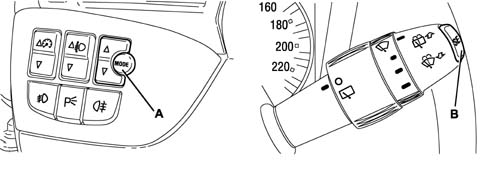
A - Mode button
B - Set button
Control buttons for display / setting
MODE = MENU screen activated / desired selection confirmed
Up and down triangles = allow upwards and downwards movements inside the MENU screen; allow increase and decrease during setting operations.
SET = activation, navigation and TRIP zeroing
Access to MENU screen
After the initial check stage, after the key on, pressing the MODE button activates the MENU ambient.
Use the buttons (top triangle) and (bottom triangle) to navigate inside the menu and press the MODE button again to confirm a selection.
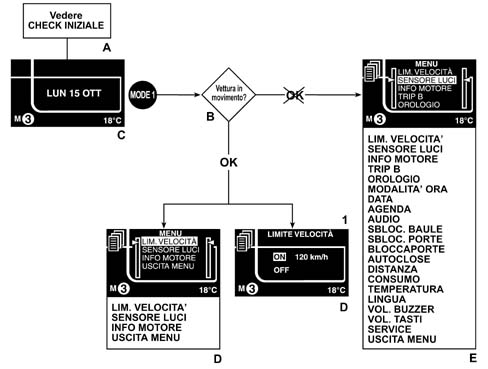
A - See INITIAL CHECK
B - Vehicle moving?
C - Example of standard screen
D - With or without Connect
E - Without Connect
1 - Speed limit
Access to MENU screen
The items which can be selected from the MENU are listed below:
- SPEED LIMIT: Activation / deactivation of the signal (on/off), Speed limit setting
- LIGHT SENSOR: Adjustment of dusk sensor sensitivity (3 settings)
- ENGINE INFO: activation / deactivation (on/off) of the engine oil information repetition (pressure and temperature) in the instrument panel display
- TRIP B: Activation / deactivation (on/off) of the relevant function
- CLOCK: Setting of hours, Setting of minutes
- HOUR MODE: Selecting the 12 or 24 hour clock mode
- DATE: Setting the year, Setting the month, Setting the day
- AGENDA: Setting 8 expiry dates or occasions (e.g. birthdays, appointments, etc.) in a 'field' with a maximum available length of 14 alphanumerical characters.
- AUDIO: Activation / deactivation (on/off) of audio repetition in instrument panel display
- BOOT RELEASE: Activation (INDEPENDENT): boot release indepdent of central door opening; Deactivation (WITH THE DOORS): centralized boot release with opening of doors
- DOOR RELEASE: Activation (DRIVER'S DOOR ONLY): release of the driver's door only via the remote control impulse; Deactivation (ALL): simultaneous release of doors via remote control impulse
- CENTRAL LOCKING: Activation / deactivation (on/off) of automatic door locking when vehicle speed exceeds 20 Km/h
- AUTOCLOSE: Activation / deactivation (on/off) of automatic locking of doors when CID moves away from the vehicle
- DISTANCE: Selection of the following units of measurement: Km or miles
- CONSUMPTION: Selection of the unit of measurement for the fuel consumption (Km/l - l/100 Km or mpg) depending on the unit of measurement for the distance set previously (Km or miles)
- TEMPERATURE: Selection of the following units of measurement: °C or °F
- BUTTON VOL: Adjustment and possible exclusion of button volume
- BUZZER VOL.: Adjustment of fault / warning acoustic signal volume
- LANGUAGE: Setting of language for messages displayed
- SERVICE: Display of next Service due closely connected to the Planned Maintenance Programme
- MENU EXIT: Exit from the Menu
Here are some examples of settings / displays
ENGINE INFO
When this function is activated, the display will replace the standard screen (with the DATE in the middle) with the screen showing the ENGINE OIL TEMPERATURE and PRESSURE values; this will be the new standard screen.
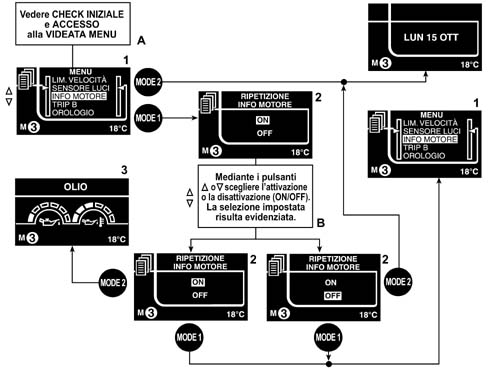
A - See INITIAL CHECK and ACCESS TO MENU SCREEN
B - The buttons (up and down triangle) are used to select activation and deactivation (on/off). The selection made will be shown
1 - Menu: Engine info
2 - Engine Info repetition
3 - Oil
Access to MENU screen
DOOR RELEASE
This function gives the customer the opportunity when controlling the release of the vehicle, of deciding to activate the release of all the doors at the same time or whether to unlock the driver's door only.
The types of display and the setting logic for the two different LOW and HIGH panels are the same, only the graphic display changes; therefore the descriptions for the LOW panel relating, for example, to the SERVICE, TRIP COMPUTER, ETC., are the same but with different graphic screens.
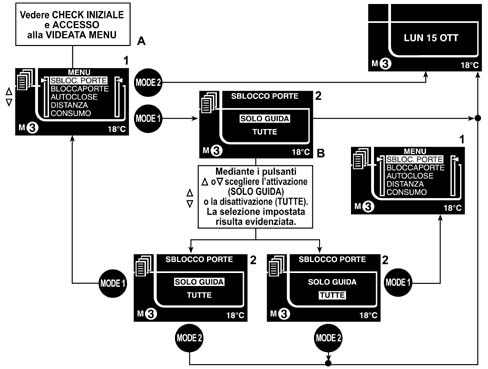
A - See INITIAL CHECK and ACCESS TO MENU SCREEN
B - The buttons (up and down triangle) are used to select activation and deactivation (on/off). The selection made is shown
1 - Menu: Door release
2 - Door release
'AGENDA function shown on display
The 'AGENDA function allows the user to show a maximum of 8 dates / occasions (e.g. birthdays, appointments, insurance expiry, etc.) which they have set in the matrix display that can be reconfigured.
The display takes place according to the following logic: each date produces a warning in the display the first time the vehicle is started (and subsequently) on the expiry date. If the vehicle is not started up on the expiry date, the display moves to the next key on.
The display is shown when the check is over, after starting, and persists for 5 seconds.
Once the 'AGENDA screen has been accessed, it is possible to enter up to 8 items with a maximum length of 14 characters (blank items are shown by asterisks ***********).
For each item set, the customer must allocate an expiry DATE and a graphic symbol selected from the 8 in the system.
First section
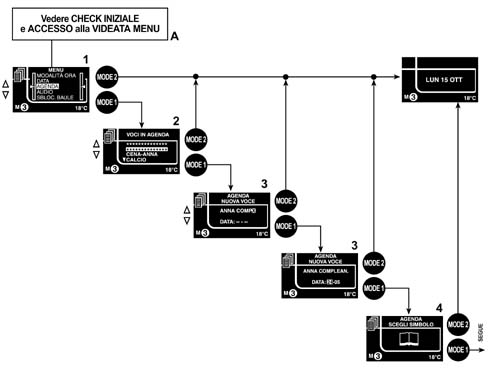
'AGENDA function shown on display
Second section
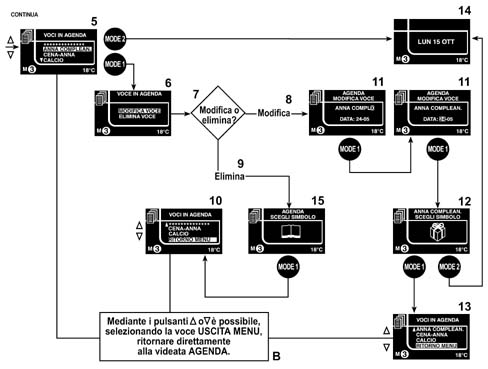
A - See INITIAL CHECK and ACCESS TO MENU SCREEN
B - Using the buttons (down and up triangles) it is possible to select the item MENU EXIT and return directly to the AGENDA screen
1 - Menu: Agenda
2 - Items in agenda
3 - Agenda: New item
4 - Agenda: Select the symbol
5 - Items in agenda
6 - Item in agenda: Modify item
7 - Modify or delete?
8 - Modify
9 - Delete
10 - Item in agenda: Menu return
11 - Agend: Modify item
12 - Select symbol
13 - Items in agenda: menu return
14 - return to screen activated previously
Management of dimmed ideogram lighting
There are two buttons for the adjusment of the vehicle interior lighting (ideograms) located on the left side of the dashboard, as illustrated in the diagram.
The adjustment is only activated with the side lights on.
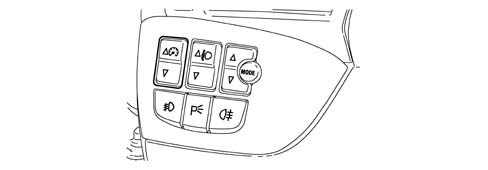
Management of dimmed ideogram lighting
The two buttons send a signal to the NQS which receives the + lights status from the NBC via the B - CAN network; this information is also received from the following nodes: NVO, NVB, CONNECT, NRR, NPG, NPP and NCL (if fitted).
At this point the instrument panel will adjust the intensity of the light for the instrument panel and the various buttons in the dashboard and will make the desired brightness level available to the network.
It will be the task of the various nodes listed above to regulate the brightness of the ideograms.
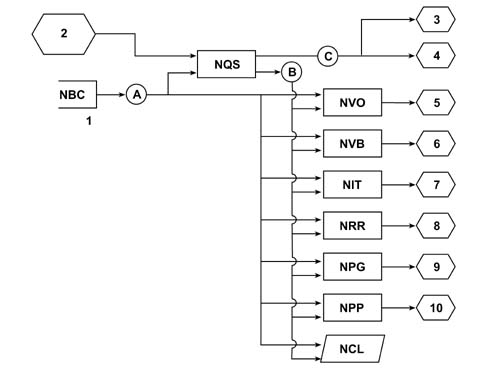
A - Lights state +
B - Desired lighting level
C - Dimmed lighting
1 - + lights
2 - dimmer switch + (on PCS) dimmer switch - (on PCD)
3 - PCT lighting, PCS lighting
4 - Panel lighting, lighting adjustment indicator
5 - Ideogram lighting
6 - Ideogram lighting
7 - Ideogram lighting
8 - Ideogram lighting
9 - Ideogram lighting
10 - Ideogram lighting
Parts & tools for this job For 2001 Fiat Stilo
- TOOLDigital multimeterSearch: automotive digital multimeter
- PARTAssorted fuse kitSearch: car fuse assortment kit
- TOOLWire crimper and connector kitSearch: wire crimper connector kit
Links open Amazon search results in a new tab. As an Amazon Associate I earn from qualifying purchases.